GPS Maps & Voice Directions review
 Analysis by Appsdrops
I think of GPS Maps & Voice Directions as a straightforward navigation app for the moments when I need help getting from where I am to where I’m going. Its focus is clear: maps, directions, and spoken guidance, rather than a wider collection of travel or lifestyle tools. That simplicity is appealing, but it also makes the quality of the experience depend on practical details such as a steady connection, a clear destination, and a phone positioned where I can safely glance at it.
Made by Big Ocean Studio, this free Maps & Navigation app is rated 4.3 on average from around 2,100 ratings and has passed 100,000 installs. It is suitable for everyone, and the current version is 1.0.5. Those figures suggest that many people have tried it, but they don’t tell me whether it will suit a particular route or routine. I’d treat it as a useful option to try, not as a reason to abandon a navigation app I already trust for demanding trips.
When the connection shapes the route
Navigation is most reassuring when the app can keep its map and directions current as I move. In everyday use, that makes mobile data and signal quality part of the experience, especially when I’m starting a trip in an unfamiliar area or changing plans on the way. A route can be easy to follow when everything loads promptly; a weak connection can make the same journey feel less predictable.
I would therefore check the route before setting off rather than waiting until I’m already moving. Confirm the destination spelling, inspect the starting point, and give the directions a moment to appear while still somewhere safe to pause. This small habit is particularly helpful when a destination has several entrances or when a street address points to a large building. A correct route to the general area is not always the same as a useful route to the door I need.
I would not plan around offline navigation unless I had independently confirmed that a particular capability was available and working. If I expect to drive through a signal-poor area, I’d prepare a backup before leaving: keep the destination details handy and consider another navigation option whose offline behavior I already know. This is not a criticism unique to this app; it is a sensible precaution whenever a trip depends on live phone connectivity.
Preparing before the first turn
A practical workflow is to enter the destination before starting the vehicle, check that the map is centered where I expect, and listen for the first spoken instruction while parked. If the starting position looks wrong, I’d wait briefly and check again rather than following a route from an uncertain location. That avoids a common source of confusion: assuming the app has settled on the right starting point when the phone is still locating me.
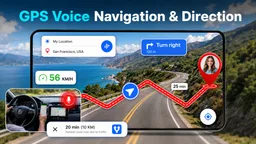
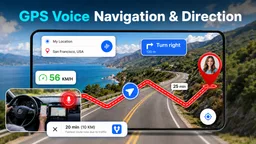
For a familiar trip, I’d use the app as a prompt rather than stare at the screen continuously. Voice guidance is valuable because it lets me keep attention on the road, but a spoken cue still needs context. At a busy junction, for example, I’d listen early and make a quick screen check only when safe. If the route’s next turn sounds unexpected, I would not make a sudden maneuver; I’d continue safely and let the navigation reassess the route.
On foot, in a car, and between errands
The most obvious fit is a driver who wants spoken directions instead of repeatedly checking a phone. It can also be useful when walking through an unfamiliar neighborhood, where a map view helps orient me before I reach a crossing or turn. The right way to use it changes by setting: in a car, the phone should be mounted and the audio audible; on foot, I can pause somewhere out of the way to check the map rather than stopping in the middle of a crowded pavement.
Imagine I’m heading to a new appointment across town. Before leaving, I enter the address and make sure the route begins from my current location. Once underway, I rely on the voice prompts for the broad sequence of turns, then check the map after parking or at a safe stop if the final approach is unclear. That division of labor is more useful than treating the screen as something to monitor constantly, and it reduces the temptation to handle the phone while moving.
For a short, familiar commute, the app may be more help than I need. I already know the turns, so spoken instructions can become background noise. Its value rises when I’m visiting somewhere new, taking an unfamiliar route, or trying to keep my attention off the screen. If I regularly need transit schedules, cycling-specific route planning, saved multi-stop itineraries, or detailed travel research, I’d compare it with a broader mapping service rather than assume this focused navigation app covers those needs.
What to do when directions falter
When a route appears wrong, I’d first separate a location problem from a destination problem. Check whether the blue position marker is close to where I’m standing or parked, then confirm the destination text. If either is off, correct it while stopped. This is more reliable than repeatedly tapping around during a turn or assuming that every reroute means the app has made a mistake.
If spoken guidance is hard to hear, I’d check the phone’s volume and audio setup before changing the route. In a noisy car, a prompt can be easy to miss even when the app is functioning normally. I’d also avoid placing the phone where its display is obscured or where reaching for it could distract me. Voice guidance reduces the need to look, but it does not make unsafe phone handling safe.
A connection interruption calls for patience rather than improvisation. I would keep driving or walking only when I can do so safely and confidently, pause somewhere appropriate if I need to reassess, and use a familiar landmark or another trusted source to regain my bearings. For a time-sensitive trip, I’d leave room for that possibility. A navigation app is a guide, not a substitute for judgment, particularly when the route changes or the map does not match the street in front of me.
Keeping mobile use sensible
Navigation can involve extended screen use and data use, so I’d make a few practical choices before a longer journey. Start with a charged phone, use a secure mount when driving, and avoid leaving the display at maximum brightness if a lower setting is easy to read. Those habits are useful regardless of the app and matter more on a long route than on a quick walk around the block.
I would also be cautious about using mobile data where it is costly or limited. The app’s basic access is free, while in-app purchases are listed from $14.99 to $199.99 per item. That range is worth noticing before buying anything: I’d inspect the purchase details in the app store and decide whether an offered item addresses a need I actually have. I would not assume that a purchase is necessary for ordinary navigation, nor would I buy one simply because I’m trying to solve a weak-signal problem.
On a trip where data use matters, I’d test the app on a short, low-stakes route first and observe how it behaves on my phone and network. That gives me a realistic sense of whether the experience is comfortable before I depend on it for a long journey. It also helps distinguish a phone or signal issue from a route-planning issue without risking an important appointment.
How it compares with familiar map apps
Compared with the large, general-purpose map apps many people already have, GPS Maps & Voice Directions presents itself as a more focused choice: get directions and follow them with voice guidance. That narrower purpose can be a benefit if I want a simple navigation tool and do not need a large set of surrounding services. The trade-off is that people who rely on one app for place discovery, travel planning, multiple transport modes, or a familiar set of saved locations may prefer to stay with their established option.
I would judge the comparison by the route I actually take, not by the number of buttons on a screen. Try a familiar journey first, where I can recognize an odd instruction, then test an unfamiliar but uncomplicated destination. If the directions are clear and the app is comfortable to use, it may earn a place in my routine. If I need dependable offline preparation, specialized route controls, or a particular feature I use in another map service, I’d choose the alternative that demonstrably meets that requirement.
Who I’d recommend it to
I’d suggest giving this app a try if you want a free, direct way to follow GPS directions and hear spoken prompts, especially for occasional trips in places you don’t know well. Its Everyone age rating makes it broadly accessible, though safe use still depends on the person holding the phone and the situation. Big Ocean Studio’s app is most compelling when a simple route-following task is all you need.
I’d be more hesitant if my journeys routinely pass through places with unreliable reception, if I must plan around data limits, or if navigation is only one part of a more complex travel workflow. In those cases, test it before depending on it and keep a backup method. A strong average rating is encouraging, but a navigation app earns my confidence through the specific routes and conditions I use it in.
My connectivity verdict: GPS Maps & Voice Directions is worth trying as a focused companion for ordinary, connected trips, not as something I’d blindly rely on everywhere. I like the practical emphasis on spoken directions, and I’d use it when I want help staying on course without constant screen checks. My advice is simple: set the destination while stationary, test it on a low-pressure route, and have another plan for journeys where the signal matters most.
What we like
- Voice prompts make it easier to follow routes without watching the screen.
- Turn-by-turn guidance helps drivers prepare for upcoming maneuvers.
- GPS positioning can locate the device without a mobile data connection.
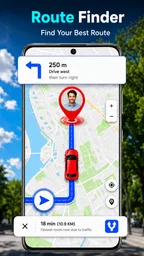
- Route options can help users compare different ways to reach a destination.
- Saved places make frequently used destinations quicker to select.
What could be better
- GPS use can drain the battery quickly during long trips.
- Voice guidance may be hard to hear in a noisy vehicle.
- Poor satellite reception can reduce location accuracy.
- Map details may be outdated or incomplete in some areas.
- Using the app while driving can distract without a mounted phone.





