


GPS Location Phone Tracker review
 Analysis by Appsdrops
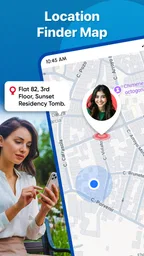
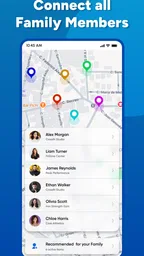
I judge a family location app less by how impressive its map looks and more by what happens when someone is on the move, the signal is uneven, or a check-in would be useful right now. GPS Location Phone Tracker is built around that practical idea: it is a free navigation app from Maps Store for keeping track of loved ones through live location. My view is that it may suit families who want a straightforward way to check where a person is, but location sharing is only useful when the people involved understand how it works and can rely on their phones being connected.
When the network is part of the experience
A live location service depends on two things working together: a phone needs to determine its position, and the app needs a connection to share that position with someone else. That makes this kind of tracker different from an ordinary map used to look up a place. The value is not simply seeing a point on a screen; it is having a timely enough update to make a sensible decision.
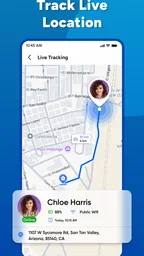
For example, imagine waiting to collect a family member after an appointment. A location check could help you decide whether to leave home now or allow a little more time. But if either phone has a poor connection, the displayed position may not reflect where the person is at that moment. I would treat a live map as a useful indication, not a guarantee of exact, continuous awareness.
This is the central trade-off with GPS Location Phone Tracker: connectivity can make a location check convenient, while weak or interrupted service can make it less reassuring. If a person’s position matters for immediate safety, a tracker should not replace calling or messaging them directly. A map can offer context, but a conversation is often the better way to resolve uncertainty.
The app sits in the crowded maps and navigation category, yet its focus is narrower than a general-purpose navigation tool. You would normally use a conventional map to plan a route, search for a business, or get directions. Here, the core purpose is checking on people. That distinction matters: choose it for family location awareness, not as a substitute for a full navigation app or an emergency service.
Make location checks useful, not constant
A practical way to use a family tracker is to agree on a few situations when checking is helpful: a child travelling to an agreed destination, a relative heading home, or a family member expected at a meeting point. This gives the map a clear job and reduces the temptation to refresh it repeatedly without gaining useful information.
I also recommend deciding what you will do if a location appears old or unexpected. Try a direct call or message first, then allow time for the person’s connection to recover before drawing conclusions. This small routine can prevent an ordinary dead zone or a phone left in a bag from turning into an unnecessary alarm.
How it fits into everyday mobile life
Because a phone is carried through changing environments, location checking can feel different on a walk through a busy neighbourhood than it does while someone is travelling through a building or an area with patchy reception. The app’s appeal is that it brings the check to the same device people already carry. Its usefulness still depends on the person being tracked having their phone with them and able to share a location.
A realistic example is coordinating a family pickup. Instead of sending several messages asking how far away someone is, you can look for their location and make a rough plan for when to head out. If the map seems behind, confirm by message rather than assuming the person has stopped. That is a more reliable workflow than treating every screen update as exact.
For a household with different comfort levels around tracking, it helps to discuss the purpose before anyone installs an app. Explain who will check, in which situations, and whether the expectation is occasional coordination rather than watching someone throughout the day. This is not a technical feature; it is a sensible way to keep a location tool from becoming a source of friction.
The app is free to download, while in-app purchases range from $2.99 to $23.99 per item. I would check the available purchase details in the app store before committing to anything, especially if you only need basic location checks. A free starting point makes it easier to assess whether the app suits your family, but it does not mean every part of the experience necessarily has the same cost arrangement.
Its age rating is Everyone, and the current version is 1.4. It supports Android from version 8.0. Those details make the device check straightforward: confirm the phone meets the minimum before trying to set up a family workflow. A compatible operating system alone does not guarantee a good experience, though; reliable connectivity and a clear agreement between users matter just as much.
Where it differs from familiar alternatives
Compared with a regular navigation app, a family locator is meant to answer “Where is this person?” rather than “How do I get there?” If you mainly need turn-by-turn directions or help finding local places, your usual maps app is likely the better tool. If you already coordinate comfortably by texting, a message may also be simpler when all you need is a quick arrival update.
Compared with other family location options, I would focus less on promises of constant visibility and more on whether the people you care about will actually use the app consistently. A tracker that is installed but forgotten, or that one person does not want to use, adds little value. Before making it part of a routine, try it during an ordinary outing and see whether checking the location is clearer than your current method.
There is also a useful distinction between a location check and a safety plan. A map can help with coordination, but it cannot explain why someone is delayed, confirm they are okay, or ensure a phone is reachable. For a child or relative who may need help, agree on a direct way to contact them and a backup plan for missed calls. The location display should support that plan, not replace it.
What to do when a location looks wrong
Location apps can become confusing when a displayed position does not match what you expect. The first step is to avoid assuming the worst. Check whether the person may be indoors, travelling through an area with weak service, or simply not looking at their phone. Then try a call or message. If you are coordinating a pickup, choosing a nearby agreed meeting point can be more useful than repeatedly checking a map that has not changed.
When a location fails to update, recovery is mostly a matter of checking the situation on both ends: is the phone with the person, is it connected, and can they respond? I would not build a plan that depends on the app recovering at a precise moment. For routine arrangements, set a time to check in or share a meeting place as a backup.
The app’s average rating is 3.2 from 649 ratings, so I would approach it with measured expectations rather than assuming it will work perfectly in every household or location. There are also 12 written reviews, which is a relatively small set of detailed experiences to consult. Ratings can flag that experiences vary, but they cannot tell you whether a particular connection problem or family setup will match your own.
It has been installed over a million times, which suggests that many people have tried it, but popularity does not settle the practical question: will it work well for your devices, routines, and local connectivity? I would test the basic workflow before relying on it for an important journey. A low-stakes outing is a good chance to see whether location checks feel timely enough for your needs.
Be deliberate about data and trust
Location is personal information, so I would use a tracker with a clear purpose and a limited audience. Talk through who will be able to check a person’s position and why. For adults, consent should be explicit rather than assumed; for children, explain the arrangement in age-appropriate terms. A location tool is most useful when everyone understands the boundaries.
To keep the routine data-conscious, avoid checking just because the map is available. Use it when it answers a real coordination question, then return to ordinary communication. You can also agree that a direct check-in is preferable when a location seems inconsistent. These habits reduce needless monitoring and make the app feel like a practical aid instead of a constant presence.
I would not use a family locator to secretly monitor someone or to make high-stakes decisions without confirming what the map shows. Location can be imprecise or delayed, and connectivity can vary. If you need a dependable safety arrangement, combine occasional location checks with calls, agreed arrival messages, and a clear plan for what to do if nobody can be reached.
Who I would recommend it to
GPS Location Phone Tracker is worth considering if your family often coordinates arrivals and you want a map-based way to check on one another. It is most promising for people who already agree to share location and who have phones they carry regularly. Its free download also gives you a chance to judge whether the idea fits before paying for any optional items.
I would skip it if you expect uninterrupted, precise tracking, need a guaranteed emergency response, or are uncomfortable with the privacy trade-offs of sharing location. I would also choose a standard navigation app if route planning is your main concern, and stick with calls or messages if your household already has a dependable check-in habit. The best tool is the one everyone understands and is willing to use.
Maps Store’s app is a focused option in a category where expectations can easily run ahead of what a phone and network can deliver. My recommendation is cautious but positive for everyday coordination: try it during a normal trip, agree on when location checks are appropriate, and keep direct communication as your backup. If those conditions suit your family, a live location view can save a few messages and make meetups easier; if they do not, it is unlikely to improve on the tools you already use.
What we like
- Live location sharing helps coordinate meetups.
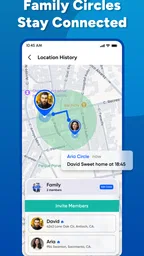
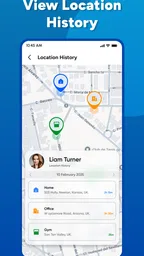
- Location history can help retrace recent trips.
- Geofencing alerts can notify you about arrivals and departures.
- A map view makes shared locations easy to understand.
- Useful for checking on consenting family members while traveling.
What could be better
- Location tracking requires ongoing access to device location.
- Continuous GPS use may drain the phone battery faster.
- Tracking depends on a working internet connection.
- Location accuracy can suffer indoors or in dense areas.
- All users should agree to sharing their location.





