


GameChanger review
 Analysis by Appsdrops
I like GameChanger best when a team’s game needs to be easy to follow for people who can’t be at the field. It brings game updates, video coverage, and coaching tools together, so a parent can keep up from a distance while a coach can use the same team-centered setup to support the season. That focus is also its main limitation: this is a sports app built around organized team activity, not a general-purpose place to watch every sport or follow professional leagues.
Built around the team, not the spectator
GameChanger is a free sports app from GameChanger Media, and its central appeal is practical rather than flashy. It gives teams a shared way to keep a game moving for people following remotely, while giving coaches tools that can be useful beyond the final score. I find that combination more valuable than a stream on its own: video is helpful in the moment, but keeping the team’s activity and coaching workflow connected can make the app relevant from one game to the next.
The difference matters if you are choosing between GameChanger and a typical sports-results app. A scores app is often better for quickly checking professional fixtures, standings, or headline results across a broad range of competitions. GameChanger makes more sense when you already care about a particular team and want to stay connected to its games. Its promise is close-up team coverage, not comprehensive sports news.
The app’s audience is visible in its scale: it has more than five million installs, an average rating of 4.4, and around thirty thousand ratings. Those figures suggest broad adoption, but they do not mean every team will use every part of it. The experience depends on whether the people around a team actually make the app part of their routine. For a family member following a game, that habit can matter as much as the app’s own tools.
Why the live experience stands out
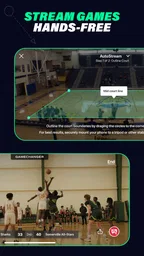
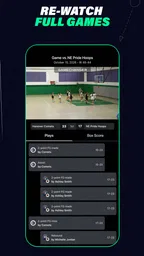
For a relative who cannot make it to the field, the useful question is not whether a sports app has a long feature list. It is whether it can make a specific game feel followable from somewhere else. GameChanger is designed for that situation, pairing live video coverage with game updates rather than treating a stream as the only reason to open the app.
Imagine a parent stuck at work while a child is playing. They can check in during a break, follow how the game is progressing, and return later without relying entirely on a rushed text from the sideline. That is a small but meaningful convenience. It also gives coaches and families a more shared point of reference: instead of several people keeping separate notes or messages, they can use the team’s app as a common place to follow what is happening.
There is a practical trade-off here. A live stream is only useful when there is someone or some setup making the coverage happen, and viewers still need a reliable connection to watch comfortably. I would not treat GameChanger as a guaranteed substitute for being at the game or for a locally organized update channel. It is best seen as a useful bridge between the field and the people who want to stay involved from elsewhere.
Scoring can create a better record
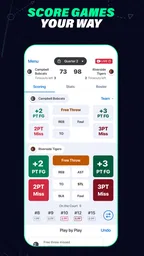
One of the more interesting parts of a team-focused app is the work behind the updates. Scoring is not merely a result to look at after the game; it is an activity that can keep the people following along oriented while play unfolds. For teams that use the scoring tools consistently, that shared record can also help reduce the familiar mismatch between one person’s notes and another person’s recollection.
That benefit comes with a human factor. Someone has to keep the scoring information current, and a busy game is not always the easiest place to do that. If the person responsible is distracted, new to the workflow, or simply unable to keep up, the live record may not feel as useful as expected. My advice is to agree on who is handling scoring before the game starts, rather than assuming the updates will take care of themselves.
That small bit of preparation is a concrete way to get more from the app. A parent who only wants to watch does not need to take on the scoring role. A coach or team helper who does may find it worthwhile to get familiar with the process during a lower-pressure moment, instead of learning while trying to follow a close game. Keeping those roles clear helps the app serve both groups without turning every spectator into a volunteer.
Coaching tools add purpose after the final play
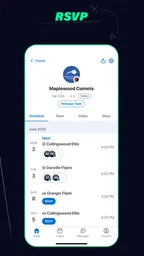
GameChanger is not only aimed at people checking in from the stands. Its coaching tools give it a role in the team’s wider routine, which is one reason I would consider it for a coach who wants a digital companion to team activity rather than a standalone viewing app. The strongest case is continuity: game-day information and coaching needs sit in the same team-oriented environment instead of being scattered across unrelated tools.
That does not make it a replacement for every coaching method. A coach who prefers paper notes, face-to-face discussion, or a specialist tool built for a different training workflow may not want to shift their habits. Nor should a team assume that installing the app will automatically improve communication. The tools are only useful if coaches and families agree on how they will be used, and if the chosen workflow stays simple enough to maintain during a demanding season.
A useful approach is to choose a small, clear job for the app first: follow games, handle the team’s scoring workflow, or support the coaching routine. Once people are comfortable, they can decide whether the other tools are worth adding. Trying to make everyone use everything from day one can make a team app feel like another obligation. A focused rollout is more likely to build a habit that lasts.
Where it may frustrate you
The biggest limitation is fit. If you want a broad scoreboard for professional sports, breaking news, or a quick glance at many leagues, GameChanger is not the obvious choice. Its value is tied to teams and their activity, so a user who does not follow a participating team may have little reason to return. A general sports app is a better match for casual, wide-ranging browsing.
There is also a difference between having access to tools and having a smooth team experience. Families may arrive with different expectations: one person wants a stream, another wants updates, and a coach may care most about the scoring or coaching workflow. If the team has not agreed on what to use, the app can feel uneven from one game to another. That is not a flaw a viewer can fix alone, but it is worth knowing before recommending the app to an entire group.
Cost deserves a little attention too. The app is free to download, but it includes in-app purchases ranging from $7.99 to $99.99 per item. I would check what a particular team plans to use before assuming that every part of its experience is included at no cost. The sensible move is to start with the free app, identify the feature that matters to your family or team, and review any purchase decision in that context rather than paying for tools you may never use.
For younger users, the app carries an Everyone content rating. That makes its stated age classification broad, but families should still make their own decisions about how children use a team app and what role they should have in game-day activity. The practical point is to make sure the adult who manages the team workflow understands the tools and expectations, rather than leaving a child to sort out team communication alone.
Who will get the most from it
I would recommend GameChanger to families following a child’s organized team, especially when travel, work, or other commitments make attending every game unrealistic. It can also suit coaches and team helpers who want to connect live coverage with scoring and coaching tools. In both cases, the app is most convincing when several people around the team are willing to use it consistently.
I would be more cautious about recommending it to a solo fan who simply wants sports scores across many competitions. That person is likely to get more from a general sports-results app. I would also hesitate if a team already has a dependable system that everyone understands and no one wants to change. A new app has to solve a real coordination problem; adding another place to check can make routines worse rather than better.
Before bringing it to a team, I would ask three simple questions: who will handle scoring, which people need live access, and which coaching tasks belong in the app? Those questions uncover whether the team wants a shared workflow or just a way for distant relatives to follow along. They also help avoid the common mistake of treating the app as a complete solution before anyone has agreed on how to use it.
A considered recommendation
The app has been available since January 31, 2018, and its current version is 2026.44.0.0. It supports devices running iOS 11 or later, making the operating-system requirement a straightforward check before installing. The platform details are less important than the team’s plan, but they are worth confirming if a family member is using an older device.
My overall view is positive, with a clear condition: GameChanger is strongest when the team itself makes it useful. It brings together remote game following, scoring, and coaching in a way that can save families from piecing updates together and give team organizers a shared workflow. It is less compelling as a generic sports companion, and its paid items mean it is sensible to understand the team’s intended use before spending anything.
If you are connected to a team that is ready to use it, I think it is worth trying. Start with the need you actually have—watching from away, following the game, or supporting the coach—and see whether that part fits your routine. If you only want broad sports coverage, choose a different kind of app. For the right team, though, GameChanger can make it easier to stay involved without pretending that an app can replace the people who make the game happen.
What we like
- Live score updates help families follow games remotely.
- Lineup tools make it easier to share team roles.
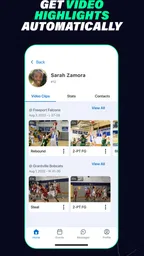
- Video clips can be linked to specific game moments.
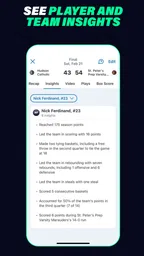
- Player stats provide useful season-long performance context.
- Team messaging keeps schedules and announcements in one place.
What could be better
- Some features require a paid subscription.
- Reliable use depends on a stable internet connection.
- Entering live stats can distract volunteers from the game.
- Video uploads may use substantial mobile data.
- App features and availability can vary by team plan.





