
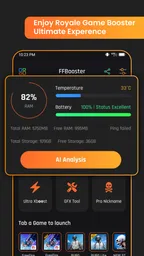

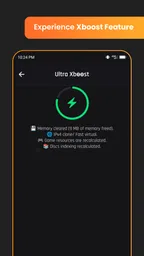
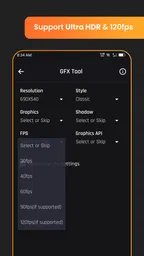
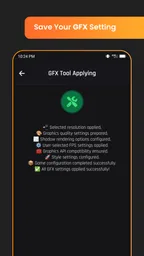
Game booster GFX Fire Fix review
 Analysis by Appsdrops
When I consider a game booster, I look past the promise of a faster session and ask a more practical question: will it make gaming feel less interrupted without adding another layer of fuss? Game booster GFX Fire Fix is a free utility from Royal Games Boosters, in the Libraries & Demo area, aimed at players who want help improving the experience of mobile gaming. Its appeal is straightforward, but it is best approached as a possible aid rather than a guaranteed fix for lag or weak hardware.
What a booster can—and cannot—do for speed
I would treat the app’s central promise as a way to try to reduce interruptions, not as a way to transform a phone into a more powerful gaming device. A booster cannot make a slow processor faster or give a game more memory than the device has. If a game stutters because the phone is overheating, running out of storage, or struggling with its graphics load, a separate utility may have little influence on the underlying cause.
That distinction matters when deciding whether to install it. The app is most plausible as a small part of a tidy gaming routine: close distractions, launch the game, and see whether the session feels more consistent. I would not judge it from a single brief match. Compare a few similar sessions on the same device, with the same game and roughly the same conditions. Changes in heat, battery level, network quality, or background activity can affect performance enough to muddy the comparison.
The name includes “GFX,” which points toward graphics-oriented gaming tools, but I would avoid assuming that every game or phone will benefit in the same way. A graphics adjustment can involve trade-offs: a lighter visual load may feel smoother, while lower visual quality may be unwelcome in a game where detail matters. If the game itself already offers reliable graphics controls, I would start there, since its own settings are usually the most direct way to balance appearance and performance.
When a little preparation helps most
A realistic use case is a quick gaming break after a day of switching between messaging, video, and other apps. Before starting a demanding game, I would close anything I do not need, check that the phone is not already hot, and then try the booster as part of the launch routine. The useful question is not whether a screen or setting looks technical; it is whether the game stays comfortable to play over a normal session.
For a short, casual game, opening another utility may be more effort than it is worth. For a longer session where interruptions are especially irritating, testing a dedicated booster makes more sense. I would keep the routine simple and change only one thing at a time. If several settings or habits change together, it becomes difficult to tell what helped and what merely coincided with a better session.
The most useful expectation is a possible improvement in consistency, not a dramatic jump in frame rate. That is a more grounded standard for a utility whose stated aim is to improve the gaming experience and reduce interruptions. If the phone is already running a game smoothly, I would not expect a visible difference simply because a booster is installed.
Heavy sessions and the limits of recovery
Long play sessions put several pressures on a phone at once: the game keeps the processor busy, the display stays active, and heat can build up. I would be cautious about interpreting a temporary improvement at the start of a session as proof that a booster can keep performance steady indefinitely. If a device slows as it warms, the sensible response may be to pause, let it cool, and reduce demands in the game rather than repeatedly restarting tools and hoping for a lasting fix.
There is also a difference between a game being interrupted and a game simply being demanding. If notifications or app switching break concentration, a calmer pre-game routine may help even when raw performance stays the same. If the problem is a weak connection, the booster should not be treated as a substitute for a better network. Separating these causes is a practical way to avoid blaming the wrong part of the setup.
I would use the app as an experiment, not as a recovery button. After a crash or a severe slowdown, first reopen the game normally and check whether the issue repeats. If it does, consider the game’s own settings, available storage, device temperature, and connection before adding more interventions. A booster is unlikely to solve every problem that happens during play, and stacking multiple “performance” utilities can make it harder to identify the real cause.
Reliability is about repeatable results
The app has an average rating of 4.6 from around 14,000 ratings, and it has been installed over 500,000 times. Those figures suggest that many people have tried it, but they do not tell me whether it will help on a particular phone or with a particular game. I would use popularity as a reason to consider testing it, not as a promise of a specific result.
Reliability, in this case, should mean that the routine is easy to repeat and does not create new problems. I would check whether the phone remains comfortable to use outside gaming and whether the game behaves normally after the booster is closed. If the experience becomes less predictable, or if a game already performs well without it, there is little reason to keep adding a step to every launch.
The developer is Royal Games Boosters, and the app is currently at version 26.08.28. It first appeared on February 17, 2022. I would keep the app updated through the app store when updates are available, but I would still judge performance by direct use on my own device rather than assuming that a version number alone means an improvement for every game.
Device fit, age rating, and cost
The minimum operating system is Android 7.0, so compatibility is a sensible first check before installing. The content rating is Everyone, which makes the app broadly suitable from an age-rating perspective, though that does not mean every device is a good performance match. Older or entry-level phones may be precisely where players hope for help, but they can also be the devices with the least spare headroom. A booster cannot remove those hardware limits.
The app is free to install, with in-app purchases listed at $14.99 per item. I would begin with the free experience and decide whether it makes a repeatable difference before considering any purchase. For a tool whose value depends on how it behaves on your particular setup, paying before you have tested the basics would be hard to justify. The rating and download figures do not change that personal cost-benefit calculation.
Compared with the usual alternatives, I would first try a game’s built-in graphics options and the phone’s own battery or performance controls, where available. Those choices avoid adding a separate app to the routine and can address settings closer to the source. A dedicated booster may be worth trying if you want a focused gaming utility, but it is not automatically better than adjustments already provided by the game or device.
Who should try it—and who should skip it
I can see this being useful for someone who plays regularly, notices interruptions, and is willing to compare sessions carefully rather than expecting an instant cure. It may also suit a player who prefers having a dedicated gaming utility to consult before launching a game. The best test is practical: use the same game under similar conditions, observe whether play feels steadier, and keep the app only if that difference matters to you.
I would skip it if your games already run smoothly, if you only play occasionally, or if your main problem is a poor internet connection, a hot device, or hardware that cannot meet a game’s demands. In those situations, changing the game’s settings, improving the network, taking a cooling break, or choosing a less demanding game is more likely to address the cause. A booster should not become an excuse to ignore a phone that needs a pause.
One helpful habit is to establish a baseline before relying on any performance tool. Play for a familiar stretch with your usual setup, then repeat with the booster while keeping other conditions as similar as possible. Note not only whether the game seems smoother, but also whether the phone heats up, whether the session is interrupted, and whether the routine feels worth the extra step. That simple comparison is more informative than a vague impression from a single match.
My performance verdict
Overall, I see Game booster GFX Fire Fix as a low-commitment utility to test, not a guaranteed route to faster gaming. Its strongest case is for players who want to explore whether a dedicated booster helps reduce disruptions on their own device. Its weakest case is for anyone expecting it to overcome heat, hardware limits, or network problems without changing anything else.
Because it is free to install and works with Android 7.0 or later, trying it is relatively straightforward for compatible users, though the in-app purchase option is worth keeping in mind. I would start without paying, compare a few ordinary sessions, and keep expectations modest. If performance is already good or the trouble has an obvious cause elsewhere, the game’s own controls or a simpler device-level adjustment may be the better choice.
For me, the deciding factor is repeatability: if a familiar game feels less interrupted across comparable sessions and the extra step does not create friction, the app has earned a place in the routine. If the difference is hard to notice, I would uninstall it and focus on the game and device settings instead. That is the fairest way to judge a booster whose usefulness depends so much on the phone and the games being played.
What we like
- Offers graphics controls for tuning supported games.
- Can help reduce visual clutter with lower graphics settings.
- Provides a quick way to adjust game display options.
- May improve playability on devices that struggle with demanding games.
- Includes settings aimed at reducing lag and stutter. ї
What could be better
- Results vary depending on the phone and the game.
- Some options may not work with every game version.
- Aggressive graphics changes can make visuals look worse.
- Third-party tools may conflict with game updates or policies.
- Changing advanced settings can cause instability or crashes.





