

FloSports: Watch Live Sports review
 Analysis by Appsdrops
Sports streaming sounds simple: open an app, find the event, and start watching. In practice, the small steps around that routine can be where frustration creeps in. FloSports: Watch Live Sports brings live events and exclusive original content together for streaming on demand, so it is aimed at fans who want to follow sports through a dedicated service rather than rely only on conventional broadcasts. My overall impression is that its appeal depends on how well it fits the way you already watch: the sports you care about, the events you want to catch, and the device and connection you plan to use.
Getting oriented before the event
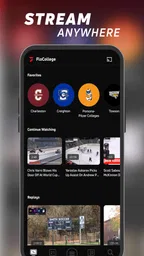
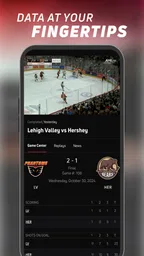
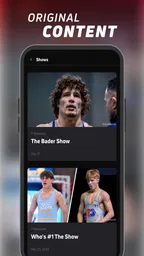
FloSports is a sports app from FloSports, with a straightforward central purpose: stream sporting events live and watch original content when it suits you. That combination gives the app more than a one-time, event-only role. You can think of it as a place to check when a live competition is happening and a way to return for on-demand viewing when watching in real time does not work for your schedule.
That sounds convenient, but the first question I would ask is not whether the app has a lot of content. It is whether the particular event or sport I want to follow is available through it. Sports fans often have very specific viewing habits, and a streaming service is only useful when it lines up with those interests. Before building your routine around FloSports, I would look through its available programming and make sure it matches the competitions you actually plan to watch.
Finding the right event can also take a moment when you open a sports app without a particular destination in mind. I recommend starting with a clear idea of what you want to see, then browsing the available live and on-demand options. That simple approach helps separate a genuine playback problem from an event that is not currently available or from a search that has not yet led you to the right program.
The app has a Teen content rating, and it is free to install. FloSports has a 4.2 average from around 8,700 ratings, with more than a million installs. Those figures suggest that it has found a substantial audience, but they do not tell me whether every viewer will find their favorite sport. For this kind of app, the best test is still whether its lineup suits your own viewing needs.
Where viewers can get stuck
The most common source of confusion in a live-streaming routine is timing. An event may not be available to watch at the moment you open the app, or you may be looking for an on-demand option when the content you want is presented as a live event. I would first check that I have selected the right program and that I am approaching it as either a live stream or a replay, rather than assuming every listing behaves the same way.
Another point of friction is simply knowing where to go. When a sports service carries a range of events and original content, it is easy to spend time browsing instead of watching. I find it useful to narrow the search by the sport or event I care about, then check the program details before settling in. This is a practical habit rather than a special trick, and it can prevent the familiar cycle of opening several listings and wondering why none is the one I meant to watch.
Playback trouble can feel especially urgent when an event is already underway. Before repeatedly restarting the app, I would take a breath and check the basics: is the device connected to the internet, is the connection behaving consistently, and does the same issue happen with other online content? A brief interruption may be caused by the network rather than the app itself. Rechecking those basics is often a more useful first move than changing several settings at once.
It is also worth distinguishing between an app that will not open, a stream that will not start, and a picture that stops after playback begins. Those are different symptoms, and keeping track of what actually happens makes troubleshooting more focused. I would note whether the issue affects one event or everything I try to play, and whether it continues after closing and reopening the app. That small bit of observation can help identify whether the problem is isolated or broader.
Setup checks that make watching easier
Before an important stream, I like to prepare the viewing setup rather than wait until the event starts. I check that the app is installed and opens normally, confirm that the device has a working internet connection, and locate the event I intend to watch. These uncomplicated checks cannot guarantee a flawless stream, but they make it easier to spot a setup issue early, when there is still time to deal with it.
I would also make sure I am using the intended device and that its software is in a healthy state. If the app behaves oddly, closing it fully and opening it again is a sensible first step. If that does not help, restarting the device can clear up temporary problems. I would make one change at a time and test again, because changing several things together makes it harder to learn what helped.
Connection quality deserves attention, especially for live sports, where a pause can make you miss a key moment. If the stream stutters, I would check whether other apps or services are also struggling online. Moving closer to the router or switching to another stable connection, when available, can help determine whether the issue is tied to the current network. I would avoid assuming that every interruption comes from FloSports before making this comparison.
There is a practical benefit to checking the event listing before the start time, too. Confirm that the program you have chosen is the one you meant to watch, then give yourself a moment to verify that playback begins. This gives you a chance to respond calmly if the device, connection, or app needs attention. It also avoids trying to diagnose a problem while keeping one eye on an event that has already begun.
A sensible recovery routine
If playback does not begin, I would work through a short sequence rather than repeatedly tapping the same control. First, confirm that the selected content is the intended event. Next, check the internet connection and try another available online service to see whether the connection is generally working. Then close FloSports and reopen it. If the problem remains, restart the device and try once more.
When only one stream seems affected, I would leave the rest of the setup alone and check whether another piece of content plays. That comparison can show whether the issue is tied to a particular listing or whether the app is having a wider playback problem. If nothing plays, the device or connection becomes a more likely place to investigate. The point is not to guess at a hidden cause, but to use simple comparisons to narrow the possibilities.
For a stream that starts and then freezes or becomes unreliable, I would first test the connection again. If possible, I would try a different stable network and see whether the behavior changes. I would also close other apps that may be using the connection heavily, then return to the stream. These are general troubleshooting steps, but they are useful because they avoid jumping straight to drastic measures when a smaller adjustment may be enough.
If the app itself will not open or continues to behave unexpectedly, checking the app store for an available update is another reasonable step. Keeping the device’s operating system current can also help with ordinary compatibility issues. I would avoid deleting anything until I have considered what may be needed to sign back in or restore my usual setup. A measured approach is less disruptive than immediately reinstalling an app whenever a stream has a hiccup.
When the app may not be the cause
Not every viewing problem starts inside the app. A weak or inconsistent internet connection can affect streaming across multiple services, while a device that is short on resources may struggle with demanding tasks in general. If other apps are also slow, or the whole device feels unresponsive, I would look beyond FloSports and check the broader setup first.
Timing and expectations matter as well. A live event and on-demand content are different ways to watch, so I would confirm which kind of program I am trying to open. I would also check that I have selected the correct listing instead of treating every unavailable result as a technical failure. Being precise about what I am trying to play can save a surprising amount of time.
It helps to record the simplest useful details if the trouble persists: the device being used, whether other content works, and whether the problem affects one event or all playback. That is more constructive than reporting only that the app is broken. If I need help from the app’s support resources, a clear description of what I tried and what happened gives them a better starting point.
How FloSports fits into a viewing routine
FloSports makes the most sense for people who want a dedicated way to stream sports events and explore exclusive original content. Its live and on-demand mix is appealing because it offers two different ways to fit viewing into a busy schedule. Live streaming suits fans who want to follow an event as it happens; on-demand viewing gives more flexibility when real-time viewing is inconvenient.
I would treat the app as a destination for the sports and programs it actually offers, rather than assuming it will replace every other way of watching. That expectation keeps the decision grounded: browse its programming, identify the content you care about, and see whether the app becomes a useful part of your routine. The service’s value is personal, because one fan’s must-watch event may mean little to another.
For searchers looking for a sports streaming app, the important questions are practical: Can I find the events I want? Can I watch in a way that suits my schedule? Does my device and connection handle streaming reliably? FloSports addresses the first part with live sports and original content, while the rest depends on your own setup and viewing preferences.
My practical verdict
I see FloSports as a focused option for sports fans who want live events and exclusive original programming in one place. Its purpose is easy to understand, and the live-plus-on-demand approach gives it flexibility beyond watching only at event time. The experience is likely to feel most worthwhile when its available content lines up with the sports you follow and you have a steady connection for streaming.
My main advice is to check the programming before relying on it for a particular event, then prepare the device and connection ahead of time. If something goes wrong, test the network, compare playback with other content, and restart the app before making bigger changes. That simple routine makes the experience less stressful and helps separate a local setup issue from a problem with a particular stream.
For fans whose interests match its programming, FloSports is a sensible app to explore for live sports and on-demand viewing. I would approach it with realistic expectations, use the available content as the deciding factor, and keep a few basic troubleshooting steps in mind. With that mindset, it can be a convenient way to follow sports without turning every playback hiccup into a major mystery.
What we like
- Covers niche sports that may be hard to find on mainstream services.
- Offers live events alongside replays and on-demand coverage.
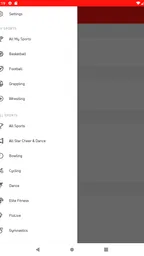
- Lets subscribers follow a range of sports through one app.
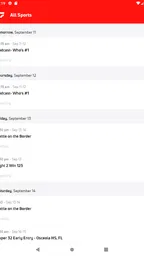
- Event schedules help viewers find upcoming broadcasts.
- Useful for fans of sports with dedicated FloSports channels.
What could be better
- A subscription is required to access most content.
- Coverage is limited for fans of major mainstream leagues.
- Some events may be unavailable in certain regions.
- Streaming quality can depend heavily on your internet connection.
- The subscription may be poor value if you follow only one sport.





