
Flashfood—Grocery deals review
 Analysis by Appsdrops
When I want to cut the cost of groceries, the usual options are simple: wait for a supermarket promotion, plan around what is on sale, or buy more than I need because a bulk deal looks tempting. Flashfood offers a different approach: it helps me look for discounted food nearby and decide whether a particular find can fit into the meals I already have planned. That can be useful, but it works best when I treat it as a supplement to shopping rather than a replacement for a deliberate grocery list.
Flashfood is a free Food & Drink app from Flashfood, aimed at shoppers interested in lower-cost groceries. It has an average rating of 4.0 from around 27,000 ratings, and it has passed one million installs. Those figures suggest that the idea has found a sizable audience, though they don’t tell me whether the available offers will suit a particular shopper’s location or routine.
Start with your meal plan, not the discount
The most useful way to approach the app is to begin with a practical question: what food could I actually use soon? A low price isn’t a saving if the item doesn’t suit my household, requires an extra trip, or goes unused. I’d open Flashfood with a loose plan in mind—perhaps ingredients for a couple of dinners—then see whether nearby deals match it.
That small change in mindset matters. A conventional grocery trip often starts with a list and ends with a basket; this app invites me to look at offers first. That can lead to a good find, but it can also encourage impulse buying. I’d compare each item with what I have at home and how many people I’m feeding before committing.
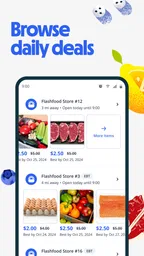
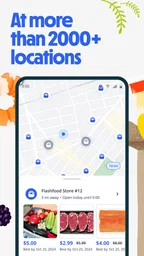
Availability is naturally tied to the stores and offers accessible to a shopper. So the first useful check is whether the app shows appealing options close enough to make collection worthwhile. If the nearest offers require a special journey, the discount may lose its appeal once travel time and effort enter the calculation.
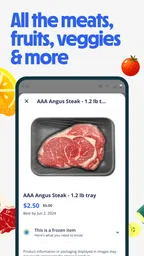
Flashfood’s central promise is grocery deals across familiar food types, including meat, produce and family staples. That mix makes it more relevant to ordinary meal planning than an app focused on a single kind of surplus food. Still, a broad range doesn’t mean every category will be available whenever I look, so I’d use it as a source of possibilities rather than a guaranteed shopping list.
Turn a promising offer into a sensible purchase
Once I spot an item I could use, I’d pause before treating it as a bargain. I’d consider how soon I can collect it, whether I can cook or store it promptly, and whether it replaces something I would otherwise buy. This is especially important for fresh food: the value comes from using it, not simply from getting it home.
A helpful habit is to keep a short “flexible meals” list. If a deal fits one of those meals, I can adapt dinner around it without reworking the whole week. For example, a household planning a simple dinner might find discounted vegetables and use them alongside ingredients already in the kitchen. The app can then shape one meal rather than dictate every meal.
I’d also separate essentials from opportunistic buys. If I need a specific ingredient for a recipe on a particular evening, I wouldn’t rely on a deal appearing at the right moment. Flashfood is more comfortable for adaptable plans than for a strict recipe schedule. That distinction prevents a tempting offer from becoming a frustrating substitute for something I genuinely need.
The app is free to download, which makes trying it relatively low-commitment. Its age rating is Everyone, so it is presented for a general audience. The current version is 3.17.0, and the app’s release date was April 25, 2018. Those details give a sense of an established product, but my practical decision would still depend on the local selection and whether pickup fits my day.
Collection is part of the shopping decision
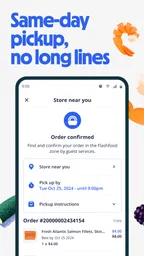
A deal isn’t complete when I find it on a screen; the handoff from browsing to collecting is what makes the workflow useful or inconvenient. Before placing an order, I’d make sure I can get to the relevant store within my existing errands or schedule. Combining collection with a regular grocery trip is usually more appealing than travelling solely for one uncertain item.
This is one of the app’s less obvious trade-offs. A lower grocery cost may come with a higher planning cost: checking what is available, deciding quickly, then coordinating collection. For someone already passing a participating store, that extra effort may be small. For someone with limited transport or a tightly packed day, even an attractive offer can be impractical.
I’d avoid building a whole shopping trip around a single deal unless I already know the location is convenient and the item is genuinely useful. A better workflow is to check offers before a routine stop, pick only what fits, and keep the rest of the grocery list intact. This reduces the chance that a bargain turns into an unnecessary detour.
Another practical point is to think about the handoff at home. If I’m buying food that needs prompt attention, I should have a plan for storing or preparing it after collection. That may mean choosing a flexible dinner for the same day or making room in the fridge beforehand. It’s a small step, but it turns a rushed pickup into a usable part of the week.
What the result looks like in an ordinary week
Imagine I’m planning meals after work and know I’ll pass a nearby grocery store. I check Flashfood before leaving, find a discounted item that complements food already at home, and decide whether I can use it soon. If it fits, I arrange the stop around the existing trip; if not, I leave it alone and shop from my original list.
The good outcome isn’t necessarily a dramatic reduction in the entire grocery bill. It may simply be one useful ingredient bought for less, with no waste and no special trip. That’s a more realistic way to judge the app than expecting every browse to produce a worthwhile purchase. The value comes from matching an offer to a real need.
Compared with standard supermarket promotions, Flashfood is more focused on finding particular discounted items than on planning a complete shop around a weekly flyer. A store’s own loyalty offers may be more predictable for items I buy regularly, while a conventional grocery list is better when I need exact ingredients. Flashfood’s advantage is the chance to discover a suitable deal that wasn’t part of the original plan; its weakness is that discovery can’t guarantee the right item will be available at the right time.
That makes it a useful companion for flexible cooks and households willing to adjust a meal or two. It is less compelling for someone who shops on a fixed schedule, needs specific products, or can’t conveniently collect from nearby stores. I wouldn’t use it as my only source of groceries, but I can see it helping make an existing routine more economical when the timing lines up.
Where the routine can fall apart
The main friction is uncertainty. An app built around deals may show options that don’t match my needs, and a shopper who expects a dependable supply of particular foods could find that disappointing. I’d check it when I have room to adapt, not when dinner depends on one exact ingredient.
There is also a risk of confusing a reduced price with genuine value. If I wouldn’t normally buy the item, or if I can’t use it in time, the purchase may add cost instead of saving money. I recommend setting a simple rule before browsing: buy only what can replace a planned purchase or has a clear place in an upcoming meal.
Fresh groceries can require more thought than shelf-stable pantry items. I’d be particularly careful about timing, storage space and household appetite before choosing a perishable deal. A large quantity is only useful if it can be shared, prepared, or stored sensibly. This is why a smaller, purposeful purchase may be a better result than filling a basket simply because several offers look appealing.
Flashfood may also be the wrong choice when convenience matters more than price. If I need groceries delivered, want a complete and predictable order, or can’t make a pickup fit my day, a regular supermarket service may suit me better. Likewise, shoppers who prefer to buy only from a fixed list may find browsing offers distracting rather than helpful.
Who I’d recommend it to
I’d recommend giving it a try if you already shop near participating grocery locations, can be flexible about ingredients, and like making practical use of discounted food. It may be especially handy for someone who plans a few meals at a time rather than following a rigid menu, because that leaves room to let a suitable deal influence one dinner without disrupting the rest of the week.
I’d skip it—or at least keep expectations modest—if travel to a store is difficult, your schedule leaves little room for collection, or you need the same products every week. In those cases, predictable supermarket promotions and a planned list are likely to feel easier. The app’s 7,900 reviews and 4.0 average rating offer one broad indication of how people respond to it, but a personal trial near your usual shopping area is the more useful test.
My overall view is that Flashfood is worth considering as a flexible, local-minded addition to grocery shopping, not as a guaranteed route to cheaper meals. Start by checking whether nearby offers fit a meal you already expect to cook, combine collection with an errand when possible, and be strict about buying only what you can use. Follow that routine and the app has a clear role; expect it to replace a full, predictable grocery shop, and its limitations are likely to show quickly.
What we like
- Find discounted groceries from nearby participating stores.
- Reserve deals in the app before heading to the store.
- Listings can include fresh produce and other perishable foods.
- The app helps reduce food waste by selling surplus groceries.
- Clear product photos make it easier to assess available deals.
What could be better
- Availability depends on participating stores in your area.
- Some deals have limited quantities and may sell out quickly.
- Pickup is generally required rather than home delivery.
- Items may have short use-by dates due to their discounted status.
- Store hours and pickup windows can limit when you collect an order.





