
Firehouse Subs review
 Analysis by Appsdrops
I would treat Firehouse Subs as a practical companion to a restaurant habit, not as an app that needs to become part of every lunch. It is a free Food & Drink app from Firehouse Subs, centered on the brand’s rewards program. That focus makes the decision fairly simple: if you already visit Firehouse Subs, it may be worth keeping handy; if you rarely go, the appeal is much thinner. In my view, its lasting value depends less on novelty than on whether remembering to use it becomes part of ordering.
From a quick download to a first order
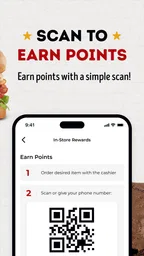
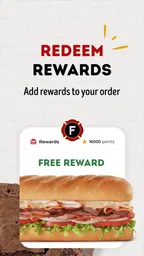
The first-week appeal is easy to understand. Instead of treating rewards as something to remember after a meal, the app puts the program in the same place you can check when planning a Firehouse Subs visit. That can make it easier to consider the rewards experience before you order rather than trying to reconstruct what happened later. For a regular customer, that small shift is more useful than a flashy feature would be.
The app is developed by Firehouse Subs, and its identity is deliberately narrow: it is for the chain, rather than a general restaurant finder or a broad coupon wallet. I think that is a strength when you want to deal with one familiar brand, but a limitation if you are looking for a single app to organize meals across several restaurants. You will get the most from it when a Firehouse Subs stop is already a realistic option, not when you are browsing for somewhere new to eat.
For a typical first visit, I would open it before heading to the restaurant, check the rewards area, and make sure I know how I am expected to use the account during the purchase. That pre-order habit is a useful safeguard: rewards apps are easiest to forget when the line is moving and you are focused on choosing food. The app’s purpose is clearest when it supports a visit you were already making, rather than becoming a reason to buy more than you planned.
A realistic scenario is a workday lunch with a familiar order. I might check the app while deciding whether to stop for a sub, then bring it up before paying rather than waiting until I have the receipt in hand. That sequence gives me a moment to see what the rewards program currently makes relevant and avoids turning the checkout into a hurried search. It is a modest workflow, but it is precisely the kind of habit that can determine whether a loyalty app earns space on a phone.
The broader audience figures suggest that many customers have found a reason to try it: it has more than a million installs, an average rating of 4.8, and around 68,000 ratings. Those figures are reassuring as a sign of broad use, but they cannot tell me whether the app suits someone who visits only occasionally. For that person, the meaningful test is not popularity; it is whether the rewards available during their own visits justify another account and another app to maintain.
What makes the first visit easier
My practical advice is to set up and inspect the app when you are not already standing at the counter. That gives you time to understand where the rewards information lives and what you may need to do at purchase. Then, before ordering, make a quick check rather than assuming the app will automatically apply something. This is not a complicated routine, but it turns an easy-to-miss benefit into a deliberate part of the visit.
I would also avoid installing it just because a reward sounds appealing in the abstract. The useful question is whether Firehouse Subs is already among the places you choose. If you are trying the restaurant once, the app can help you explore its rewards setup, but one visit may not establish a lasting routine. If you already go there, opening the app before an order is a low-effort way to see whether the program adds something to your normal purchase.
Month-to-month value depends on your routine
After the first few uses, the novelty fades and the app has to justify its place through repetition. That is where a dedicated rewards app can either become convenient or feel unnecessary. If Firehouse Subs appears regularly in your lunch rotation, checking the program can become as automatic as deciding what to order. If visits are sporadic, you may forget the app exists until after you have paid, which weakens its value even if the program itself is appealing.
The main trade-off is concentration versus convenience. A single-brand app can keep the Firehouse Subs rewards experience focused, while a general rewards or payment tool may be more convenient for someone who eats at many different chains. The broader alternative may reduce app clutter, but it may not offer the same direct connection to this restaurant’s own program. I would choose the dedicated app when Firehouse Subs is a recurring choice; I would skip it when variety matters more than a specific brand’s rewards.
To judge its recurring value, I would give myself a simple rule: check it before each visit for a short period, then decide whether that check has changed what I get from the routine. The goal is not to chase every possible reward. It is to find out whether using the program fits naturally into orders I would have made anyway. If it requires remembering a complicated sequence or changing my plans, that is a warning that the app may not earn permanent attention.
It is also worth separating loyalty from budgeting. A rewards app can make a regular purchase feel more rewarding, but it should not be treated as a reason to spend extra or visit more often. I would compare the experience with ordering without the app and ask whether it adds practical value to the same meal. That keeps the decision grounded in the food and routine, rather than letting the prospect of accumulating benefits dictate lunch.
Keeping it useful without adding chores
Maintenance should be light if you approach the app with a specific purpose. Keep it installed while you are actively using the rewards program, check it before a Firehouse Subs order, and occasionally make sure it is current. The current version is 12.7.0, and the app requires Android 7.0 or later on Android devices. Those details matter most when deciding whether an older phone can run it; they do not change the core question of whether you visit the restaurant often enough.
The app is rated for Everyone, so its audience is not restricted to adults by the content rating. It is free to download, which removes a direct purchase decision, but “free” does not mean there is no upkeep: you still spend attention on installing updates, opening the app, and remembering to use the rewards program. I would count that attention as the real cost. If it sits unused for months, removing it is a reasonable way to keep a phone uncluttered.
One useful habit is to connect the app check to a moment that already exists: deciding where to eat or waiting before placing an order. That is more reliable than hoping to remember it during checkout. Another is to review the rewards information before a visit instead of repeatedly opening the app throughout the day. These are small workflow choices, but they reduce the chance that a loyalty tool becomes another source of notifications or idle screen time.
For people who share meals or make group orders, I would not assume that one person’s app automatically handles everyone’s rewards or preferences. Treat the account as a personal ordering aid, and make sure the person expecting to use the program is the one prepared to present or use it. That avoids a common loyalty-app frustration: the group has finished paying before anyone remembers whose account should have been involved.
Where fatigue can set in
The narrow focus is also the clearest source of fatigue. A Firehouse Subs customer who wants restaurant discovery, meal planning, or rewards across several brands will not find this app a replacement for those tools. Its usefulness rises and falls with visits to one chain. Once that pattern changes, the app can quickly become dead weight, even if it worked well when the restaurant was part of a weekly routine.
There is also a memory burden. A rewards app only helps when it is used at the right point in the purchase, and a busy lunch rush is exactly when people forget secondary steps. If you often order quickly, or if you prefer not to manage accounts and apps while buying food, the simpler option may be to order without it. I would rather miss a possible reward than let the app create friction every time I want lunch.
Ratings offer some context but are not a substitute for trying the workflow yourself. The app has about 9,100 written reviews alongside its large rating total, which shows that customers have left substantial feedback. Still, no overall score can predict whether its routine fits your phone, ordering habits, or visit frequency. I would use it for a few ordinary visits and judge the actual convenience, not keep it solely because other customers rate it highly.
For a person who eats at many competing sandwich shops, the usual alternative is to choose based on location, menu preference, or whichever rewards system is easiest to use across their routine. That may be better than maintaining a separate app for each chain. Conversely, if Firehouse Subs is the specific place you return to, its dedicated app is more direct than trying to track that brand’s rewards in a generic notes app or relying on memory.
Who should keep it after the novelty
I would recommend keeping Firehouse Subs if you already visit often enough to remember the rewards program and want a straightforward place to check it before ordering. It makes the most sense for someone who can fold the app into an existing lunch habit without changing what they buy. Its free price and focused purpose make a trial easy, while its Everyone age rating makes it broadly accessible.
I would skip it if you rarely eat at the chain, dislike maintaining separate restaurant apps, or tend to forget loyalty steps when paying. In those cases, the app’s central benefit is tied to a pattern you do not have. A multi-brand rewards option or simply choosing a restaurant based on convenience may be a better fit, even if that means giving up a dedicated Firehouse Subs experience.
Released on July 6, 2014, the app has been around long enough to attract a substantial audience, but longevity alone does not make it essential. My verdict is that it earns lasting space for a regular customer who checks it before visits and finds the rewards worthwhile. For everyone else, it is better treated as an optional tool to install when a Firehouse Subs routine begins, then remove if that routine fades.
What we like
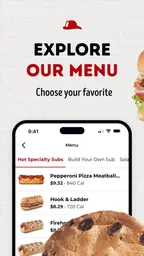
- The menu includes a range of hot and cold sub options.
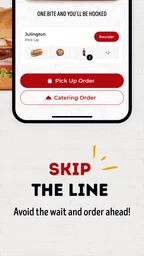
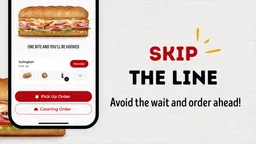
- Online ordering makes pickup convenient.
- The app helps locate nearby Firehouse Subs restaurants.
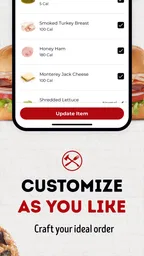
- Users can customize many sandwich ingredients.
- The rewards program offers points on eligible purchases.
What could be better
- Restaurant hours and availability vary by location.
- Some menu items may be high in calories or sodium.
- Customization options may differ between restaurants.
- Promotions and rewards can have terms or expiration dates.
- The app is most useful in areas with nearby locations.





