Exxon Mobil Rewards+ review
 Analysis by Appsdrops
When several people in a household take turns buying fuel, keeping rewards and receipts straight can become a small but persistent chore. I see Exxon Mobil Rewards+ as most useful when it gives one driver a simple routine for Exxon and Mobil stops, rather than as a general-purpose navigation tool. It is a free Maps & Navigation app from ExxonMobil, built around finding fuel and managing rewards. Its value depends on whether the stations it covers fit the routes you actually drive.
One household, several drivers, one rewards routine
A realistic use case is a household where one person usually drives to work, another handles errands, and either might stop for fuel. The app can help the person at the pump connect a visit to the rewards routine, while the other driver can know what the household is using it for. That is useful coordination, but it is not the same as a shared household account or a built-in family-management system. I would agree on who is responsible for the account and how rewards are tracked before multiple people start using it.
That distinction matters because rewards are only helpful when the household can reliably connect them to the right purchases and account. If one driver expects points to appear automatically for everyone, while another assumes each person has a separate balance, frustration is likely. I would treat the app as a tool for the account holder and make the routine clear to anyone else who may use it: check the location, follow the app’s instructions at the station, and confirm that the visit is being handled as intended.
With an average rating of 3.6 from around 34,000 ratings, the app has a mixed reception rather than universal approval. That does not tell me exactly how it will behave on a particular phone or at a particular station, but it is a sensible reason to test the basic workflow before relying on it for every household fuel purchase. Exxon Mobil Rewards+ has over a million installs, so it is established enough to be familiar to many drivers, yet I would still keep a backup plan for locating fuel.
Set expectations before sharing a phone or account
For a shared-device setup, I would keep the app signed in only if the people using that device understand whose account it represents. A phone passed between family members can blur the line between “helping with a fuel stop” and “managing someone else’s rewards.” Before handing it over, make sure the account holder is comfortable with the other person using the app and knows what activity may be associated with that account. This is a practical boundary, not a claim that the app offers household controls.
On separate phones, the same principle applies: do not assume that installing the app creates a shared balance or gives another person access. Decide whether one person will handle rewards and tell the rest of the household how to coordinate. If a driver only needs directions, they may prefer a regular map app rather than being asked to sign into a rewards service. That keeps the task proportionate and avoids sharing account details when the extra rewards features are not needed.
The app is free, which makes trying it low-commitment, but “free” does not mean every driver should install it. I would start with the person who most often buys fuel at Exxon or Mobil, see whether the experience fits that person’s routine, and then decide whether another household member needs it. If the second driver rarely visits those stations, adding another account or device may create more coordination than value.
Coordinate the stop, not just the points
A useful habit is to check the app before leaving for a planned fuel stop, rather than waiting until the tank is nearly empty. That gives the driver time to compare the station option with the route and decide whether an Exxon or Mobil stop makes sense. A station that is convenient on a normal commute may be a detour during a time-sensitive trip. I would compare the app’s station information with a general navigation app when distance, traffic, or a precise arrival route matters more than rewards.
For a shared car, a simple handoff note can prevent confusion: tell the next driver whether fuel is needed and whether the rewards app is part of the plan. This is especially useful when one person is using a shared phone or the account holder is not in the car. The app can support the stop, but it cannot replace a household agreement about who pays, who keeps track of receipts, or whether a particular purchase should count toward someone’s personal rewards.
One small but useful trade-off is that rewards can influence where a driver stops. I would not let that become the only decision rule. If a different station is much more convenient, or if a trip calls for broader route planning, choose the better practical option and treat the rewards as a bonus rather than a reason to make a poor detour. This is where a dedicated fuel rewards app differs from a general map: its focus can make a brand-specific stop easier to manage, but it is not necessarily the best tool for evaluating every station along a route.
Who should have access, and what feels age-appropriate?
The app’s content rating is Everyone, but that rating is not a substitute for an adult deciding how an account should be used. A younger family member might help locate a station or accompany an adult, while the account holder remains responsible for sign-in and rewards activity. I would not hand over credentials simply because the app is rated for everyone. Keep account access tied to the person who understands the household arrangement and is comfortable managing it.
For adults sharing a household, trust is mostly about clarity. If rewards belong to one person’s account, say so. If the household treats them as shared, agree on that explicitly. Neither approach is inherently better; the trouble comes when people assume different rules. A rewards app can make fuel purchases easier to organize, but it cannot settle disagreements about ownership or spending.
ExxonMobil released the app on July 30, 2013, and its current version is 6.6.0. It requires Android 9 or later, so an older Android phone may be excluded even if it still works well for calls and basic directions. Before making the app part of a shared-car routine, check that the phone the driver actually takes on trips can run it. Otherwise, the account holder may need to handle the rewards side separately while the driver uses another navigation option.
How it fits beside other navigation and fuel apps
I would not replace a general map app with Exxon Mobil Rewards+ if my main need were broad route planning, comparing many fuel brands, or navigating a long trip with changing stops. A standard navigation app is usually the more natural starting point for the overall journey. This app makes more sense when a driver already chooses Exxon or Mobil and wants the fuel-and-rewards process in the same place. In practice, the two kinds of apps can complement each other: use a map for the route, then use this one when the branded station and rewards workflow are relevant.
That approach also helps avoid a common annoyance: opening a rewards app only after arriving and discovering that the driver has not set up the routine they expected. I would test it on an ordinary local stop first, when there is time to read the screens and understand how the visit is handled. Once that feels familiar, using it during a commute is less distracting. Do not troubleshoot account details while driving; a passenger can help, or the driver can pull over safely.
The experience is naturally less compelling for someone who buys fuel at many different brands or chooses a station solely by price and proximity. In that case, a brand-neutral map or fuel finder may be more useful day to day. The trade-off is clear: Exxon Mobil Rewards+ is focused, and that focus can be convenient for loyal Exxon and Mobil customers, but it narrows its usefulness for drivers whose habits are more varied.
My household verdict
I would recommend Exxon Mobil Rewards+ to a household member who regularly stops at Exxon or Mobil and wants a dedicated way to handle fuel rewards alongside station-finding. I would start with one account holder, try the app on a routine stop, and agree on who uses it before involving other drivers. Those steps make the experience easier to understand and reduce the risk of confusing personal and shared activity.
I would skip it as a household’s only navigation option, and I would not ask every driver to install it if only one person uses those stations. It is also not the right choice when broad station comparisons or complete trip planning are the priority. ExxonMobil’s app is best treated as a focused companion for a particular fuel routine, not a universal answer to every driving need.
Overall, I like the idea of making a regular branded fuel stop easier to coordinate, especially when a household shares a car but not every driver shares the same habits. The app’s strongest case is simple: one responsible account holder, a clear understanding among drivers, and frequent use at the stations it serves. If those conditions match your household, it is worth trying; if not, a general map and a less brand-specific routine will probably be easier to live with.
What we like
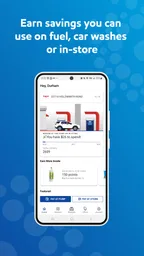
- Earn points on eligible fuel purchases and redeem them for savings.
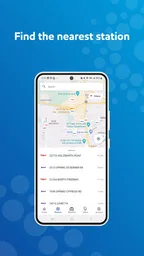
- The app makes it easy to find nearby Exxon and Mobil stations.
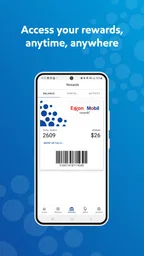
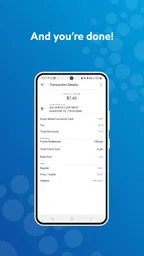
- Digital receipts help keep track of recent purchases.
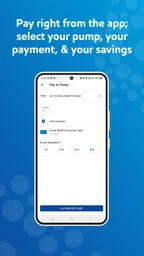
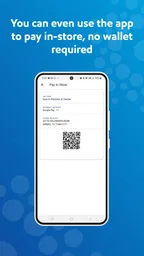
- Payment options can make fueling quicker at participating stations.
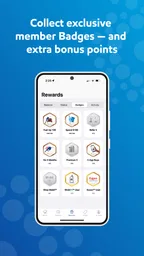
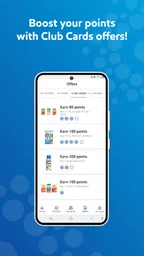
- Rewards offers can add extra value beyond standard point earnings.
What could be better
- Rewards and payment features may vary by station.
- You need an account to access the rewards program.
- Some offers may require activation before purchase.
- Points may take time to appear after an eligible transaction.
- The app is less useful for drivers without nearby participating stations.





