

Dutch Bros review
 Analysis by Appsdrops
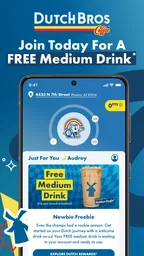
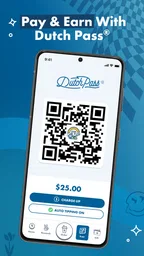
I see the Dutch Bros app as a handy companion for people who already visit Dutch Bros and want to make ordering and paying less of a chore. It is a free Food & Drink app from Dutch Bros Coffee, and its focus is deliberately narrow: it helps you handle your coffee stop rather than trying to be a general café guide. In my experience, that focus is useful when the routine goes smoothly—and it also means the app is less compelling if you rarely buy from the chain.
Where an ordinary coffee run can get stuck
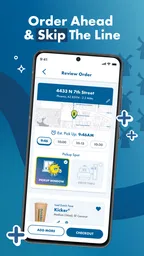
The most useful way to think about Dutch Bros is as part of a short sequence: get ready to order, pay through the app, and keep track of rewards. That can make a familiar stop feel quicker, especially when you already know what you want. But convenience depends on getting through each step before you reach the counter or drive-through. If you are still deciding on a drink, changing your order repeatedly, or dealing with a slow connection, the phone can become an extra task instead of a shortcut.
I would set it up and explore it when I have a quiet moment, not while a line is moving behind me. That is a small but practical distinction: a coffee app is most helpful when it reduces decisions at the point of purchase, not when it asks you to learn its flow under pressure. If your usual order is settled, preparing to pay ahead of the interaction can make the stop feel smoother. If you tend to choose something different every time, the benefit is more about having the payment and rewards workflow close at hand than about eliminating all ordering friction.
The app’s appeal is clearest for regular Dutch Bros customers. If you stop in often, keeping ordering, payment, and rewards in one place can be easier than treating each visit as a separate transaction. If you visit only occasionally, the extra setup and remembering to use the app may not feel worthwhile. I would not install it simply because I want a broad directory of coffee shops: it is tied to one brand, so a general map or café-discovery option is a better fit for that need.
One useful habit is to decide before opening the app whether you are there to place an order, pay, or check your rewards. Having a specific goal keeps the visit focused and makes it easier to notice if one part of the process is holding things up. It also avoids the familiar phone-in-hand shuffle of trying to browse, customize, and complete a purchase while someone is waiting.
Start with the basics, then test the routine
My recommended first run is simple: install the app, open it somewhere with a stable connection, and take time to understand the account and payment steps before relying on them at a busy stop. I would also make sure the app is current. Version 3.25.0 is the current release, and the minimum operating-system requirement is version 10. On an older device, checking compatibility before spending time on setup can save frustration.
It is also worth thinking through your normal ordering pattern. If you usually make a quick, familiar choice, the app’s streamlined purpose should suit you. If you need to compare options or ask questions before deciding, you may prefer to speak with staff first and use the app only for the parts it handles comfortably. A digital flow cannot replace a conversation when you need clarification about an order.
For a first visit after setup, I would keep the order uncomplicated and confirm what is on screen before completing the transaction. This is not a special trick; it is a sensible way to learn any ordering workflow without adding unnecessary variables. Once you know where the important controls are, you can decide whether it is worth using on a rushed morning or only when you have a little more time.
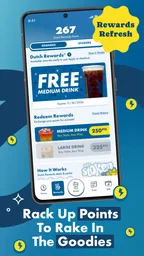
It helps to treat rewards as a reason to keep the process together, not as a guarantee that every visit will be effortless. The app is designed to connect rewards with ordering and payment, but a customer still has to follow the app’s prompts and make sure the intended account or payment method is being used. If you are unsure whether a step went through, pause and check the on-screen status rather than immediately trying the same action again.
Recovering when the workflow stalls
If a screen takes longer than expected, I would avoid tapping repeatedly. Repeated attempts can make it harder to tell whether an order or payment action is still processing. First, give the screen a moment, then check whether the app has moved to a confirmation or another clear next step. If it has not, a careful retry is more useful than several quick taps.
A weak or interrupted connection can also make a digital ordering routine feel unreliable. If something appears stuck, check that the phone is connected and try again when the connection is steadier. I would not assume that closing and reopening the app has completed an order or payment; after reopening, look for a clear indication of the current status before beginning again. That small check can prevent duplicate effort and confusion at the counter.
For a practical everyday scenario, imagine heading out before work and wanting your usual drink without holding up the drive-through. The best workflow is to prepare before you leave, review the order carefully, and use the app’s payment and rewards steps deliberately. If the order does not appear to be confirmed, switch to a direct check rather than assuming it worked. When time is tight, the ordinary in-person route may be the safer fallback than trying to troubleshoot on the spot.
If a payment method or account step is the obstacle, separate that issue from the order itself. Check the information you entered and follow any prompts the app presents. If the app gives no clear result, avoid repeatedly submitting the same action. The goal is to understand whether the current attempt completed before starting over—not to force the screen forward at all costs.
There is a trade-off here: putting several parts of a coffee purchase on a phone can save effort on a smooth day, but it creates one more point of failure if the device, connection, or account is not ready. I would keep a simple backup plan, such as being prepared to order and pay through the usual in-person process. That is especially sensible when you are new to the app or trying it during a busy visit.
When the phone is not the real problem
Not every awkward visit is an app issue. A confusing order, a change of mind, or a question that needs a staff member’s answer may be better handled face to face. The app can support the transaction, but it cannot make a decision for you or resolve every misunderstanding about what you want. If the problem is the drink choice rather than the digital process, talking it through is usually the more direct route.
Likewise, if you are at a location or in a situation where the app’s flow does not fit what you need, do not assume that continuing to tap will fix it. Use the store’s normal ordering process when that is clearer. A dedicated brand app is useful precisely because it concentrates on Dutch Bros, but that specialization also limits its value outside those visits. A general payment app may be more convenient for someone who wants one tool across many businesses, while a conversation with staff is better when the order needs explanation.
I would also avoid judging the whole experience from one slow moment. A connection problem or an interrupted screen can get in the way of any phone-based purchase. Try again later under calmer conditions, and see whether the same step causes trouble. If it does, adjust your routine or use the in-person option rather than allowing the app to turn a simple coffee stop into a project.
As a sign of its reach, the app has more than five million installs. Its average rating is 4.5, based on around 120,000 ratings, with roughly 53,000 written reviews. Those figures suggest many people use and respond to it, but they do not tell me whether it suits a particular routine. What matters more is whether you visit often enough to benefit from having payment and rewards close together.
Who will get the most from it
I would recommend Dutch Bros to regular customers who like using their phone to prepare for a familiar purchase and want rewards included in that routine. It is also a reasonable choice if you prefer to handle a payment step before reaching the counter, provided you are comfortable checking the app’s status and keeping a backup option in mind.
I would skip it if you seldom visit Dutch Bros, dislike managing purchases on a phone, or generally need staff help to settle your order. It is not a substitute for a broad café finder, and it is not automatically faster when you are still deciding what to order. For those situations, paying and ordering in person is often simpler. The app is rated for Everyone, and it is free, so trying it does not require an upfront purchase; the real cost is the time spent setting it up and remembering to use it.
My verdict is that this is a focused, practical tool rather than an essential app for every coffee drinker. I would install it if Dutch Bros is already part of my routine, test the ordering and payment flow before a rushed visit, and use it when it genuinely reduces steps. If the phone becomes the slowest part of the stop, I would put it away and order normally. That flexibility is the key to getting value from it: use the app for the convenience it offers, but do not let the convenience become another thing to troubleshoot.
What we like
- Order ahead through the app to save time at participating locations.
- Customize drinks with a wide range of flavors and add-ons.
- Earn rewards on eligible purchases through the loyalty program.
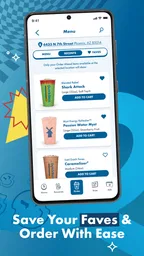
- Save favorite orders for quicker repeat purchases.
- Browse the menu and check prices before visiting.
What could be better
- Mobile ordering is not available at every location.
- Menu options and availability can vary by store.
- Rewards require an account and eligible purchases.
- Some customizations may increase the final price.
- The app offers limited value if you rarely visit Dutch Bros.





