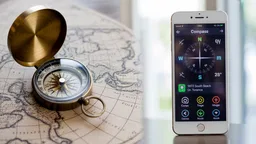
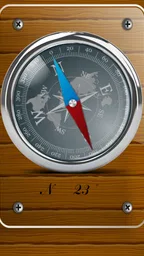
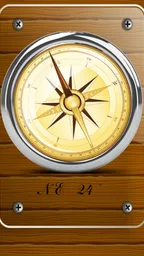
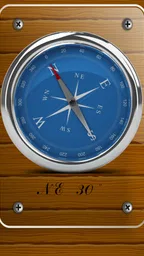
Digital Compass for Android review
 Analysis by Appsdrops
I find a compass app most useful when it answers one simple question quickly: which way am I facing? Digital Compass is built around that job, rather than the route planning and place search that make a full navigation app useful. That narrow focus can be a strength, but it also means I would treat it as a directional aid, not as a substitute for a map or a dependable navigation plan.
Trust starts with a narrow purpose
Digital Compass is a free Android app in the maps and navigation category, developed by Photo and video apps. It has an average rating of 3.6 from around 532 ratings, with over 500,000 installs. Those figures suggest that people have tried it in meaningful numbers, but the middling score is a good reason to test it in an easy setting before depending on it outdoors.
The app is marked for everyone and runs on Android 6.0 or later. It was released on November 26, 2023, and its current version is 1.10. That gives me the practical compatibility picture, but not a reason to assume that every phone will behave identically: compass readings depend on the device’s magnetic sensor and its surroundings, as well as on the app.
Its developer name, Photo and video apps, is broader than the app’s compass purpose. I would not read that name as proof of a problem, nor as evidence about how the app handles information. A careful user should distinguish what is visible in the app and its permission prompts from guesses based on a developer label. I would check the app’s permissions in Android settings and consider each request on its own merits.
What a compass can—and cannot—tell you
A digital compass reports direction using a phone’s sensors. It can help orient you when you already know where you are, such as when you step out of a station and need to choose the right street, or when you want to tell which side of a building faces north. It does not, by that function alone, show your position, plan a route, or tell you whether a path is safe or open.
That distinction matters because a compass can look precise while still being wrong in context. Nearby metal, magnets, electronics, and the phone’s own calibration can affect the sensor. If the needle or heading jumps around, I would move away from the source of interference and follow any calibration guidance shown by the phone or app. I would not keep walking in the direction of an unstable reading just because the display gives a specific heading.
My practical rule is to use the compass to orient a map or confirm a direction, then use landmarks and a route source to make the actual navigation decision. That keeps a convenient instrument from becoming false reassurance, especially in unfamiliar terrain or when visibility is poor.
Permissions, information, and visible choices
Trust is easier to judge when an app asks for only what its purpose calls for, but I would avoid assuming which permissions Digital Compass needs without seeing the prompt on my own device. Android lets me review an app’s granted permissions in system settings; that is the place to check what is enabled and to revoke access I do not want. A compass reading itself is not a guarantee about broader data practices.
I also look for choices I can control rather than relying on an assumption that an app collects nothing. Before using it, I would review the app’s store privacy information and any disclosures or settings presented in the app. If it asks for access unrelated to a compass task, I would pause and decide whether that access is necessary for the way I intend to use it. The important point is to make that decision from what is actually displayed, not from the app’s name or category.
For a data-sensitive moment—say, checking direction while travelling in a place where I prefer to limit location sharing—I would inspect location access in Android settings first. A compass and a location-based map are different tools, and a basic direction check does not automatically mean I want location access enabled. If the app’s operation is affected by a permission choice, I would weigh that trade-off before granting it rather than tapping through a prompt automatically.
There is another useful habit: check the app’s current permissions after an update if privacy is a priority. I would not treat an update as evidence that permissions changed, but Android’s app controls make it possible to verify the current state. That small check is more reliable than guessing from an old installation or assuming that a free app has a particular business model.
How I would use it in ordinary situations
Imagine leaving a large transit station through one of several exits. The street layout is unfamiliar, and the map on your phone is rotated in a way that makes the first turn confusing. I would open Digital Compass, establish north, and compare that direction with the map before choosing a route. Once I know which way I am facing, I would switch back to the map for street names and turn-by-turn decisions. That brief handoff is where a dedicated compass can be more convenient than searching through a full navigation interface.
It can also help with small, low-stakes tasks: orienting a paper map, checking the direction of a trail junction, or confirming which side of a campsite is exposed to the morning sun. In each case, I would hold the phone steadily and away from objects likely to interfere, then look for a consistent reading rather than trusting a single glance. If the result conflicts with obvious landmarks, I would trust the surroundings and recheck the device.
A useful trade-off is that this focused tool may be quicker to consult than a map app, but it cannot supply the context that makes a direction actionable. Knowing that a path runs east does not tell me whether it reaches my destination. For hiking, cycling, or driving in unfamiliar areas, I would plan with a map that includes routes and relevant local detail, then use the compass only as a supporting orientation aid.
What to expect from the experience
The app’s short description identifies it simply as a digital compass, and the store summary emphasizes precision. I would interpret that as the intended role, not as a promise that readings will be perfect on every handset. Sensor quality differs between phones, and local magnetic interference can matter more than the interface. The best first test is at home or in a familiar open area, where I can compare the direction with a known reference.
If a reading seems off, rotate the phone slowly and see whether the heading settles. A common practical mistake is to test a compass beside a laptop, speaker, magnetic phone case, or vehicle and then blame the app for an unstable result. Taking a few steps away and repeating the check can help separate an environmental issue from a persistent problem. I would also avoid calibrating near the same interference that caused the questionable reading.
The rating of 3.6 is neither a clear endorsement nor a reason to dismiss the app outright. Ratings capture different devices, expectations, and situations, while a compass is unusually sensitive to the environment in which it is used. I would install it only if I wanted a quick directional tool, test it against a known direction, and keep another navigation option available for anything consequential.
Who should choose it, and who should look elsewhere
I can see Digital Compass suiting someone who wants a straightforward way to check orientation without opening a full navigation app. It is especially reasonable for occasional use: finding north in a new neighborhood, aligning a map, or getting a quick sense of direction while exploring. Since it is free, trying it is a low-cost way to see how well the phone’s sensor and the app work together, though free access should not be confused with a conclusion about privacy or data handling.
I would look elsewhere if I needed reliable route guidance, offline maps, saved destinations, or a complete outdoor navigation setup. Those jobs call for a mapping or navigation app with the relevant tools, not a compass alone. I would also avoid relying on any phone compass as my only safety instrument on a serious trip; a physical compass and sound navigation preparation remain sensible alternatives when conditions make a phone vulnerable to battery, signal, or device problems.
Compared with the compass tools already built into some phones or map apps, the main reason to try this one is convenience if its focused presentation suits you. The trade-off is that a separate app adds another item to maintain and evaluate. If your existing map app already gives you a clear orientation indicator, switching between tools may not be worth it. If you prefer a dedicated compass screen, this app may fit that habit, provided its readings prove stable on your device.
A cautious recommendation
I would recommend Digital Compass as a simple, free directional aid for everyday orientation, with a clear boundary around what it can do. Its focused purpose is useful when I need to establish a heading quickly, but it does not replace a map, route planning, or careful judgement. I would test it away from magnetic interference, compare the result with a known direction, and check Android’s permission controls before granting access I do not expect a compass task to need.
That is the kind of modest role in which I would feel comfortable keeping it: useful for a quick check, not something I trust blindly. If the readings are steady on your phone and the permissions and privacy choices suit you, it may earn a place in your toolkit. If you need richer navigation or want to avoid adding another app, the compass already available in your preferred map tool may be the better fit.
What we like
- Quickly shows your current direction without needing a map.
- Simple controls make it easy to use on the go.
- Lightweight design suits older Android devices.
- Useful for checking bearings during outdoor activities.
- Can help orient you when traveling in unfamiliar areas.
What could be better
- Compass accuracy can vary near metal objects or electronics.
- The device needs a magnetometer for compass readings.
- Calibration may be needed before readings become reliable.
- It may be less useful in areas with weak GPS signals.
- Some features may require location access to work properly.





