

Detroit Lions Mobile review
 Analysis by Appsdrops
I see the Detroit Lions app as a focused companion for people who follow the team, rather than a general sports hub. Its value is straightforward: keep Lions-related information close at hand and make it easier to follow the team without piecing everything together from unrelated sources. I’d recommend it most to fans who check in regularly, especially around game days, and less to someone who only wants broad league coverage.
A practical home base for following Detroit
Detroit Lions Mobile is the team’s official sports app, developed by YinzCam, Inc. It is free, rated for Everyone, and has a 4.7 average from around 7,600 ratings. That gives a useful sense of its audience and reception, though the real question for me is whether a dedicated team app fits the way you already follow football.
Compared with a general sports app, the appeal here is focus. A league-wide service may be better when I want to jump between teams, competitions, or unrelated sports. This app is for keeping my attention on Detroit. That makes it a natural choice for a Lions supporter who wants one team-oriented starting point, but it will feel narrow if I mainly want scores and headlines across the whole sports world.
The app has been available since September 15, 2012, and its current version is 4.0.2. It has over 100,000 installs, so it has found an audience beyond a small group of devoted users. I would treat those numbers as context, not a promise that every feature or screen will suit every fan: the best fit depends on how often you follow the team and what you expect a mobile companion to do.
Start with one repeatable game-day routine
For a useful baseline, I’d open the app before a game and use it as my first stop for Lions-focused information. Then I’d decide whether I need to keep it open during the action or simply check in at a few planned moments. That small choice matters: a fan watching the broadcast may only need occasional updates, while someone following along away from a television may want to return to the app more often.
A realistic routine could be checking in before leaving home, taking a quick look during a break, and returning after the game to catch up on what I missed. The benefit is not that an app replaces watching a game or talking with other fans; it is that having a team-specific place to begin can reduce the effort of searching through several general sources.
I would also avoid treating the app as a reason to keep checking my phone every few minutes. If I’m watching with friends, driving, or trying to focus on something else, I’d leave it alone and check when convenient. A dedicated team app works best as a deliberate companion, not as a constant interruption.
Check the setup before relying on it
When I install a sports app, I make a quick pass through its available settings before settling into a routine. I look for options that control alerts and decide which ones would genuinely help me. For a Lions fan, the practical question is whether I want timely reminders or updates, or whether I’d rather open the app on my own schedule. I would not enable every option automatically; too many interruptions can make a useful companion feel noisy.
I also check the phone’s notification settings alongside the app’s own controls. If an alert is not arriving—or is arriving at an inconvenient time—those two places are the sensible first checks. This is a general troubleshooting habit, not a claim about a particular control or alert the app offers. It helps me separate an app preference from a phone-level setting before I assume something is broken.
Storage and connectivity are worth thinking about in practical terms, too. If I’m heading somewhere with unreliable service, I don’t assume that an app will provide every update offline. I’d check what I need while connected and keep another way of following the game in mind if staying current is important. That expectation is especially useful for fans who travel, attend events, or rely on a limited mobile connection.
There is also a small but important compatibility check: the current version requires iOS 11 or later. Before installing, I’d confirm that my device meets that requirement. The app is free, which lowers the barrier to trying it, but a free download is still only worthwhile if its team-specific focus matches my habits.
Build a faster habit instead of browsing aimlessly
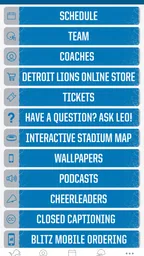
Experienced users can make a simple app feel quicker by choosing a repeatable sequence. I’d decide in advance what I usually want to learn when I open it, then go straight to that information rather than browsing every area on every visit. The exact screens available can change with updates, so I wouldn’t rely on a particular menu path without checking the current app. The useful principle is to turn frequent visits into a short routine.
One effective pattern is to check once before a game, use the app only when I have a specific question during it, and make a final check afterward. Another is to open it during natural pauses—before kickoff, at halftime, or after the final whistle—rather than interrupting the experience continuously. These habits make a sports app more helpful without requiring me to spend more time on my phone.
If I follow more than one team, I’d keep this app’s role clear: it is my Detroit destination, while a broader sports source handles league-wide comparisons and other teams. That division avoids trying to make one app do everything. It also means I can judge this app fairly by how useful it is for following the Lions, not by whether it replaces every sports service I use.
A further tip is to be selective about what I expect from a team app when I’m away from home. If I’m in a crowded venue or moving between places, I’d check the connection before depending on live updates. If the connection is poor, the sensible fallback is a broadcast or another source already available to me. Planning that backup is more reliable than assuming a phone app will always have ideal conditions.
Where a dedicated team app can feel limiting
The same focus that makes the app appealing also sets its limits. A Lions-centered experience is not the strongest choice for someone who wants to compare many teams, follow several sports, or use one app as a broad scoreboard. In those cases, a general sports app is likely the more convenient daily tool, with the Lions app serving as a secondary option for a supporter who wants a closer team-specific view.
I would also be cautious about expecting any app to replace a full game broadcast. A phone is useful for checking in, but it is not automatically the best way to experience a match, particularly if I care about watching the action continuously. Fans who mainly want video or a particular kind of live coverage should check the current app experience before making it central to their game-day plans rather than assuming a team app provides everything they want.
Another possible friction point is attention. Alerts can be helpful when they match a fan’s interests, but an overly active phone can pull focus away from the game or the people nearby. My advice is to start with a restrained setup, observe whether it improves your routine, and adjust only if you find a genuine need. If you prefer to seek out information yourself, opening the app when you choose may be a better fit than relying on notifications.
As with any app, the experience can change over time as the software is updated. I’d install the current release, explore it briefly, and make sure it behaves well on my device before depending on it for an important game. A strong average rating and a substantial body of user feedback suggest that many people find it useful, but individual expectations still matter more than a rating when deciding whether a focused tool belongs on your phone.
Who will get the most from it
I’d point a regular Lions follower toward this app if they want a free, team-specific place to check in and are comfortable keeping their sports tools focused. It is also a reasonable option for someone who is new to following Detroit and wants a dedicated starting point rather than searching through general coverage first. The Everyone content rating makes its intended audience broad, though the main appeal is naturally strongest for fans with an interest in the team.
I’d skip it, or keep it as a secondary app, if I rarely follow the Lions, want one service for every team, or do not want sports notifications on my phone. Those are not flaws so much as a mismatch between the app’s purpose and the user’s needs. A general sports service is the better everyday choice for someone whose attention moves between teams and leagues.
For me, the best way to use Detroit Lions Mobile is as a small, dependable part of a larger game-day routine: check it when I have a reason, keep settings intentional, and use another source when broader coverage or a different format matters more. Its narrow focus is both its main strength and its clearest boundary. If Detroit is the team you follow most, that focus can make the app worth keeping; if not, you may get more use from a wider sports app.
What we like
- Official team news and updates are easy to find.
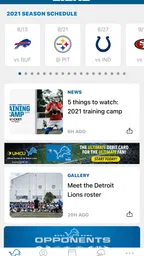
- The schedule helps fans keep track of upcoming games.
- Team videos add useful context beyond written coverage.
- Roster details make it simple to learn about players.
- The app offers a dedicated place for Lions content.
What could be better
- Some features may require a stable internet connection.
- Game-day content can be less useful during the off-season.
- Notifications may feel frequent if you follow every update.
- The experience may be less relevant to fans of other teams.
- Availability of live features can depend on your location.





