



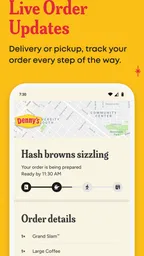


Denny's review
 Analysis by Appsdrops
I see the Denny’s app as a practical ordering tool for people who already know they want a Denny’s meal and would rather sort out the details on a phone than at a counter. It is free, made by Denny’s, Inc, and focused on ordering from the restaurant rather than browsing a broad collection of food options. That narrow purpose is both its main strength and its first limitation: it can make a familiar Denny’s visit more convenient, but it is not a substitute for a general delivery or restaurant-discovery app.
In everyday use, the best results come from treating it as part of a simple routine: decide what you want, check the order carefully, and use the app when it genuinely saves time. It is most useful when convenience matters more than comparing restaurants. If you are still deciding where to eat, a broader food app is likely a better starting point.
Ordering works best when you know your plan
The basic appeal is straightforward. Instead of working through an order in person, you can use your phone to place an order with Denny’s. I find that idea especially useful when I am picking up food on the way home, coordinating a meal with someone else, or trying to make a familiar stop less of a last-minute decision. The app is centered on that direct interaction with the chain, not on discovering nearby independent restaurants.
A useful first habit is to decide whether you are ordering for now or planning ahead before you start tapping through the menu. That small pause helps keep the order focused: choose the meal, review the selections, and make sure the finished order matches what you intended. It is an ordinary workflow, but it matters more in a restaurant-ordering app than in a menu you are only browsing. A rushed tap can turn a convenient order into an avoidable correction.
For a realistic example, imagine leaving work and wanting a Denny’s meal without spending the stop deciding what everyone wants. I would settle the group’s choices before opening the app, enter the order with those decisions in mind, then take a moment to review it before submitting. This is more dependable than using the ordering screen as a conversation prompt while several people change their minds. The app helps with the transaction; it cannot make a group agree on dinner.
That distinction also helps set expectations. The app’s purpose is ordering from Denny’s, so it makes sense for a regular customer or someone who has already chosen the restaurant. If your main concern is comparing menus, delivery arrangements, or restaurant options across a neighborhood, you may be better served by an app built around those alternatives. I would not install this expecting it to function as a general-purpose food guide.
Small checks that prevent avoidable friction
Before relying on any restaurant app for a time-sensitive meal, I recommend checking the order details on the final screen rather than assuming earlier selections carried through exactly as expected. Read the item names, review any choices you made, and confirm that the order is being placed the way you want. This is not a special trick; it is the kind of careful habit that prevents the most common ordering mistakes.
It is also worth distinguishing an app order from a promise about the whole visit. The phone can make placing an order more convenient, but the restaurant still determines how the in-person experience unfolds. I would leave room for that difference when planning a tightly timed stop, especially if you are picking up food between other commitments. The app is helpful for reducing ordering steps, not for controlling every part of a restaurant visit.
If you are new to Denny’s, I would browse before committing to an order rather than treating the first screen you see as a complete picture of what you want. Familiar customers can move more quickly because they already have a shortlist. That is the first repeatable pattern I would build: know the meal you are aiming for, use the app to place that specific order, and check it once before finishing.
Habits that make repeat orders feel quicker
The strongest shortcut is preparation, not a hidden setting. If you tend to order the same kind of meal, remember the items and choices that worked for you so you do not have to rethink the whole decision each time. I would keep that memory outside the app rather than assuming it offers a particular saved-order feature. A short note or a familiar personal routine can make the next visit smoother without relying on functionality that may not be available.
For households, it helps to collect everyone’s choices first and enter them in one pass. That avoids switching between the app and a family conversation after every item. It also makes the final review more useful: you can check the complete order against the people who asked for it, instead of trying to reconstruct who wanted what while placing it.
Another sensible habit is to use the app when the order is settled, not when you are still weighing several possibilities. A chain-specific ordering experience is naturally more efficient once the restaurant choice is made. If you are deciding between Denny’s and another place, compare those options before beginning the order. That keeps the app from becoming an extra detour and makes its focused design work in your favor.
The name is familiar enough that some people may expect the app to cover every part of a Denny’s visit. I would keep expectations practical: think of it primarily as a way to order, and check the screens available in your own version when you need to understand what the current experience supports. The app is on version 2.71.3, but that number alone does not tell you which individual options will suit your routine. A quick look through the current interface is more useful than assuming a feature exists because another restaurant app offers it.
What to check before making it part of your routine
The app is rated for Everyone and is free to install, which makes trying it a low-commitment way to see whether its ordering flow fits your habits. It has a 4.3 average from around 45,000 ratings, and it has passed one million installs. Those figures suggest that many people have given it a try, but they do not tell me whether it will be convenient for a particular restaurant visit. Your own test order is the better measure.
It was released on January 8, 2014, and the current version is 2.71.3. It requires Android 8.0 or later. If you have an older Android device, check compatibility in the app store before making plans around it. For someone using a compatible phone, I would still judge it by the everyday basics: can you find the meal you want, make your choices clearly, and review the order without confusion?
There are trade-offs in using a dedicated chain app. The benefit is a direct route to ordering from Denny’s, without the broader browsing and comparison that can make a general food app feel crowded. The downside is just as clear: it only helps with Denny’s. If your group regularly changes restaurants, or you want a single place to compare different eateries, a multi-restaurant alternative is more flexible. If the restaurant is already decided, the focused app is the more natural tool.
I would also avoid making the app the only part of a plan that depends on precise timing. A smooth ordering interface can reduce the work of placing an order, but it cannot remove the need to check the details or account for the restaurant visit itself. Use it as a convenience, leave a sensible margin in your schedule, and confirm that your order is right before moving on. That is a more reliable approach than expecting any phone app to make every step automatic.
Where the focused design reaches its limits
The most important limitation is scope. This is not a food-delivery marketplace in the broad sense; it is Denny’s own app for Denny’s ordering. That focus will feel efficient to people who are already customers, but it gives occasional visitors fewer reasons to keep it on their phone. If you only eat at Denny’s once in a while, ordering through the app may not be worthwhile unless the convenience suits that particular visit.
Another limitation is that a digital menu does not replace asking a restaurant directly when you need an answer that affects an important dietary or personal decision. I would not assume an app screen settles every question about preparation or ingredients. If something needs clarification, use a reliable direct channel with the restaurant rather than guessing from the order flow. That is a sensible boundary for any restaurant app, and it matters more than saving a few taps.
Likewise, I would not choose this app just because you prefer placing every kind of food order on your phone. Its value depends on wanting Denny’s specifically. For exploring a new area, weighing several restaurants, or coordinating a meal around options outside the chain, a general food app or direct contact with the restaurant may be better. The right choice is the one that matches the decision you are actually making.
Denny’s has about 6,000 reviews alongside its broader rating history. I treat that as a useful sign that the app has a substantial user base, not as a guarantee that every device or order will feel identical. App experiences can change, and a feature that matters to you should be checked in the current version before you build a routine around it. I prefer that cautious approach to assuming that popularity automatically means a perfect fit.
My verdict for regulars and occasional visitors
Denny’s is worth trying if you already choose the restaurant and want a more phone-centered way to place an order. It suits regular customers, commuters arranging a pickup, and families who can settle their choices before ordering. Its clearest advantage is focus: it is about getting a Denny’s order started, rather than helping you search the entire food scene.
I would skip it if your priority is comparing multiple restaurants, if you rarely visit Denny’s, or if you expect a dedicated app to answer every question about a meal and its preparation. In those situations, a broader service or direct conversation with the restaurant may be a better fit. The app does not need to be an all-purpose solution to be useful; it just needs to make a familiar order easier.
My recommendation is to try it on a low-pressure visit first. Choose your meal in advance, enter the order without rushing, and check the finished selections before submitting. If that routine saves you effort, keep using it when Denny’s is already your choice. If you find yourself opening it only to compare unrelated options, it is probably not the right tool for that job.
Overall, I see Denny’s as a practical companion to a specific restaurant habit, not a replacement for deciding where to eat. Used with a little preparation, it can make a familiar order feel more orderly. The best results come from knowing what you want, using the app for the task it is built around, and recognizing when another way of ordering would serve you better.
What we like
- Find nearby Denny’s locations and check their hours.
- Browse menu options before visiting a restaurant.
- Order select meals for pickup through the app.
- Join the rewards program to earn points on eligible purchases.
- Save favorite orders for quicker repeat ordering.
What could be better
- Pickup ordering may not be available at every location.
- Menu prices and availability can vary by restaurant.
- Some app features require creating an account.
- Rewards points may take time to appear after a purchase.
- The app offers limited usefulness when no Denny’s is nearby.





