


Dairy Queen® Food & Treats review
 Analysis by Appsdrops
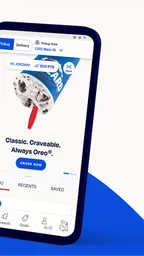
When I’m hungry for something familiar from Dairy Queen, the hardest part can be deciding what to order and how to make a quick stop feel worthwhile. Dairy Queen® Food & Treats is built around that everyday situation: it brings food deals, rewards, reordering and order-ahead options into one place. Rather than changing the way I think about the restaurant, it gives me a digital route from browsing to placing an order, with incentives that can make coming back more appealing.
From craving to a plan
The experience begins with a straightforward purpose. I open the app because I want to see what’s available, find a deal, or make it easier to repeat an order I already know I like. That focus makes the app approachable, especially for someone who does not want to spend time navigating a complicated food service tool. Its core promise is practical: exclusive food deals, rewards, fast reordering and order-ahead options.
That combination suits a range of familiar moments. I might be deciding on a treat, planning a meal, or trying to place an order before heading out. Deals can help guide the decision, while rewards give a visit an extra sense of progress. If I already have a go-to choice, reordering can reduce the amount of work between opening the app and getting to the part I care about: enjoying the food.
Dairy Queen® Food & Treats is a free food-and-drink app from International Dairy Queen®. It is rated for Everyone, and its appeal is easy to understand even if I have never used a restaurant app before. The app keeps its purpose close to the surface: help me explore an offer, earn rewards, and make ordering more convenient. That clarity is a strength because I can approach it with a specific goal instead of learning a broad set of unrelated tools.
There is also a useful distinction between browsing and ordering. Sometimes I want to see what might tempt me before committing; at other times, I already know what I want and just need a smoother way to place the order. Deals and rewards support the first kind of visit, while reordering and order-ahead support the second. The overall idea is to make the transition from “I could go for Dairy Queen” to a planned purchase feel less like a chore.
Following the order flow
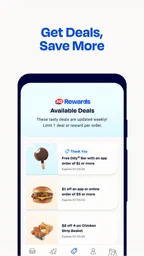
Once I have a reason to open the app, the natural next step is to look for an offer or decide what I want. The deals give me a reason to check in before ordering rather than treating the app as a simple digital menu. If I find something appealing, it can shape what I choose. If not, I can still use the app’s ordering conveniences when I have a familiar selection in mind.
The rewards element adds another layer to that decision. Instead of each visit feeling entirely separate, earning rewards gives me a reason to think about repeat use. I do not need to treat the app as a game or spend time chasing a complicated system; the appeal is more everyday than that. It connects ordering with a benefit that can make returning feel worthwhile, especially if Dairy Queen is already part of my routine.
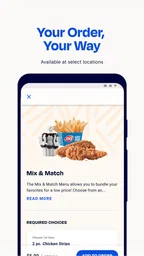
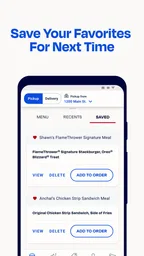
When I know what I want, fast reordering is one of the most immediately useful ideas in the app. Repeating a familiar order can save effort and avoid starting the decision process from scratch. That matters most when I’m in a hurry or simply want the same dependable choice again. The convenience is not just about tapping fewer times; it is about lowering the mental load of an order I have already settled on.
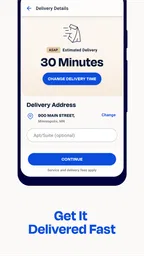
Order ahead addresses a different part of the same workflow. Instead of waiting until I arrive to begin the ordering process, I can use the app to place an order in advance. That can make planning a stop feel more deliberate and may help the visit fit into a busy day. The feature is most compelling when I already know where I’m headed and want to handle the ordering step before I get there.
In practice, the flow is easy to picture: I start with a craving or a plan, check for a deal, decide whether rewards or a familiar order are relevant, then use the ordering option that fits the moment. A first-time user may spend more time exploring, while a returning user can focus on speed. That flexibility gives the app a sensible role whether I am experimenting or sticking with a reliable favorite.
Where the handoffs happen
A restaurant app has to connect several small decisions, and Dairy Queen® Food & Treats is most useful when those handoffs feel natural. The first is from browsing to choosing: a deal may catch my attention, but I still need to decide whether it suits what I want. The next is from choosing to ordering. Reordering can make that handoff quick, while order ahead gives me a way to move from a decision to a plan without waiting until I’m at the restaurant.
Rewards create another handoff, this time between one visit and the next. They encourage me to see the app as something worth keeping around rather than opening only once. That ongoing connection is valuable when it remains simple: I want to understand why using the app is helpful without feeling as though I must constantly monitor it. The best version of this experience is one where the reward element complements the meal rather than distracting from it.
There is also a handoff from digital convenience to the real-world visit. Ordering ahead can prepare the order before I reach the restaurant, but the app is only one part of that journey. I still need to make the trip and complete the pickup or visit in person. That makes the app a useful bridge rather than a replacement for the restaurant experience. Its job is to help with planning and ordering; the food and the visit remain the payoff.
This division of work feels sensible. I can use the app when it makes a particular step easier, without needing to turn every visit into a fully digital routine. A quick check for deals may be enough on one occasion. Another time, I might lean on a repeat order or order ahead. That pick-and-choose quality is important because convenience apps work best when they adapt to the user’s immediate need.
What the experience delivers
The result is a practical companion for people who already enjoy Dairy Queen or expect to visit. The app is not trying to make a restaurant stop feel elaborate. Instead, it concentrates on the useful details around the purchase: finding food deals, earning rewards, repeating an order, and arranging an order ahead of time. Those functions reinforce one another, giving the app a clearer purpose than a tool that merely advertises a brand.
I especially like the balance between discovery and routine. Deals give me a reason to browse, while reordering makes it easier to skip browsing when I know exactly what I want. Rewards add a reason to return, and order ahead can help the visit fit around the rest of my day. Each feature meets a different point in the customer journey, so the app can still be relevant after the first download.
Its scale also suggests that it has reached a broad audience: Dairy Queen® Food & Treats has more than 10 million installs and an average rating of 4.0 from around 71,000 ratings. Those figures do not tell me whether every individual order will feel effortless, but they do place the app among established options for customers looking to interact with the brand digitally. It has been available since May 22, 2018, and its current version is 5.6.0.
For a regular customer, the strongest payoff is likely to come from repeated use. An occasional visitor may value a deal or the ability to plan an order, while someone who returns often may appreciate having rewards and familiar choices in the same app. That makes the experience feel more useful over time than it would if it were only a one-off ordering shortcut.
The app’s straightforward focus is also a good fit for mobile use. Food decisions are often made quickly, and I do not want to spend more time managing the ordering process than thinking about the meal. A tool centered on a few recognizable tasks can be easier to return to than one that tries to do everything. Here, the main benefits are easy to describe and closely tied to a real restaurant visit.
When the flow can lose momentum
The same focused design also means the app’s usefulness depends on what I need at a given moment. If I am not looking for a Dairy Queen visit, its deals and rewards are less relevant to me. The experience is intentionally tied to the brand, so it works best for customers who already have a reason to consider its food or treats. It is not a general-purpose food discovery app, and I would not expect it to replace one.
There can also be a gap between planning an order and completing the in-person visit. Order ahead helps with the digital part, but I still have to coordinate the stop itself. If my plans change or I am not ready to decide, placing an order in advance may not suit the moment. In that situation, the app’s value comes more from browsing deals or returning to it later than from pushing me through an order immediately.
Rewards can be motivating, but they are most satisfying when I understand how they fit into my normal visits. If I open the app only occasionally, that part of the experience may feel less central than a deal or a quick reorder. Conversely, regular customers may find the reward loop more compelling because it gives repeat visits an extra benefit. The app’s different tools therefore have different value depending on personal habits, not just the feature list.
Another possible friction point is choice. A deal can be enticing, but I still need to decide whether it is what I want; a saved or repeated order is convenient, but only when I have already found a favorite. The app can shorten the route to a decision, yet it cannot make the decision for me. That is a normal limitation of restaurant apps, and it is worth keeping in mind if I expect every visit to become completely effortless.
Even with those qualifications, the app has a clear role. I would use it when I want to check for an offer, keep rewards connected to a visit, repeat a familiar order, or place something ahead of time. Those are concrete reasons to open it, rather than vague promises of convenience. Its best moments are the ones where it removes a small obstacle from a plan I already want to make.
A worthwhile companion for Dairy Queen regulars
Overall, Dairy Queen® Food & Treats is a focused app that connects the parts of a restaurant visit customers often want to handle on their phones. It supports discovery through food deals, encourages repeat visits with rewards, and makes familiar orders or advance planning more convenient. I find the approach easy to understand: start with what sounds good, choose the ordering path that fits, and let the app handle some of the preparation.
It is most compelling for people who expect to visit Dairy Queen more than once and want a simple reason to keep the brand close at hand. Someone who visits rarely may still appreciate an offer or order-ahead option, but regular customers are more likely to get consistent value from the combination of rewards and reordering. The app’s free price also makes it easy to try without treating the download as a major commitment.
My overall impression is positive because the features support a complete, recognizable journey from craving to order and then to the next visit. The app does not remove every real-world step, and its value naturally depends on whether Dairy Queen fits my plans. But when it does, having deals, rewards and ordering convenience together makes the experience feel more organized. For customers who want a smoother way to interact with the chain, it is a practical addition to the routine.
What we like
- Order food and treats ahead for pickup.
- Earn rewards through the app’s DQ Rewards program.
- Save favorite orders for quicker repeat purchases.
- Find nearby Dairy Queen locations with the store locator.
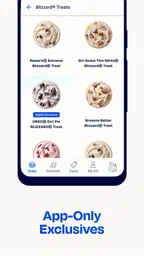
- Get access to app-exclusive deals and offers.
What could be better
- Mobile ordering is available only at participating locations.
- Menu options and prices may vary by restaurant.
- Some orders may require payment at the store.
- Reward availability and terms can vary by offer.
- The app’s usefulness depends on nearby Dairy Queen locations.





