



Cracker Barrel review
 Analysis by Appsdrops
Cracker Barrel’s app is meant to make the restaurant experience more rewarding, but a useful app still has to work smoothly when you want to get something done. I’d judge it less by a catchy promise and more by how clearly it guides you through opening it, finding what you need, and recovering when a screen or connection gets in the way. For people who already enjoy Cracker Barrel, it is a convenient place to start; for anyone trying it for the first time, a little patience with setup can make the experience easier.
Getting started and finding your way around
The Cracker Barrel app is a free Food & Drink app from Cracker Barrel CBOCS. Its store description sums up the goal as offering a more rewarding experience with the brand. That makes it most relevant to diners who want to use a mobile app as part of their restaurant routine, rather than people looking for a general food discovery or cooking tool.
On first launch, take a moment to let the app finish loading before tapping around. If you move quickly between screens while a connection is slow, it can be hard to tell whether a selection registered or the app is still working. I find it helpful to make one choice at a time and give the screen a moment to respond. That small habit can prevent repeated taps and the confusion that follows when a page changes unexpectedly.
If something seems missing, first check that you are looking in the part of the app that matches what you are trying to do. App navigation can feel less obvious when you arrive with a specific task in mind, so returning to the main screen and starting again is often simpler than tapping through several uncertain routes. Look for clear labels and prompts, and avoid assuming that a button will do something different from what its wording suggests.
The easiest way to avoid setup friction is to slow down, follow the on-screen prompts, and confirm that each screen has finished responding before continuing. That advice is basic, but it applies to plenty of restaurant apps: a rushed start can make an otherwise straightforward visit feel more complicated than it needs to be.
When a screen or action seems stuck
If a page appears frozen, wait briefly before trying the same action again. Repeatedly tapping a button can create uncertainty about which request the app received, especially when the connection is taking time. If the screen still does not change, return to the previous screen if that option is available, then try the action once more. A calm retry is usually more useful than starting over immediately.
It also helps to separate a navigation problem from a loading problem. A screen that opens but shows incomplete content may simply need more time or a steadier connection. A screen that never responds to taps may call for closing and reopening the app. These are general steps rather than a guarantee, but they provide a sensible first pass before you assume there is a bigger issue.
Simple setup checks before a visit
Before relying on the app while you are out, open it at home or somewhere with a dependable connection. Confirm that it launches and that you can move through its visible screens. Doing this ahead of time gives you a chance to notice a sign-in prompt, an update request, or a connection issue without the added pressure of being at the restaurant and trying to act quickly.
Keep your device’s operating system in mind as well. The current version listed for the app is 10.0.7.1509, and the minimum operating system is version 12. If the app will not install or update, check the device’s software version and the app store’s update screen before repeatedly attempting the same download. An older device may need a system update, while a pending app update may be the more straightforward fix.
When an update is available, use the app store to install it and then reopen the app. If an installation appears to stall, check that the device has a working internet connection and enough general room to complete downloads. Those are standard device checks, not special requirements unique to this app, but they can explain why an installation does not finish when expected.
Recovering your workflow
When the app interrupts a task, try to resume from the last screen you can identify rather than repeating every earlier step. Read any message displayed on screen, follow its directions, and give the next page time to load. If you are unsure whether an action completed, check the app’s current screen before submitting it again. This is a useful way to avoid duplicate attempts and keep the process understandable.
If the app closes unexpectedly, reopen it and see whether it returns to a usable screen. If it does not, close it fully and launch it again. Restarting the device can be a reasonable next step if several apps are also behaving poorly. Keep troubleshooting proportional: one app issue does not automatically mean the whole phone needs a reset or that you should remove the app.
For a login or account-related obstacle, use the prompts presented inside the app and carefully check the information you enter. A mistyped detail can look like a technical failure, so it is worth reviewing the entry before trying again. If the screen provides a recovery route, follow that route rather than guessing at a workaround. Keeping the process within the app’s own instructions is the clearest option.
When the app may not be the cause
Sometimes the problem is outside the app itself. A weak or changing internet connection can interrupt loading, and device settings or an outdated operating system can affect whether an app installs or behaves as expected. If other apps are slow too, the connection or device is a sensible place to start. If only this app is affected, restarting it and checking for an update are reasonable next steps.
It can also help to try again later if a temporary service interruption seems possible. Avoid making several changes at once, such as adjusting device settings, reinstalling the app, and changing account details all in one go. When the issue improves, you will then have a better idea of what helped. If it continues, use the support option available through the app store or the app’s own help resources.
Be cautious about advice from unofficial sources that asks you to share account details or install unfamiliar software. For routine troubleshooting, stick with your device settings, the app store, and the guidance shown in the app. That keeps the process practical without adding unnecessary risk.
Who may find it worthwhile
The app has an average rating of 4.5 from around 22,000 ratings, and it has more than one million installs. Those figures suggest that many people have tried it, though they cannot tell you whether its particular workflow will suit your habits. I would treat them as background context, then decide based on whether you regularly visit Cracker Barrel and prefer handling restaurant-related tasks on your phone.
It is rated for everyone and was released on August 27, 2018. The review count stands at around 4,000, and the app is free to install. Those details make it easy to give a try if you already have a reason to use it, while the minimum operating system requirement is worth checking first if you have an older device.
The main appeal is straightforward: having a restaurant’s app ready when you want to engage with that brand. The experience is likely to feel most useful to people who already know what they want from a Cracker Barrel visit. If you rarely go there, installing another app may not add much to your routine. Either way, it makes sense to explore it without assuming that a mobile app will replace every part of an in-person experience.
My practical verdict
Overall, Cracker Barrel is a reasonable choice for regular customers who want the brand’s app close at hand. I would install it ahead of a visit, check that it opens properly, and take a moment to understand the prompts rather than waiting until I am in a hurry. That simple preparation addresses most everyday friction without overcomplicating the process.
If a task fails, work through the basics in order: check the connection, wait for the screen, retry once, and reopen the app if needed. Then confirm that the device’s operating system and app version are up to date. These steps cannot solve every possible issue, but they are sensible first moves and help distinguish a temporary loading problem from a broader device or connection problem.
My take is that the app is worth trying if Cracker Barrel is already part of your routine. It is free, widely installed, and has a strong average rating, but the best measure is whether it makes your own visits easier. Give it a quick test before you depend on it, keep expectations practical, and use the app’s prompts as your guide. For the right customer, that is enough to make it a useful companion rather than another app that sits untouched on a phone.
What we like
- The menu includes familiar Southern comfort food.
- The store offers gifts and branded merchandise.
- Family-friendly dining makes it suitable for group visits.
- Seasonal menu items add variety throughout the year.
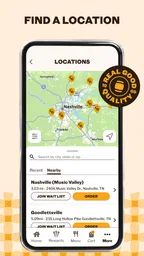
- The app can help locate nearby Cracker Barrel restaurants.
What could be better
- Menu prices may feel high for casual dining.
- Some dishes can be heavy in calories and sodium.
- Restaurant hours and services vary by location.
- Popular times may bring longer waits for a table.
- The app's usefulness depends on local restaurant participation.





