Compass app - Accurate Compass review
 Analysis by Appsdrops
I tend to think of a compass as a tool that should stay out of the way: open it, get a sense of direction, and get on with the walk. Compass app - Accurate Compass is aimed at that simple job, making it a lightweight option in the Maps & Navigation category rather than a replacement for a full map or route planner. Its appeal is easy to understand, but a compass is only useful when you know what its reading can—and cannot—tell you.
What this compass is useful for
The app is a free compass tool from the developer Photo and video apps. It has an average rating of 3.3 from around a thousand ratings, with more than a million installs and about seventy written reviews. Those figures suggest that plenty of people have tried it, while the middling score is a useful reminder to approach it as a basic direction aid rather than a polished navigation suite. It is rated for Everyone.
In practical terms, I’d reach for a compass when I already know where I want to go but need to orient myself. On a neighborhood walk, for example, I might use a street map to find a park, then check the compass to see which way to head when several paths look similar. That division of labor matters: a compass can help with orientation, but it does not by itself explain which street is safe, whether a trail is open, or how far away a destination is.
The app’s version is 1.0.8, and it runs on Android 6.0 or later. That broad minimum makes it relevant to people using older Android phones, though a compatible operating system alone does not guarantee that every phone will deliver an equally dependable compass reading. The phone’s own sensors and the way it is held can affect the experience.
Connectivity matters most before and around the reading
A compass reading is not the same thing as a route downloaded from a map service. In everyday use, I would treat this app as a direction reference and keep a separate map available when I need street names, trail details, or a route. That distinction is especially useful when planning a trip: check the map and destination beforehand, then use the compass to orient yourself on the ground.
Network conditions can shape the larger navigation task even when the immediate question is simply “which way is north?” If I’m heading into an unfamiliar area, I prefer to prepare the route while I have a reliable connection instead of assuming that a compass will fill in missing map information later. A compass can help me hold a direction, but it cannot substitute for a map’s context or tell me whether a chosen direction leads to a road, a private path, or a dead end.
For that reason, my useful routine is to decide on a destination first, use a map to understand the surroundings, and then consult the compass only when orientation becomes confusing. It reduces the temptation to stare at a direction indicator while walking and makes connectivity less central to the moment-to-moment task. If a trip depends on detailed guidance, I would choose a navigation app with explicit route and map tools rather than relying on this compass alone.
How it fits into real mobile situations
On a short walk in a familiar area, the app makes the most sense as a quick check. I might pause at a junction, orient myself, and put the phone away again. That is a better use than continuously holding the screen up: it keeps attention on traffic, uneven pavement, and other people, while limiting needless screen time.
It can also help when a building or a row of trees makes it hard to judge direction by sight. I would still verify the result against a known landmark, such as the direction of a main road or the sun’s position when that is clear. A compass gives a directional reference, not proof that the surrounding environment is understood. This small habit can prevent a quick check from becoming false confidence.
There are situations where I would skip it. If I need spoken turn-by-turn directions, live traffic, a chosen walking route, or detailed trail information, a full navigation app is the more suitable tool. If I’m navigating somewhere safety-critical, I would not make a phone compass my only reference. A dedicated compass or dependable map-and-navigation setup is a better choice when the cost of a wrong turn is high.
The comparison with a phone’s built-in map app is straightforward: maps offer context and destination planning, while a standalone compass focuses on orientation. The map is usually better for deciding where to go; the compass is more convenient for checking the direction you are facing. I find the pair more useful than either tool alone, provided I don’t mistake one for the other.
When a reading seems wrong, reset your approach
One common source of frustration with phone compasses is expecting a stable answer while moving the device quickly or holding it close to other objects. If the direction seems inconsistent, I would stop, hold the phone steadily, and compare the indicated direction with a known reference before acting on it. This is a practical check, not a guarantee: a phone’s sensors can be affected by the environment and the device’s condition.
I also recommend avoiding snap decisions based on a single glance. At an unfamiliar junction, check the direction, look for a landmark that supports it, and then consult a map if the choice still matters. If the reading continues to feel implausible, use another navigation method rather than repeatedly turning in place and hoping the display settles. The value of a compass is limited when the user has no way to cross-check it.
This is where expectations matter. The app’s name makes accuracy central to its pitch, but the real-world result still depends on the phone and how it is used. I would not interpret a confident-looking display as a promise of survey-grade precision. For a casual walk, a directional estimate may be enough; for surveying, precise alignment, or a consequential outdoor route, use equipment and navigation practices built for that purpose.
Using it without wasting attention or data
For a simple compass task, I would avoid opening several navigation tools at once or leaving a map actively refreshing in the background. Prepare what you need before setting off, then use the compass for brief checks. This is a sensible way to reduce battery and data use across a phone’s navigation setup, though the app’s own network behavior is not something I would assume from its basic role.
If you are trying to keep mobile data low, the safest approach is to separate preparation from orientation. Look up the route when you have a connection, save or otherwise make available the map information you need using a map app that supports that workflow, and then use the compass as a limited reference. Do not assume that installing a compass also gives you maps, route downloads, or navigation without a connection.
For privacy-conscious use, I would grant only the access that the phone or app actually requests and that I understand. A compass’s purpose does not require me to share a destination with someone else, so I would not enter or transmit location details casually. At the same time, I would judge any access request on the screen rather than guessing what the app collects; the useful lesson is to review prompts carefully, not to infer a policy from the app’s category.
Who should choose it—and who should use something else
I’d recommend trying Compass app - Accurate Compass if you want a straightforward directional aid on an Android phone and already have another way to handle maps and routes. It is a reasonable fit for casual orientation, familiar outdoor walks, or checking a heading during a trip. Its free price makes experimenting easy, and its Everyone rating makes the intended audience broad.
I would look elsewhere if your main need is a complete navigation experience. People who rely on turn-by-turn instructions, offline route preparation, detailed trail data, or a clear destination search should start with a map or navigation app that explicitly provides those tools. Likewise, anyone who needs high confidence in a demanding setting should carry a more appropriate backup rather than treating a phone compass as a standalone safety device.
The rating gives me pause, but not enough to dismiss the app outright. A 3.3 average points to a mixed experience, and a compass can feel unreliable when a phone’s sensor reading or the user’s expectations do not line up. I would test it in a familiar place before depending on it on an unfamiliar outing. That low-stakes check is more useful than assuming that the app will behave identically on every device.
My connectivity verdict
My view is that this is best treated as one small part of a navigation setup, not the setup itself. Connectivity is most important when gathering route context and map information; the compass’s role is narrower, helping you orient once you are already making sense of your surroundings. Plan with a map, use the compass briefly, and cross-check a doubtful reading instead of pressing ahead.
For an everyday walk, that can be enough. For an unfamiliar route, a changing network connection should prompt preparation rather than confidence that a compass will replace missing guidance. If you want a simple direction check and are comfortable supplying your own context, Compass app - Accurate Compass is worth a cautious try. If you want one app to plan, map, and guide the entire journey, I’d choose a fuller navigation tool instead.
What we like
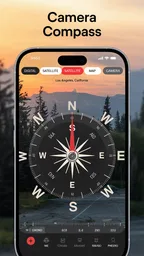
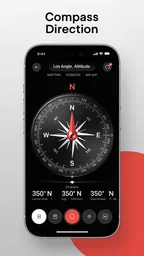
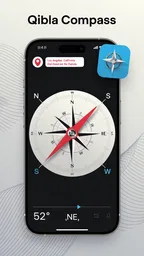
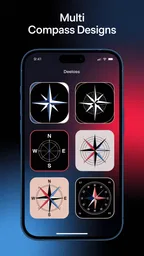
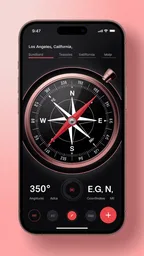
- Provides a clear compass display that is easy to read at a glance.
- Shows direction changes smoothly as you turn your device.
- Useful for quick orientation during walks and outdoor activities.
- Simple controls make it accessible to first-time users.
- Compact design keeps the main compass information prominent.
What could be better
- Compass accuracy can be affected by nearby metal or electronics.
- The app needs location access for some features.
- The device may need calibration before readings become reliable.
- It depends on a phone with a built-in magnetic sensor.
- Readings may fluctuate when the phone is held at an angle.





