
Command review
 Analysis by Appsdrops
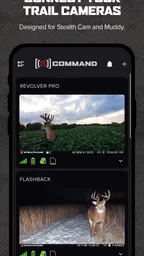
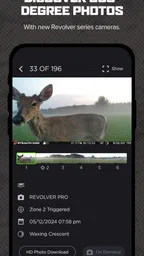
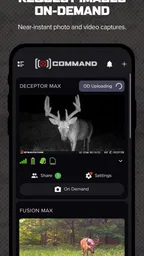
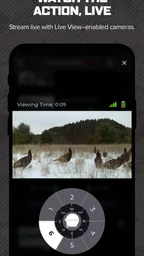
When I use a cellular trail camera, the real test is not how impressive its feature list sounds; it is whether I can manage the camera without making another trip into the woods. Command is built for that practical job: it lets owners manage compatible Stealth Cam and Muddy cellular trail cameras from a phone. I see it as field equipment in app form, rather than a general-purpose wildlife camera tool.
Building a dependable camera-checking routine
The most useful way to approach Command is to treat it as the remote end of a camera workflow. The app matters when a camera is already deployed and you want to handle routine management from elsewhere. Instead of walking out simply to check or adjust the setup, you can use the app to stay connected to the cameras it supports. That convenience is especially meaningful when the location is distant, access is inconvenient, or a visit would disturb the area.
On a normal week, I would make the app part of a small, repeatable check: open it, review the cameras I manage, deal with any available updates or controls, then close it. The advantage is less about staring at a phone all day and more about making each check deliberate. A short routine is easier to remember than a string of casual checks, and it helps me notice when a camera needs attention before I plan a trip around it.
There is an important boundary here: Command is not a universal remote for every trail camera. Its purpose is tied to compatible Stealth Cam and Muddy cellular models. Before relying on it for a property or a multi-camera setup, I would confirm that the particular camera is supported and ready to work with the app. If your equipment belongs to another brand, a general wildlife camera app or that manufacturer’s own tool is the more sensible starting point.
This focused approach is also what makes the app appealing to the right audience. Hunters, land managers, and wildlife observers who already use those camera lines have a clear reason to keep it close at hand. Someone who only wants to browse animal photos, with no compatible camera to manage, may find little reason to install it. Command is most useful as a companion to equipment, not as a standalone photo destination.
Set the expectations before heading out
Cellular camera management is convenient, but it does not make a remote camera immune to the realities of its location. A phone app can only help when the camera and its connection are functioning well enough for remote management. If a camera is in a poor coverage area or has another on-site issue, the app cannot substitute for physically inspecting the equipment. I would plan remote checks as a way to reduce unnecessary visits, not as a promise that every problem can be fixed from home.
That distinction changes how I would use it during a busy season. If a camera is placed somewhere important, I would establish a baseline while I am on site: make sure the installation is sound, note how the camera is positioned, and verify that it is ready for its intended job. Then the app can help with ongoing management, while a planned field visit remains the backup for anything that requires hands-on attention.
Settings to review before trusting a camera
My first recommendation is to check the camera’s own configuration before treating the app as a shortcut around setup. Think through the purpose of each location: a trail crossing, feeder area, or boundary point may call for a different approach. The app is part of managing the compatible camera, but good placement and a clear plan still start with the camera itself. Remote access cannot correct a camera aimed at the wrong patch of ground.
I would also make the first remote session a test rather than waiting for a critical moment. Confirm that the camera appears as expected and that the controls you intend to use are available for your device. This is a simple but easy-to-miss habit: a quick check while you are still near the camera can prevent a long drive later to discover that the setup was not ready. It is not an advanced trick; it is the kind of small rehearsal that makes remote tools dependable.
Another worthwhile habit is to keep camera identities and locations clear in your own routine. When you manage more than one unit, a mental note such as “north boundary” or “creek crossing” is more useful than remembering a device only by its hardware. I would keep a concise record outside the app if the installation is complicated, especially where cameras are close together or serve different purposes. That avoids changing the wrong setup during a quick check.
Command is free, and GSM Outdoors is the developer. It has an average rating of 4.6 from around 33,000 ratings, alongside roughly 5,300 written reviews and over 500,000 installs. Those figures suggest that it has found a substantial audience among people who need this specific kind of camera management, though popularity alone does not guarantee a smooth experience with every phone or camera configuration.
Faster habits for repeat users
Once the basics are in place, I would avoid opening the app every time curiosity strikes. A scheduled check-in is more useful than repeatedly looking for changes that may not require action. For example, before a weekend on a property, I would review the cameras I care about, note anything that needs attention, and decide whether a physical visit is worthwhile. That turns the app into a planning tool rather than a distraction.
For a property with several camera locations, I would group checks by purpose. First review the cameras that protect access points or monitor a specific route; then look at units used for broader wildlife observation. This is a personal workflow, not a feature I assume the app provides. Its value is that remote management makes it practical to carry out the same review from one place, rather than checking each camera only when I happen to visit its location.
I would also separate “camera is reachable” from “camera is doing the job I want.” A connection check may reassure me that remote management is possible, but it does not tell me whether the camera’s placement is producing useful results. If a location repeatedly disappoints, I would use a planned visit to reconsider the angle or position rather than hoping that app checks alone will solve it. That distinction saves time and keeps expectations realistic.
For a shared property, I would agree on a simple communication habit before multiple people begin managing equipment. Decide who is responsible for routine checks and who will make a field visit if something needs physical attention. This is not a claim about a special collaboration feature; it is a practical way to avoid duplicate trips or uncertainty about who last handled a camera. The more remote equipment you manage, the more valuable a consistent human routine becomes.
Where the convenience reaches its limits
The main trade-off is that Command is tied to compatible hardware. If you are choosing a camera system from scratch, it makes more sense to compare the camera, its cellular suitability, and the management experience together than to judge this app in isolation. Someone who already owns a different brand will usually be better served by that brand’s tools than by installing Command and hoping it can take over.
It is also not the right choice if your goal is simply to explore wildlife photography without maintaining a cellular trail camera. A photo library or general camera app would be a better fit for that purpose. Command’s value depends on having compatible equipment in the field and a reason to manage it remotely. Without that, its narrow focus is a limitation rather than an advantage.
Even for the intended audience, I would not rely on remote access as the only maintenance plan. Batteries, mounting, vegetation, weather, and site conditions are physical concerns; an app cannot inspect a strap or clear a branch from the lens. Experienced users get the best result by combining remote checks with occasional on-site upkeep. That is less glamorous than expecting the phone to handle everything, but it is the more dependable way to run a camera setup.
The app is rated for Everyone, was released on May 20, 2020, and its current version is 6.6.7. It requires Android 9 or later. Those details make it straightforward to assess whether an Android device meets the stated minimum, while the app’s practical usefulness still depends on the camera system you own and the conditions where it operates.
A focused tool for people who already have the right cameras
In my view, Command earns its place when it saves a real journey or makes routine checks easier for owners of Stealth Cam and Muddy cellular cameras. The best results come from pairing it with careful setup: test the camera while you are on site, give each location a clear role, check the system on a repeatable schedule, and treat field maintenance as the fallback for physical problems. Those habits make a focused app more valuable than constant phone checking ever could.
I would recommend Command to someone already using supported cameras who wants to manage them from a phone and is comfortable keeping an eye on both the app and the equipment in the field. I would skip it if I owned another camera brand, had no cellular trail camera, or expected remote management to replace proper installation and maintenance. For its intended users, the appeal is simple and practical: fewer unnecessary visits, a clearer routine, and a more manageable way to stay connected to cameras placed out of reach.
What we like
- Supports keyboard shortcuts for faster navigation.
- Lets users customize the interface to suit their workflow.
- Includes tools for managing files and folders.
- Search features help locate items quickly.
- Offers useful controls for advanced users.
What could be better
- The interface may feel overwhelming to newcomers.
- Some features can take time to learn.
- A small screen can make controls harder to use.
- Advanced options may require extra setup.
- Performance may vary across devices.





