

CollX: Sports Card Scanner review
 Analysis by Appsdrops
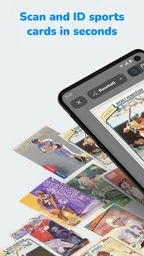
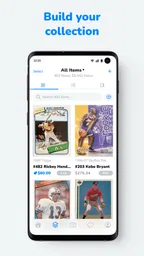
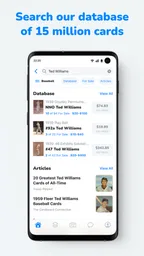
I see CollX as a useful tool for collectors who want to identify and keep tabs on sports cards without turning every sorting session into a manual research project. Its central appeal is straightforward: use a phone camera to help recognize a card, then manage its place in your collection or consider buying and selling with other users. In practice, though, a scanner is a starting point rather than a substitute for checking the card in your hand. The best results come when I treat the app as a quick assistant and verify anything important before making a decision.
Where scanning can get frustrating
Card scanning is most appealing when a collection is large or unfamiliar, but it is also where expectations need to be realistic. A camera can only interpret what it can see. Glare, shadows, a sleeve, a tilted card, or a busy background can make identification less straightforward, especially when the printed details are small. I would begin with a clean, well-lit surface and hold the card steady rather than repeatedly moving it around in search of an instant match.
When a result looks wrong, I would not immediately assume the card is rare or that its value has changed. First compare the visible player, team, season, and design with the physical card. Similar-looking releases can be easy to confuse, and a near match is not necessarily the exact version in your hand. This careful check matters most for cards with variations, special finishes, or condition issues, because a general identification does not by itself settle those details.
The practical rule I use is to trust a scan as a lead, not as a final appraisal. If the app shows a price or a possible listing, I would still inspect the card’s condition and compare it with relevant examples before buying, selling, or assigning a value to a collection. A scanner can save time finding a starting point; it cannot make a worn corner disappear or guarantee that two cards in different condition should be priced alike.
It also helps to separate “I want to catalog this” from “I need an exact selling price.” The first task can tolerate a little cleanup later. The second deserves more careful checking. If an identification is uncertain, leaving it aside and returning to it with better light is often quicker than forcing a questionable entry into a collection and having to untangle it later.
Simple setup checks before a long session
Before scanning a stack, I would test a few cards that are easy to recognize. This gives a quick sense of how the camera is handling the room’s lighting and the way the cards are presented. Use a flat surface, avoid strong reflections, and keep other cards out of the camera’s immediate view. If a card is in a reflective sleeve, changing the angle slightly can reduce glare; if that does not help, removing it from the sleeve may make the printed face easier to read, provided the card can be handled safely.
It is also worth checking that the phone’s camera is clean and that the app is current. CollX is developed by CollX, and its current version is 4.1.5. The minimum operating-system requirement is 7.0, so an older device may be able to install it but still offer a less comfortable scanning experience than a newer phone. I would avoid beginning a large cataloging session until one or two test scans behave as expected.
For a new user, the most useful setup decision is choosing a consistent way to sort cards before entering them. I might work by sport, then by player or set, rather than scanning a mixed shoebox at random. That makes it easier to notice a misidentified card and reduces the chance that I will lose track of which physical cards have already been recorded. It is a simple habit, but it turns a one-off scan into a collection workflow I can maintain.
Readers often ask whether they need to know card terminology before using a scanner. I do not think specialist knowledge is necessary to begin, but it helps to recognize that the same player may appear on many different cards. When a result is ambiguous, knowing the season, set, or distinctive design can help you check it. A beginner can still get value from the app, as long as they are willing to confirm uncertain matches instead of accepting the first one automatically.
Recovering when a scan or entry goes off track
If a scan fails, I would make one change at a time: improve the light, flatten the card, reduce glare, or move other objects away. Repeating the same attempt under the same conditions is unlikely to solve a visibility problem. If the app recognizes the wrong card, compare the result with the card itself and try again with a clearer view. For cards that remain difficult to identify, it may be more efficient to set them aside and return later than to build a collection record around a guess.
For cataloging, a useful recovery habit is to keep the physical cards in the same order as the group you are processing. If you stop halfway through, you can resume without scanning the same pile repeatedly. I would also review a small batch before moving on to the next one. That catches errors while the cards are still in front of you, rather than leaving a long list of uncertain records to sort out later.
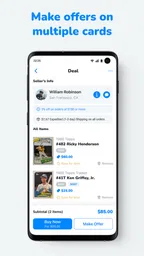
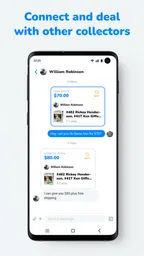
When using the marketplace side, I would treat the scan, the collection record, and a potential transaction as related but separate decisions. An identified card is not automatically a ready-to-sell listing, and a displayed price should not be treated as a promise of what another collector will pay. Check the exact card and its condition, then make sure any description you provide matches what you are offering. This protects both the seller and the person considering a purchase.
If the app seems stuck or a result looks inconsistent, basic steps are sensible: close and reopen it, check that the device has a stable connection when using online functions, and try again with a different card. If only one particular card causes trouble, the card’s visibility or identification may be the issue rather than the whole app. If many unrelated actions fail, checking for an update or restarting the phone is a reasonable next step before assuming the collection itself has been lost.
When the app may not be the cause
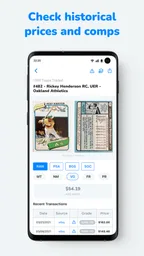
Not every disappointing price points to a scanning error. Sports-card values can depend on factors that are hard to capture in a quick phone interaction, including condition, demand, and how closely a comparison matches the exact card. A broad estimate is useful for orientation, but it should not replace a closer look when the amount matters. For a high-value sale, I would seek more than one relevant comparison and be precise about the card’s condition.
Likewise, a card that does not scan cleanly is not necessarily unsupported or defective. A worn surface, unusual reflection, partial obstruction, or small printed detail can make recognition harder. Try the physical adjustments first. If the card still cannot be matched confidently, manual research through a specialist community or a more focused card database may be a better choice for that one item.
It is also worth being clear about what kind of collector you are. If you mainly want a personal inventory, scanning and tracking can reduce the work of remembering what you own. If you mainly want to trade in person, a digital catalog can help you prepare, but you will still need to inspect the actual cards and agree on a fair exchange. And if your goal is a formal insurance inventory or a precise valuation, I would not rely on a quick scan alone; careful documentation and independent appraisal may be more appropriate.
How it fits beside other collecting tools
Compared with a spreadsheet, CollX is more convenient for turning a card in your hand into a searchable collection entry, particularly when you do not want to type every detail from scratch. A spreadsheet, on the other hand, gives you more control over custom fields and personal notes. I would choose the app when speed and a collector-oriented marketplace matter, and a spreadsheet when I need a highly tailored record or want to work entirely in my own format.
Compared with browsing listings manually, the scanner offers a quicker route from a physical card to an identification and price reference. Manual searching can be more dependable when I already know the exact set or need to compare condition carefully. These approaches work well together: scan to narrow down what you are looking at, then research further before committing to a purchase or sale. CollX is most useful as a bridge between the card box and the broader collecting market, not as a replacement for judgment.
The app is free to download, with in-app purchases ranging from $6.99 to $249.99 per item. I would start with the free experience and decide whether the parts I actually use justify any purchase, rather than paying on the assumption that every collector needs extra options. It is rated for Everyone, and its 4.6 average from around 19,000 ratings, alongside more than 1 million installs, suggests that it has attracted a substantial audience. Those figures are reassuring context, but they do not guarantee that every scan will match every collection.
Who I would recommend it to
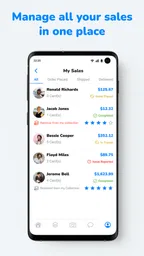
I would recommend CollX to collectors who regularly sort, trade, or sell sports cards and want a faster way to identify and organize what they own. It is especially handy for a realistic weekend task: pulling a box from a closet, scanning a manageable batch, checking questionable matches, and making a shortlist of cards to research or offer to other collectors. The app’s combination of scanning, collection tracking, and buying and selling makes it more useful than a camera-only lookup when those tasks are part of the same hobby.
I would be less enthusiastic about it for someone who owns only a few cards and rarely checks them, or for a collector who expects a camera to deliver a guaranteed sale price without any follow-up. It is also not the best fit if you need a meticulous, custom-built archive or if you prefer not to use a marketplace at all. In those cases, a personal spreadsheet or a specialist reference source may suit the job better, with CollX still available as an occasional identification aid.
My overall view is positive, with one important condition: use it as a practical collecting companion, not an authority that settles every detail. The app makes the most sense when I scan thoughtfully, review results in batches, and confirm condition and pricing before acting. If you collect enough cards for organization to become a chore, CollX can make that work feel more manageable while leaving the final calls where they belong—with the person holding the card.
What we like
- Quickly identifies many sports cards from a phone camera.
- Organizes scanned cards into a digital collection.
- Shows estimated values for supported cards.
- Makes it easy to browse other collectors’ listings.
- Supports baseball basketball football and hockey cards.
What could be better
- Recognition can struggle with worn or poorly lit cards.
- Some card values may be outdated or incomplete.
- The catalog may not cover every card or variation.
- Selling features may depend on location and account setup.
- A reliable internet connection is needed for many features.





