
Chipotle review
 Analysis by Appsdrops
When I want Chipotle, the useful question is often not whether I like the food but how to make ordering fit the rest of my day. The Chipotle app is built around that practical moment: it lets me arrange a restaurant order for pickup or delivery rather than treating the phone as a substitute for the meal itself. I find it most appealing when I already know what I want and would rather handle the order before I arrive.
It is a free Food & Drink app from Chipotle Mexican Grill, and it has a 4.7 average from around 572,000 ratings. Those figures suggest that many customers find it useful, but they do not guarantee that every location, order, or delivery experience will suit you. My take is simpler: it makes the most sense for people who choose Chipotle often enough to benefit from placing an order directly, and less sense if you are mainly looking for a broad restaurant directory.
What the free app is—and what that does not mean
There is no charge to download the app. That is a meaningful starting point if you want to browse or place an order without paying for access to the app itself. The meal is a separate matter: a free download does not make the food free, and the overall value still depends on what you order and whether pickup or delivery works for your plans.
I would keep that distinction in mind when comparing it with alternatives. Restaurant and delivery services can make it easy to see several places in one setting; Chipotle’s own app is focused on Chipotle. Its value is therefore not breadth, but having a direct route to ordering from this particular chain. If you are deciding where to eat, a multi-restaurant service may be more useful. If Chipotle is already the decision, the dedicated app is the more focused tool.
The app has been available since June 19, 2013, and its current version is 11.22.0. It is rated for Everyone and requires Android 9 or later on Android devices. It has over 10 million installs, but that reach is not a reason on its own to install it; the practical question is whether you expect to order from Chipotle and whether your preferred location supports the ordering option you need.
Where the app earns its place in a routine
The clearest benefit is planning. Instead of starting an order at the counter while deciding, I can use the app as a place to settle the choices beforehand. That can be handy when I have a short break, am meeting someone, or need to coordinate a meal around a commute. The app is less about discovering a new kind of food and more about making a familiar Chipotle order easier to arrange.
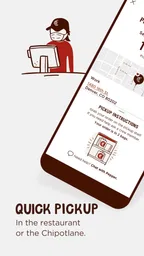
A realistic example: I have a lunch break that is too short to spend working out an order after I arrive. I can make the choices in advance and use pickup if that is available for the restaurant I intend to visit. The important practical tip is to check the selected location and order details before relying on the timing. A saved or prepared order is only helpful if it is directed to the right restaurant and matches what I actually want.
Another useful workflow is to think through the order before the hungry, rushed moment. If I am ordering for more than myself, I can treat each person’s preferences as a separate decision rather than trying to remember them at the counter. That does not remove the need to review the final order, but it can reduce the mental juggling involved in coordinating a shared meal. I would still ask everyone to confirm their choices before submitting, especially when a group has different preferences.
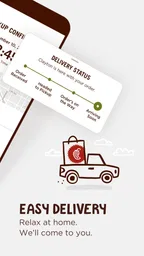
Pickup and delivery serve different needs, and I would not treat them as interchangeable conveniences. Pickup is the more straightforward fit when I am already near a restaurant or passing it on the way somewhere. Delivery is more useful when leaving is inconvenient, but the convenience has to be weighed against the total cost and the experience of having food brought to me. The app makes both ordering routes relevant; which one is worthwhile depends on the situation rather than a universal promise of speed or savings.
Useful habits before you place the order
My first habit would be to confirm the restaurant before building or submitting an order. This matters most when there is more than one Chipotle location in reach: an order aimed at the wrong branch can undermine the whole point of planning ahead. I would also check whether I selected pickup or delivery, since choosing the right food is only part of placing the right order.
For a group meal, I would settle the choices first and then review the assembled order as a whole. That final pass is a small step, but it is more useful than assuming that a convenient ordering flow makes every selection foolproof. If someone’s request is important, make sure it is represented clearly before completing the order rather than relying on memory or a last-minute message.
If I am trying the app for the first time, I would use a simple order and pickup scenario before depending on it for a tight schedule or a complicated group plan. That gives me a chance to understand the ordering process and the options at my chosen location without making the app the single point of failure for an important meal. It is sensible preparation, not a claim that the app is difficult.
Tradeoffs worth knowing before relying on it
The main limitation is also the app’s purpose: it is for Chipotle, not for comparing restaurants across town. If I am open to several cuisines, I would rather begin with a broader food-ordering option. If I have already chosen Chipotle, the narrower focus feels appropriate. That distinction is more useful than calling one kind of app universally better.
Ordering ahead can make a meal easier to organize, but it cannot guarantee that the real-world handoff will match my ideal schedule. Restaurant circumstances and delivery logistics are outside the simple act of choosing food in an app. For a fixed appointment or a very short lunch break, I would leave room for uncertainty instead of assuming that placing an order eliminates waiting.
There is also a tradeoff between convenience and attention. It is easy to move quickly through a familiar order, but that can be exactly when I overlook the selected location, order method, or a change I meant to make. I see the app as a useful way to prepare, not as a reason to skip a final check. A few seconds of review can matter more than rushing through the screens.
Finally, the app’s free access should not be confused with a promise of better value on every meal. Whether an order is worthwhile depends on the food and the method of getting it. Pickup may fit a trip I am already making; delivery may be the sensible choice when convenience matters more. I would compare the actual order total and circumstances rather than assume that using the brand’s own app automatically makes an order cheaper.
Who is most likely to get value from it?
I would recommend trying it if Chipotle is already part of your routine, you like to decide what you want before reaching the restaurant, or you sometimes need to arrange pickup or delivery. It is particularly practical for someone whose meal break is structured around other commitments, because moving the decision-making earlier can make the order easier to fit into the day.
It may also suit people coordinating a meal with friends or family, provided they are willing to review everyone’s selections before submitting. The benefit is organization, not magic: the app can help bring choices together, while the person ordering still needs to check that the final order is right. That makes it useful for ordinary planning rather than a guaranteed shortcut through every group-order complication.
I would skip it if you rarely eat at Chipotle, prefer choosing among many restaurants in one place, or do not want to place food orders through a dedicated restaurant app. A person who visits in person and enjoys deciding at the counter may gain little from adding another app to their phone. Likewise, if the nearest location does not suit your route or plans, the convenience of ordering digitally may not compensate.
The app comes from Chipotle Mexican Grill, which is a useful point of distinction from a general delivery platform: the experience is centered on one restaurant brand. That focus is a strength when you know where you want to eat and a limitation when you do not. I would choose between it and a broader service based on that simple difference, not on the assumption that either approach is always faster or cheaper.
My verdict on installing it
Chipotle is worth a try if you order from the chain regularly and want a direct way to arrange pickup or delivery. Its free download lowers the barrier to giving it a look, while the actual meal remains a purchase to judge on its own merits. I like the app’s practical role: it can move food choices out of a rushed counter interaction and into a moment when I have more time to think.
I would not install it expecting a universal restaurant finder, a guaranteed faster meal, or automatic savings. It is a focused ordering tool, and that is enough to make it useful for the right person. My recommendation is to use it when Chipotle is already your choice, check the location and order method carefully, and keep a little flexibility if your schedule is tight. If you want variety more than a direct ordering route to one chain, a broader alternative will serve you better.
What we like
- Order ahead to reduce time spent waiting in line
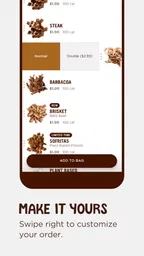
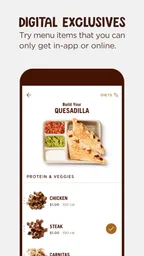
- Customize meals with a range of ingredients and toppings
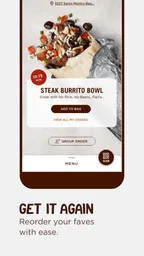
- Save favorite orders for quicker repeat purchases
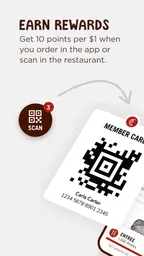
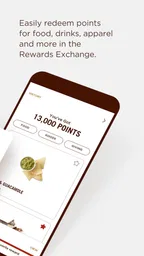
- Track rewards progress and redeem points in the app
- Find nearby restaurants and check their opening hours
What could be better
- Menu availability can vary by restaurant
- App prices may differ from in-store prices
- Customizing an order can make checkout feel lengthy
- Delivery fees may increase the total cost
- Rewards and promotions can have eligibility restrictions





