

Chick-fil-A® review
 Analysis by Appsdrops
I find Chick-fil-A® most useful when a meal involves more than one person and nobody wants to spend the last few minutes before pickup relaying orders by text. The app puts browsing, ordering ahead, and reward tracking in one place, so it can make a familiar restaurant stop easier to coordinate. Its limits matter, though: it is built around Chick-fil-A, not household meal planning or ordering from a range of restaurants. If your group is deciding between several places, a general delivery or restaurant-discovery app is likely the better starting point.
Making a shared meal easier to organize
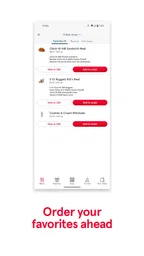
Picture a weekday lunch when one person is driving, another wants to pick up food, and everyone has a different order. I would use the app to settle the Chick-fil-A order before leaving rather than trying to remember a spoken list at the counter. That can reduce the usual back-and-forth, especially when the person placing the order is not the person who will collect it. It is a practical convenience, not a shared household workspace: the app helps with the restaurant transaction, while the group still needs to agree on choices and communicate them.
That distinction is worth keeping in mind. I would not assume that several household members can work together inside one order or see one another’s activity. A straightforward approach is for one person to handle the order and confirm the choices with everyone else before submitting it. For a small group that already knows what it wants, this is simple. For a larger group with changing requests, a quick message or written list outside the app can prevent mistakes before the order is placed.
As a Food & Drink app, Chick-fil-A is focused on a specific kind of convenience: ordering from one restaurant rather than comparing menus across town. Chick-fil-A, Inc. develops it, and the app is free to install. That focus is a strength if this is already where your household plans to eat; it is a drawback if you want a single place to coordinate meals from different businesses.
One account, one clear point of responsibility
For shared use, I would decide in advance whose account is handling the order and reward activity. That keeps the transaction and any qualifying-purchase points associated with the person using that account, instead of leaving the household to guess where the activity went. If someone else is paying or collecting, agree on that arrangement before ordering. This small step is more useful than treating the app as though it automatically manages household roles.
I also recommend checking the order carefully with the person who will pick it up. A phone screen can make a list easier to review than a rushed verbal order, but it does not solve a misunderstanding about who wanted what. For instance, ask each person to confirm their items before the account holder completes checkout. That is especially helpful when one person is ordering for coworkers or family members who are not present.
The app’s age rating is Everyone, which makes it broadly suitable for a general audience in the store. That is not the same as a promise of child-specific account controls. I would keep account access and purchasing decisions with the adult responsible for the order, particularly when a shared device is used. Younger household members can help choose food, while the adult reviews the final order and handles the account.
Rewards are useful, but they are not the whole reason to install it
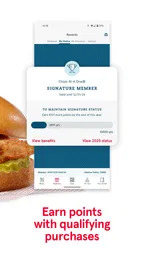
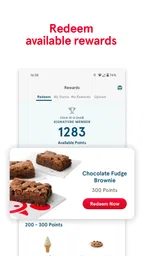
The app lets customers receive points from qualifying purchases and redeem available rewards. In practice, I would treat that as a bonus attached to an order I already intended to place, rather than a reason to make an extra trip or add food. Before paying, the account holder should check that the order is being made in the intended account and look at the rewards shown there. That habit helps avoid the common household confusion of one person expecting credit for a purchase made through someone else’s account.
Rewards can make the app more appealing to a regular customer, but they do not necessarily make it the right choice for every meal. If you visit only occasionally, the main value is likely the ability to arrange an order ahead; points may be a secondary benefit. If your household prefers to keep purchases separate, each person may prefer to use their own account rather than funneling every order through one shared login. The best setup depends on who places orders and who wants to manage the associated activity.
I would also avoid making reward redemption the final step in a rushed pickup routine. Check what is available while deciding what to order, then confirm the total choices before the order is submitted. That gives the group a chance to agree on whether using a reward makes sense for that visit. The useful principle is simple: make the meal decision first, then use the app’s account and rewards tools to support it.
What it does well compared with other ordering options
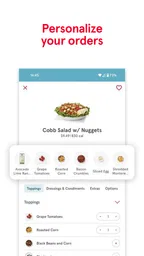
Compared with ordering at the restaurant, placing an order ahead can give you a chance to review the choices at your own pace. That is helpful when you are ordering for several people or fitting a pickup into a busy schedule. Compared with a broad delivery app, this one keeps the experience centered on Chick-fil-A and its own rewards. I would choose it when I already know where I want to eat and want a direct way to arrange that order.
The trade-off is that a focused restaurant app cannot replace a service designed to compare many eateries. If the household has not decided where to go, a general restaurant app or a conversation may be more useful first. Likewise, if your priority is having one shared list for groceries, cooking plans, and meals from multiple restaurants, Chick-fil-A is not designed for that job. It is a restaurant-specific tool, and it works best when the decision to visit has already been made.
There is also a human coordination issue that no ordering screen can fully fix. A household member may change a request after the order is placed, or the person collecting it may not be the one who selected the items. I would confirm the order and pickup plan in a message before anyone leaves. That is a small extra step, but it can be more valuable than expecting the app itself to coordinate people who are not using the same account or device.
Setup, trust, and the shared-device question
Chick-fil-A® has been available since December 20, 2013, and its current version is 2026.22.0. It requires iOS 9 or later, so anyone considering it for an older device should check that the device meets that minimum before planning to rely on it. The app is free, though the food ordered through it is a separate purchase. It is widely used, with more than 10 million installs, and its average rating is 4.5 from around 212,000 ratings; that gives a useful sense of its reach, but individual experiences still depend on the restaurant and the order.
On a shared phone or tablet, I would not leave an account open simply because the device stays at home. Decide who is allowed to place orders and who checks the final details. If several people use the same device, make sure the person placing an order knows which account is active before expecting purchase activity or points to be associated with a particular person. This is ordinary account housekeeping, not a special family feature.
For parents, the Everyone content rating is reassuring as a general age signal, but it does not remove the need to guide a child through spending and account use. I would let a child browse options with an adult, then have the adult confirm the order and manage payment. For teens who are already responsible for arranging a meal, the app may be convenient, but the household should still agree on who is paying and whose account is being used.
The app may not be worth keeping on every family member’s device. If one adult usually places the household’s Chick-fil-A orders, a single account on that person’s phone may be enough. If different adults make separate visits and want their own activity kept distinct, separate accounts are more sensible. The important point is not to assume that “shared use” means shared account history or automatic coordination; establish the household’s routine first.
Who will get the most from it
I would recommend it to someone who visits Chick-fil-A often enough to value a direct ordering option and wants qualifying purchases to contribute toward available rewards. It also suits a busy household where one person routinely organizes pickup for others. The app’s best use is narrow but clear: make a Chick-fil-A order with less counter-side decision-making, keep the account activity in view, and check available rewards along the way.
I would skip it if you rarely eat at Chick-fil-A, do not want another restaurant account to manage, or need a tool that coordinates food from several places. It is also a poor substitute for a shared family planner. In those situations, a general restaurant service, a simple group message, or ordering directly in person may fit better. The app does not need to be everyone’s preferred way to order for it to be useful to the person who handles the pickup.
Overall, I see Chick-fil-A® as a practical, focused companion for regular customers rather than an essential app for every household. Its ordering and rewards functions can make a familiar stop easier to arrange, especially when one person is responsible for the group’s order. Keep account ownership clear, confirm choices before submitting, and treat rewards as an extra rather than the main event. With those expectations, it is a sensible choice for Chick-fil-A regulars; if your needs extend beyond that restaurant, a broader option will serve you better.
What we like
- The app makes it easy to find nearby Chick-fil-A locations.
- Users can place orders for pickup or delivery where available.
- The menu includes nutrition details for informed choices.
- Rewards are available through the Chick-fil-A One program.
- Saved payment methods can make checkout quicker.
What could be better
- Delivery availability depends on the selected location.
- Menu items and prices may vary by restaurant.
- Some features require an account to use.
- Offers and rewards can have eligibility limits.
- Order changes may be difficult after checkout.





