
ChargePoint review
 Analysis by Appsdrops
I would consider ChargePoint when I wanted an electric-car charging app that could help with more than finding a pin on a map. Its focus is the practical charging routine: locating a place to plug in and, for people with compatible home charging, managing that part of ownership too. That combination makes it more specific than a general navigation app, but it also means its usefulness depends on whether its charging network and tools fit the way you travel.
Trust starts with knowing what the app is for
Made by ChargePoint, Inc., this free Maps & Navigation app has been available since June 23, 2011. It is rated for Everyone, has passed one million installs, and holds an average of 3.8 from about 54,000 ratings. Those figures suggest a widely used service with mixed experiences, not a guarantee that every charging stop will go smoothly. I treat the rating as a reason to check a location carefully rather than as a verdict on any individual charger.
The central trust question is not simply whether a map looks polished. It is whether I can make a sensible decision before driving out of my way. Charging availability can change, and a map marker alone cannot promise that a station is working, accessible, or appropriate for my vehicle. I would use the app to narrow down options, then pay attention to the station details and any current status the app presents rather than assuming that a listed location is ready when I arrive.
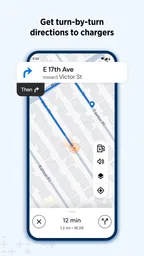
That is where a dedicated charging tool can be more useful than searching a general map. A conventional navigation app is often the better starting point for a broad route or finding businesses nearby. ChargePoint is more relevant when the destination itself needs to be a charging stop, or when home charging is part of the routine. I would keep the distinction clear: it supports a charging decision, but I would not make it my only source of route planning or on-the-road judgment.
What I would check before committing to a stop
Before setting out, I would compare the location with my actual route and the time I can spare. A station that appears convenient on a map may still be a poor choice if reaching it requires a detour or if I have no workable backup nearby. For an unfamiliar area, I would identify a second option before leaving, especially if arriving with a low battery would make a failed stop stressful.
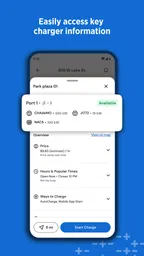
I would also look at the practical details shown for the particular station, rather than treating every listing as interchangeable. Vehicle compatibility, connector needs, access, and the expected stop all matter more than a marker’s distance alone. The useful habit is to confirm the details in the app and keep a fallback in mind, not to assume the first result is automatically the right one.
Controls are most useful when they match a real routine
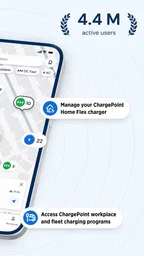
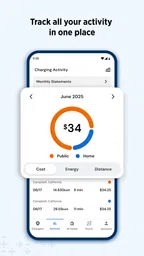
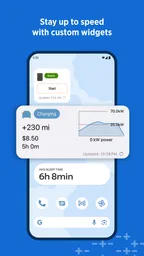
The app’s home-charging angle matters most to drivers who already use compatible ChargePoint equipment. For them, a single place to find public charging and manage home charging can reduce the need to switch between unrelated tools. If I were setting up that routine, I would first check what the app actually lets me manage for my equipment and account, then use those controls only where they clearly apply.
I would not assume that every feature is available to every driver. Public charging and home charging are different situations, and the latter depends on having the relevant equipment and access. Someone who rents, uses a charger provided by a building, or relies entirely on public stations may get little from the home-management side. In that case, the value rests mainly on finding public charging locations and handling the associated trip decisions.
For account and privacy decisions, I prefer a conservative approach. I would review the permissions requested during setup, grant only what seems necessary for the task I am trying to do, and revisit those choices if I stop using a feature. Location access is especially sensitive in a navigation app: it can make nearby searches and directions more convenient, but I would consider whether I need continuous access or can choose a narrower option offered by my device. I would not grant access merely because an app asks during onboarding.
Likewise, I would examine the account settings and the app’s own privacy information before entering personal or payment details. An app’s purpose does not, by itself, tell me how each piece of information is handled, so I avoid guessing. The practical approach is to make a deliberate choice at each prompt, read the current explanations shown in the app or store, and avoid saving details I do not need for my use. That gives me more control without making claims about practices I have not verified.
Where personal choices matter most
Location is not the only moment worth thinking about. Searching for chargers, navigating to one, and managing home charging can involve different levels of convenience and personal information. I would decide which functions I want before enabling optional access, and I would check the operating system’s permission controls if I later change my mind. Being able to deny or revoke a permission is useful, though it may limit the related feature.
I also like to separate account convenience from account necessity. If a feature asks me to sign in, I would consider whether I need that feature or whether I can still use the app for basic discovery without creating an account. I would check the sign-in screen and settings rather than assume either outcome. For a shared vehicle or household charger, I would be particularly careful about whose account is used and who can see or control the relevant information.
A realistic example is an afternoon errand in an unfamiliar part of town. I would search for charging near the destination, compare the available locations with the length of my visit, and choose one that does not force a large detour. Before driving, I would inspect the station details and pick a backup. If I only need a one-time public charge, I would avoid changing home-charging settings or granting extra access that has no bearing on that outing. This is a small workflow, but it reduces the chance of confusing “found on the map” with “dependable for my immediate need.”
What it does better than a general map—and where it does not
Compared with a general maps app, ChargePoint is more focused on charging as the destination rather than simply a place along a route. That focus can make it a more natural tool for checking charging options and for drivers whose home charging is part of the same routine. A general navigation app may still be stronger for everyday directions, traffic context, or exploring non-charging stops. I would use each for the job it handles best instead of expecting one to replace the other completely.
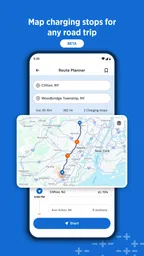
There is a trade-off in relying on a dedicated service. A focused app can be convenient when the stations and equipment relevant to me are represented well, but it is less compelling if I regularly need to compare charging options across providers or if my preferred locations are outside its useful coverage. In that case, I would cross-check with another charging directory or a general map. I would also avoid planning a long journey around a single app’s results without checking alternatives along the way.
The app’s average rating of 3.8, drawn from roughly 54,000 ratings, is a reminder that real-world usefulness can vary. I would not read that as proof of a specific problem, but it does argue against treating the experience as flawless. A driver whose daily trips depend on finding a working charger should build a little redundancy into the plan: check before departure, keep another location in mind, and leave enough flexibility for a change of plan.
Who should try it, and who may be better served elsewhere
I would recommend trying ChargePoint if you want a charging-focused map and are interested in managing compatible home charging in the same app. It is especially relevant when you charge away from home often enough that checking stations is part of planning, rather than an occasional emergency. Since it is free and rated for Everyone, the main decision is less about the cost of trying it and more about whether its features and station information fit your habits.
I would be less enthusiastic about it for someone who only wants a general-purpose navigation tool, has no use for its home-charging functions, or depends on a broad comparison of charging networks. Those drivers may prefer a general map for directions and another service for cross-network discovery. If you rarely need public charging and already have a dependable way to manage home charging, adding another app may not improve your routine enough to justify the extra account and permission choices.
My verdict is cautiously positive. ChargePoint makes sense as a focused charging companion, particularly when public charging and compatible home charging overlap in your life. I would use it as a practical planning aid, not as an unquestioned guarantee that a station will be ready or the best option for every trip. Check the details, keep a fallback for important journeys, and make permission and account choices deliberately; with those habits, the app can be useful without asking you to trust a map blindly.
What we like
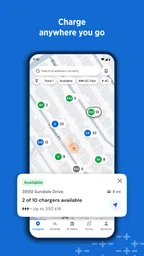
- Finds nearby charging stations with map filters.
- Shows connector types and charging speeds for listed stations.
- Lets drivers start and pay for charging through the app.
- Displays station availability and pricing when provided.
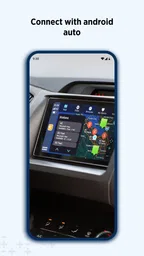
- Supports Apple CarPlay for finding chargers while driving.
What could be better
- Station details may be outdated or incomplete.
- Some chargers require a separate account or payment method.
- Charging prices can vary by station and time.
- Live availability depends on network updates.
- App usefulness is limited where ChargePoint coverage is sparse.





