


BURGER KING® App review
 Analysis by Appsdrops
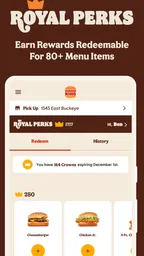
I see the BURGER KING® App as a practical companion for people who already choose Burger King, rather than a reason to make every meal a Burger King meal. Its appeal is convenience: it brings restaurant discovery, mobile ordering, and deals into one place. That can be useful when I am deciding where to eat on the way home, but the value depends on whether the offers and ordering options suit the particular visit.
It is a free Food & Drink app from Burger King, Inc., with a 4.5 average from around 330,000 ratings and more than 10 million installs. Those figures suggest that plenty of customers find a regular use for it, though popularity alone does not tell me whether it will fit your habits. The app is rated for Everyone, and its long-running presence since 2013 makes it feel like an established ordering tool rather than a temporary promotion.
Convenience is useful, but trust needs attention
My first question with a restaurant app is not just whether I can place an order; it is whether I can understand what I am choosing and feel in control while doing it. This app has an obvious commercial purpose: it connects customers with Burger King meals, restaurants, and deals. That is not inherently a problem, but it does mean I treat offers as prompts to consider, not as neutral recommendations.
I would start by checking the app’s visible choices before making an account or placing an order. In particular, read any prompts as they appear and decide whether the requested access or information makes sense for what you want to do. I can’t responsibly claim specific permission settings, privacy controls, or account tools without seeing them on your device, so I would avoid assuming that a feature exists just because other food apps offer it.
That caution is especially useful with location. Finding a nearby restaurant is a core reason to open the app, but you can first consider whether you want to share location access or would rather choose a restaurant yourself if that option is presented. The distinction matters: a nearby-store lookup is convenient when you are travelling, while a manually selected restaurant may be preferable when you already know where you plan to collect food.
Make the restaurant choice before the order rush
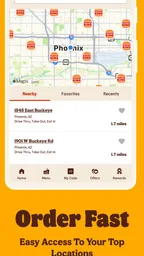
A small but worthwhile habit is to select the restaurant before you spend time reviewing a meal. For a chain with multiple locations in a town, the nearest one is not automatically the right one: your route, collection plans, or the location you are already visiting may make another branch more practical. Confirming the chosen restaurant early helps prevent the frustrating situation of building an order around the wrong pickup point.
I would also treat the restaurant finder as a planning aid, not a guarantee that every location offers identical choices or service. If you are making a special trip, check the selected branch and the options shown in the app before setting out. That simple pause is more useful than assuming that a deal or menu choice will work the same way everywhere.
Deals work best when they fit the meal
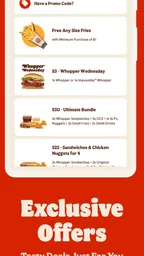
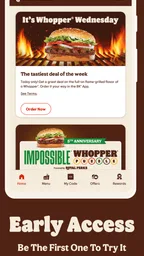
The offers are likely to be the feature that draws many regular customers back. My advice is to decide what you actually want to eat, then see whether a deal improves that order. This keeps a discount from nudging you into adding food you did not want in the first place. A deal can be good value only when it matches your appetite, budget, and plans; the word “exclusive” by itself does not make an unnecessary purchase worthwhile.
There is also a practical timing trade-off. Looking through available offers while you are calm at home is different from trying to compare them with a queue behind you. If you use the app often, checking the deal area before travelling can help you arrive with a plan. Still, review the offer details displayed in the app at the time you intend to order, since promotions can have conditions and should not be assumed to apply to every restaurant or order.
When comparing the app with a delivery service, the main distinction is the task. Burger King’s own app is the more direct place to look for Burger King-specific deals and mobile ordering; a delivery platform may be more convenient if you want to compare several restaurants or have food brought to you. I would choose based on the actual need rather than assuming one route is always cheaper or faster.
Ordering ahead can reduce friction, not remove it
Mobile ordering is most helpful when I know what I want and would rather prepare the order before reaching the counter or restaurant. A realistic example is leaving work hungry, checking which nearby Burger King suits the route home, and placing an order once I have confirmed the location and meal. The useful part is having the choice in hand before arrival; the app cannot make an uncertain restaurant selection or a changing plan disappear.
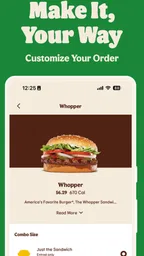
For a group order, I would agree on the restaurant and everyone’s choices first, then review the completed order carefully before confirming it. This is a simple way to avoid duplicate items or a last-minute change made under pressure. If someone in the group has a dietary need, check the item information and available customisation directly in the ordering flow rather than relying on memory or on a deal tile that may show only part of the order.
Be equally deliberate about the final step. Review the selected location, items, and any details shown before you submit. That check is useful in any mobile order, but particularly when you have been switching between deals and menu choices. If your plans change after placing an order, look for the app’s visible instructions or contact the restaurant through an appropriate channel; do not assume that an order can be edited or cancelled unless the app clearly offers that choice.
What the app does—and what another option may do better
Compared with calling a restaurant, the app gives you a digital route to browse offers and prepare a mobile order. Compared with searching in a map app, it is focused on Burger King rather than on every nearby place to eat. Those differences make it a sensible choice when you have already decided on the chain and want to check its own ordering experience.
It is less compelling if you rarely eat Burger King, prefer to make every decision in person, or mainly need a broad comparison of restaurants. In those cases, a general map or restaurant app may be a better starting point, while ordering at the counter may feel simpler than installing another app. The best tool is the one that fits the meal you are actually planning, not the one with the most screens or promotions.
The current version is 7.86.0, and the stated minimum operating-system requirement is version 7.0. If the app does not run smoothly on your device, or the store does not offer it for your operating system, check compatibility before relying on it for an immediate meal. The app is free to download, but that does not mean the food itself is free; I would treat the app as a way to browse and order, not as a promise of a particular saving.
Use visible choices rather than assumptions
When an app asks for access or presents account-related steps, I prefer to pause and ask whether that choice is needed for my current task. If I only want to look for a restaurant, I would not rush into sharing information or enabling a setting before understanding the prompt. If an option is unclear, it is reasonable to stop and check the app’s on-screen explanation or the app store’s privacy information before continuing.
The same principle applies after installation. Look through the account and app settings that are actually available on your device, and use the controls you can see to shape your experience. I would not promise that a particular setting, deletion route, or privacy toggle is present without verifying it. This is a better way to assess trust than assuming that every chain app handles information in the same way.
There is a balance here: location-based convenience can make restaurant discovery quicker, while choosing a branch yourself gives you more deliberate control over where an order goes. Deals can make a planned meal more attractive, while frequent promotion browsing can also distract from what you intended to buy. Neither trade-off makes the app good or bad for everyone; it simply means the useful choice depends on how much convenience you want and what information you are comfortable sharing.
My cautious verdict for regular customers
I would recommend giving the BURGER KING® App a try if Burger King is already part of your routine and you want one place to check restaurant options, mobile ordering, and current deals. Its strongest use case is a planned visit: choose the branch, compare the available offer with the meal you wanted, and review the order before confirming. That workflow can make a familiar stop more organised without turning the app into a necessity.
I would skip it if you visit only occasionally, do not want another restaurant account or app on your phone, or would rather compare many food options at once. I would also avoid relying on it until you have checked the location and order details for a time-sensitive pickup. In those situations, a direct visit, a phone call, or a broader restaurant finder may suit you better.
Overall, I find the app most worthwhile when the user stays intentional: use the offers as options, verify the restaurant before ordering, and make access choices based on the prompts actually shown. It is a focused tool for Burger King customers, not an all-purpose dining guide. If that is the distinction you want, it is a convenient free download; if not, you can comfortably stick with the ordering method you already trust.
What we like
- Order ahead to reduce time spent waiting at the counter.
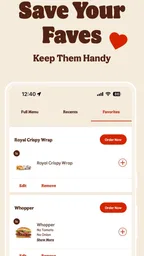
- Save favorite orders for faster repeat purchases.
- Find nearby restaurants with the store locator.
- Access digital coupons directly in the app.
- Choose pickup options where participating locations support them.
What could be better
- Offers and prices may vary by location.
- Some restaurants may not support every ordering option.
- A stable internet connection is needed to place orders.
- Promotions can have exclusions or minimum purchase requirements.
- App features may differ between iOS and Android versions.





