
Barcode Scanner review
 Analysis by Appsdrops
I find Barcode Scanner most useful in the small moments when a barcode is in front of me and I want to identify it without turning the task into a project. In a shared home, that might mean checking a package before putting it away, looking up an item someone else bought, or helping a relative scan a code they cannot read clearly. The appeal is straightforward: it is a free scanning app from Cognex Corporation, a developer associated with barcode technology, rather than a general-purpose shopping or household organizer.
When one phone serves the household
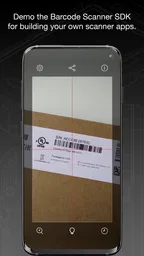
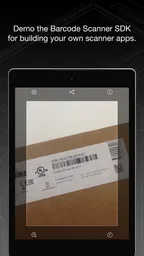
A barcode scanner can be a practical shared-device utility because the action is easy to explain: open the app, point the camera at a code, and see what it recognizes. I would keep it among the basic tools on a household phone or tablet used for occasional errands, inventory checks, or sorting deliveries. It is less useful as a shared record system; scanning a code and coordinating what happens next are separate jobs.
For example, imagine a family member asking whether a boxed item is the same model as one already at home. Scanning can help identify the item, but the result still needs to be interpreted and discussed. I would use the app to get a quick starting point, then compare the information with the packaging or the person’s own notes. That distinction matters: a scan is a convenient lookup step, not a guarantee that a product is suitable, compatible, or the right purchase.
The app sits in the Libraries & Demo area, which fits its focused, utility-first character better than a full shopping suite. It has a 4.6 average from around 15,000 ratings, and over a million installs. Those figures suggest that people find a simple scanner useful, but they do not tell me whether it fits every household’s workflow. I would judge it by the specific codes and situations I need to handle.
A quick scan is not household coordination
In my experience, the best way to use a tool like this across a household is to agree on what a scan is supposed to accomplish. If one person is checking a package and another is keeping a pantry list, the scanner may help identify the package, but it should not be treated as the shared list itself. A brief note in whatever system the household already uses can prevent the common mix-up where someone scans an item but nobody records what was decided.
This is also a useful boundary for shared phones. I would avoid assuming that a scan automatically becomes visible to everyone or is saved as a household record. Instead, I would treat the result as something displayed for the person holding the device, and pass along any useful detail explicitly. That keeps expectations realistic and avoids relying on an unconfirmed sync or history feature.
Setup choices and account boundaries
The app is best approached as a standalone scanner rather than as a family account service. If several people use the same device, they can take turns scanning, but that does not make the device itself a good place for private or sensitive information. I would keep the phone’s normal user and screen-lock boundaries in place, especially if it is also used for messages, shopping accounts, or other personal tasks.
A useful household tip is to separate the scanning task from any follow-up purchase. Let the person who needs the item review the result and decide whether to open a retailer’s app or search elsewhere. This reduces accidental purchases on a shared screen and makes it clear that scanning an identifier is not the same as approving an order.
Another practical trade-off is camera conditions. If a code is on a curved, glossy, creased, or poorly lit surface, a quick point-and-scan may be less convenient than turning the package, flattening a label, or moving to better light. I would try those simple adjustments before concluding that the item has no readable code. On a shared device, it also helps to show a new user how to hold the phone steady and frame the barcode rather than waving the camera over the whole package.
What it does well—and where another tool wins
Compared with using a phone’s built-in camera or a shopping app, a dedicated scanner has a clearer job: it is there to read barcodes, not to serve as a camera roll, storefront, or product-review destination. That focus can make it a sensible choice when the household wants a simple utility without adopting a wider shopping workflow. The app’s short store description reflects that narrow purpose, and I would consider that a strength if all I need is scanning.
The trade-off is that a specialized scanner should not be mistaken for a complete product research tool. If I need rich product comparisons, current availability, purchase options, or a maintained household inventory, I would move to a service built for that task after the scan—or choose that service directly if it already scans codes. Similarly, for a one-off scan, the phone’s built-in camera may be more convenient if it recognizes the code and provides the result I need. Installing a separate app makes most sense when scanning is frequent enough to deserve its own straightforward tool.
For a useful test, I would try a familiar product barcode first, then scan the kinds of packaging that matter in my home. This checks whether the result is understandable and whether the camera workflow suits the person who will use it. It is a better trial than assuming every barcode will lead to the same kind of useful information. Barcodes identify different things in different contexts, and the next step depends on what is encoded and what the user is trying to find out.
Age, trust, and sensible supervision
The listed content rating is Everyone, so the app is presented as suitable for a broad audience. That is reassuring for a basic utility, but an age label is not a substitute for household judgment. A child can learn the physical act of scanning, while an adult can explain that a code result is information to check rather than an instruction to buy, download, or share something.
I would be especially clear with younger users about what to do after a scan. If a result prompts them to visit another service or make a decision, they should ask before proceeding. This is ordinary shared-device guidance, not a claim that the scanner includes parental controls. For older relatives, the more useful support may be showing them how to position the camera and how to return to the scan screen without accidentally opening unrelated apps.
Trust also means checking context. A barcode can help identify a product, but it cannot tell me whether an item is safe for a particular person, whether its packaging is intact, or whether it matches a household need. I would use the scan as one clue and read the label or consult a reliable source when the decision has consequences. For everyday identification, that extra caution need not make the app cumbersome; it simply keeps the scanner in its proper role.
Version and device fit
The current release is version 5.0.16 (218), and it supports Android 5.0 or later. That makes it a possible option for older Android devices still in service around the house, though practical performance will also depend on the device’s camera and condition. If the phone struggles to focus or has a damaged lens, changing scanner apps may not solve the underlying problem.
Because this is a focused camera utility, I would check that the app opens reliably on the device intended for shared use before depending on it during a busy errand. A household phone used by multiple people may be older or have limited storage, so a quick trial on that actual device is more informative than judging only from someone else’s newer phone. The app is free, which makes that test easy to justify, but I would still remove it if it does not work well with the camera or does not fit the household’s needs.
My household verdict
I would recommend Barcode Scanner to someone who wants a dedicated, uncomplicated way to read barcodes now and then, especially when a shared device is used for practical errands. Its simple purpose makes it easier to explain than a broad shopping app, and the free price lowers the barrier to trying it. Cognex Corporation’s name and the app’s established presence may add confidence for some users, but my recommendation rests mainly on whether the scanning task is genuinely useful to them.
I would skip it if the household needs shared inventory, synchronized records, purchase coordination, or detailed product comparisons in one place. Those needs call for a broader service, or for an existing camera feature if it already handles occasional scans. I would also avoid treating the app as an authority on what to buy or whether a product is appropriate; it is a scanner, not a substitute for checking labels and making a considered choice.
Overall, I see Barcode Scanner as a handy household tool when expectations stay modest. It can help turn a barcode into a starting point for identification, but coordination still comes from the people using the device. If that narrow role matches your routine, it is worth trying; if you want a shared system that remembers decisions and keeps everyone in sync, choose a tool designed for that job instead.
What we like
- Scans common 1D and 2D barcode formats.
- Recognizes codes using the device camera.
- Requires no dedicated barcode scanning hardware.
- Can open links encoded in QR codes.
- Useful for checking product codes on the go.
What could be better
- Scan quality depends on camera focus and lighting.
- Damaged or blurry codes may not scan reliably.
- Some scanned links may lead to unsafe websites.
- Camera permission is required for scanning.
- A scan may not provide complete product details.





