

Arbiter review
 Analysis by Appsdrops
I think Arbiter makes the most sense when sport is not just something you watch, but something you help organize or officiate. It is a free sports app from ArbiterSports, and its appeal is tied to the practical work that happens around a game: keeping people and responsibilities coordinated rather than offering scores or commentary as a fan-facing destination. That focus also sets expectations. If you are looking for a broad sports news feed, this is not the app I would reach for; if your sporting role brings you into the Arbiter ecosystem, it is more relevant.
Where a connection matters most
For an app connected to sports administration, a phone becomes useful at the moments when plans are changing: before leaving for a venue, between commitments, or while checking what needs attention on a busy day. A dependable network can make those checks feel simple. A weak or unavailable connection can make a mobile workflow less reassuring, especially if you are counting on current information. I would treat connectivity as part of the experience, not an afterthought.
That does not mean every task has to happen at the field. I would use the app as one piece of preparation, checking it while I still have a stable connection and enough time to react. If a schedule or assignment is important, reviewing it before setting off is a better habit than waiting until you arrive and hoping the signal is good. That small change reduces the chance of a last-minute scramble.
Connectivity also affects how confidently I would rely on any mobile sports coordination tool. A notification or screen can only help if the information is available when I need it, and a phone’s own network conditions vary by location. For a venue with poor reception, it is sensible to have a fallback plan for essential details, such as knowing whom to contact through the usual channel. I would not make the app the sole source of critical plans without first understanding how it behaves in the places I use it.
Useful on the move, with a little preparation
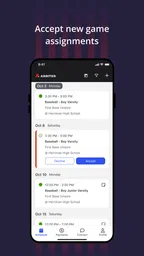
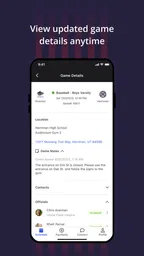
The strongest everyday use case is a person whose sports responsibilities follow them around. Imagine checking plans before work, heading to a venue later, then needing to confirm what is next while moving between locations. A dedicated app can be more convenient than searching through email threads or messages, because it gives the user a focused place to handle Arbiter-related activity. The benefit is less about novelty and more about reducing the small bits of administrative friction that accumulate during a season.
There is a trade-off, though: an app only feels like a reliable hub if the user’s organization and role actually use the service. Someone who has no Arbiter-related assignments or coordination needs may open it and find little reason to return. I would first ask a coach, officiating coordinator, or relevant organization whether Arbiter is part of their process. That is a more useful test than installing it simply because it sits in the sports category.
For referees and other people who travel between venues, I would check the relevant information before driving and avoid trying to resolve complicated details while on the move. A quick glance while parked is safer and less stressful. I would also make sure the phone has enough battery for the day; relying on a mobile device for coordination makes power management part of the routine, even though that is not unique to this app.
When something goes wrong
Network hiccups are not always dramatic. A page may take longer than expected, or a change may not appear as quickly as you want. My practical response would be to pause, confirm the phone has a connection, and try again rather than repeatedly tapping controls in a rush. If the matter affects an imminent assignment, use an established contact route as well. That is not a criticism of Arbiter so much as sensible practice for any time-sensitive mobile service.
I would also distinguish between a connectivity problem and an account or organization issue. If the app does not show what I expect, checking the connection is a reasonable first step; if it persists, the right person to ask may be the organization that manages the relevant information. Keeping those possibilities separate can save time. Reinstalling or changing settings immediately is rarely my first move when the issue could simply be temporary network trouble.
Before a busy event, it is worth opening the app while you have a stable connection and checking that you can reach the information you need. This is a small, non-obvious routine that helps reveal a problem early, when there is still time to ask for help. I would not assume that a screen already viewed will remain available later without a connection, so I would keep essential details accessible through an agreed backup method if the venue is known for poor service.
Data use and practical habits
I would expect ordinary app use to involve some data when information is retrieved or refreshed, but I would not make assumptions about how much. If you are on a limited mobile plan, using a trusted Wi-Fi connection for setup or routine checks is a straightforward precaution. You can also avoid refreshing repeatedly just because a screen seems slow; first check whether the connection itself is weak.
For people who use the app frequently, a simple routine can make it feel less disruptive: review upcoming responsibilities when planning the day, check again before leaving, and reserve urgent follow-up for a safe stop. This keeps phone use from creeping into moments when attention belongs elsewhere. It also makes the app’s role clearer: a coordination aid, not a reason to keep staring at a screen during a game or while driving.
Arbiter is rated 4.3 on average from around 935 ratings, and it has drawn roughly 495 written reviews. Those figures suggest an established audience, though they cannot tell me whether the app fits a particular league or organization. It has more than 100,000 installs, which is a useful sign that it serves a real audience beyond a niche experiment, but adoption alone does not guarantee that every local workflow will match yours.
Who will get the most from it
I would recommend considering it if your sports organization already relies on ArbiterSports and you need a mobile way to stay connected to that work. The fit is strongest for people with recurring responsibilities, such as officiating or coordination, who benefit from checking information away from a desk. The app is less compelling for casual fans, athletes who only want training advice, or anyone seeking live scores and sports reporting. Those needs are better served by apps built specifically around news, score tracking, or personal fitness.
Compared with the usual alternatives, Arbiter is not trying to be an all-purpose sports companion. A calendar can handle reminders, and email or messaging can pass along changes, but those tools tend to spread information across separate conversations and personal schedules. Arbiter’s value is that it belongs to a more specific administrative context. That focus is an advantage when your organization uses it; it is also the reason it may feel unnecessary if your group has chosen another system.
I would not switch an entire team’s process based on an individual download. First confirm that the relevant people use Arbiter and that your role has a reason to access it. If the organization’s current method is a shared calendar or another established platform, using that consistently may be better than creating a second place to check. The most useful tool is the one everyone responsible actually keeps current.
A sensible choice for the right sports routine
The app is free, carries an Everyone age rating, and its current version is 1.20.0. It was released on July 19, 2021, and supports Android 7.0 or later. Those details make it accessible to a range of Android users, but the more important question is whether Arbiter is part of your sporting life. As a sports app, it is aimed at coordination rather than entertainment, and that makes its usefulness highly dependent on the people and organizations around you.
My overall view is that Arbiter can earn a place on your phone if you need to manage sports-related responsibilities through the service. I like the idea of having a focused mobile option instead of piecing together every update from messages and calendars. At the same time, I would use it with realistic expectations about network conditions: check important information before travel, keep a backup contact method for urgent changes, and do not assume that a weak-signal venue will behave like home Wi-Fi.
My recommendation is conditional but straightforward: install it when your coordinator or organization tells you Arbiter is part of the workflow, then test the routine before relying on it for a time-sensitive day. If you are simply looking for sports scores, training plans, or general fan content, choose an app designed for that purpose instead. For the people it is built to serve, Arbiter is a practical tool; for everyone else, its specialized focus is likely to be the reason to skip it.
What we like
- Clear interface makes key features easy to find.
- Useful tools help users keep track of important tasks.
- The app is convenient to access on a mobile device.
- Settings allow users to tailor parts of the experience.
- A focused design keeps the app straightforward to use.
What could be better
- Some features may require an account to access.
- The app may not explain every tool in enough detail.
- Occasional updates can change the layout or workflow.
- Compatibility may vary across devices and operating systems.
- Users may need time to learn less familiar features.





