





All mobile Secret Codes review
 Analysis by Appsdrops
When I need a quick way to look up Android phone codes, I want a clear starting point: find a code, understand what it is meant to do, and decide whether it belongs on my device. All mobile Secret Codes is built around that basic idea. It presents itself as a collection of mobile and smartphone secret codes, making it a reference app rather than a tool for everyday messaging, entertainment, or device customization.
Finding a useful starting point
The appeal is easy to understand. Android phones can have diagnostic, information, or service codes that are entered through the phone interface, and many people would rather search a reference than hunt through scattered tips. This app aims to put that kind of information within reach. Its short store description is simply “All mobile,” while its broader pitch focuses on secret codes for smartphones.
That promise makes the app most relevant when you already have a question in mind. Perhaps you want to check what a particular code is associated with, or you are curious about the codes available for mobile devices. I’d treat it as a lookup companion: open it with a specific purpose, browse what it offers, and pause before trying any code whose effect you do not understand.
It is categorized among library and demo apps, which fits the reference-style concept. The developer is Theoca Apps. The app is free to install, and its audience rating is Everyone. It has reached over 500,000 installs, with an average rating of 3.8 from around 1,200 ratings. Those figures suggest that plenty of Android users have tried it, although a rating alone cannot tell you whether a particular code will apply to your model.
From curiosity to a code lookup
My ideal workflow begins with a clear question, not random experimentation. I would open the app, look for the relevant code or subject, and read any accompanying explanation before entering anything on the phone. That last step matters: a code is not automatically useful simply because it is labeled “secret,” and different devices or software versions may respond differently.
The app’s central value is therefore convenience. Instead of treating codes as mysterious tricks, I can approach them as reference material that may help me understand a phone’s diagnostic or service options. For someone who enjoys exploring Android features, that can make the app a handy starting point. For someone facing a specific technical issue, it may help frame the next question, but it should not replace careful troubleshooting.
When you find a promising entry, the next decision is whether to act on it. I would check the wording, confirm that the code is intended for my device, and consider the possible consequences before entering it. A cautious approach is especially sensible with codes that appear to change settings or open service menus. If the purpose is unclear, the safest move is to leave it alone rather than discover its effect by trial and error.
The handoff from reference to phone
This kind of app has a natural handoff: it gives you information, while the phone’s own dialer or system interface is where an action may take place. Keeping those roles separate is useful. The app can serve as a guide, but it does not make every code universal, and it cannot guarantee that an entry will behave the same way across manufacturers and models.
That distinction shapes how I would use All mobile Secret Codes. I would not assume that every item applies to every Android handset. I would also avoid entering a code just because it appears in a list. First identify the device and the task, then check whether the information matches, and only proceed if the likely outcome makes sense to you. The more consequential the action seems, the more important it is to verify it through a reliable device-specific source.
There is also a handoff between the app and the user’s own judgment. A reference can make information easier to find, but it cannot decide whether a diagnostic menu is appropriate for your situation. If your goal is simply to learn, browsing is low commitment. If your goal is to change something, slow down and make sure you understand what the entry does before acting.
What the result can realistically be
Used thoughtfully, the result is a more organized way to explore smartphone codes. The app’s pitch is straightforward, and that simplicity is its main draw: it is aimed at people who want a mobile-code reference close at hand. It may be especially appealing to curious Android users who like learning what their devices can expose through service or diagnostic interfaces.
I would set expectations accordingly. A list of codes is not the same as a repair tool, and finding an entry does not mean it will solve a problem. The useful outcome may simply be learning what a code is associated with, deciding not to use it, or finding a better direction for troubleshooting. That is still worthwhile when the information helps you make a more informed choice.
The app is free to download, though it includes in-app purchases priced from $0.99 to $49.99 per item. Its current version is 1.33, and it requires Android 7.0 or later. It was released on May 25, 2025. I’d keep those practical details in mind when deciding whether it fits your device and whether you are comfortable with optional purchases inside a free app.
Where the workflow can break
The biggest friction point with any secret-code reference is applicability. Android phones are not all identical, and a code that is meaningful on one model may do nothing or behave differently on another. The app can help you look up information, but the final check still belongs to you. If an entry is vague, seems risky, or does not clearly match your handset, the sensible choice is not to test it blindly.
Another possible snag is expecting the app to diagnose a problem automatically. Its stated purpose is to provide mobile secret codes, not to promise a complete repair process. Someone whose phone is malfunctioning may need manufacturer guidance or a qualified repair service rather than a code list. In that situation, use the app only as a reference and do not let curiosity turn into unnecessary changes.
There is a practical limit to browsing as well: reference material is most useful when it answers a specific question. If you open the app without knowing what you are looking for, a collection of codes may feel less helpful than a guided troubleshooting tool. I’d approach it with a simple goal, verify before acting, and stop when the information no longer clearly applies.
Who may find it useful
All mobile Secret Codes makes the most sense for Android users who want a convenient place to explore smartphone codes and who are comfortable taking a cautious, read-first approach. It is less suited to anyone expecting a one-tap fix, a guaranteed diagnostic result, or universal instructions for every phone. The value is in having a reference to consult, not in assuming that every listed option is safe or relevant.
Overall, I see this as a focused utility for curiosity and basic code lookup. Its straightforward premise is easy to grasp, and its broad reach shows that the idea has found an audience. The best experience comes from treating each entry as something to understand before using, rather than a shortcut to try at random. If you want a lightweight Android reference for mobile secret codes, it is worth considering; if you need dependable, model-specific repair guidance, use a source tailored to your exact device before taking action.
What we like
- Covers code categories for several phone functions.
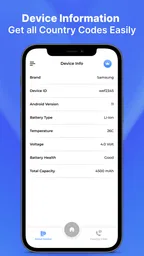
- Quick access to useful device information.
- Simple interface makes codes easy to browse.
- Can help identify supported features on a device.
- Useful reference for users who troubleshoot phones.
What could be better
- Many codes vary by device model and manufacturer.
- Some codes may not work with every carrier.
- Certain codes can change settings or erase data.
- The app may include codes that are outdated.
- Entering unfamiliar codes can affect phone functions.





