


Al Quran - Read Quran Offline review
 Analysis by Appsdrops
I like the idea behind Al Quran - Read Quran Offline: a Quran-reading app that can stay useful when you are away from a connection, rather than depending on a stream of pages or a browser session. Its appeal is straightforward, but that also makes the details of your reading routine matter. If you want a digital Quran available for quiet reading at home, during a commute, or while travelling, this app is worth considering. If you rely on advanced study tools or carefully configurable text, you should weigh that simple focus against your needs before making it your main reading app.
A straightforward Quran reader for offline routines
Al Quran - Read Quran Offline is a free app in the libraries and reading-app space, developed by genie islam. Its central purpose is to let you read Quran text without needing an active internet connection. That can make a meaningful difference in everyday situations: a weak signal on public transport, a trip where data access is inconvenient, or a quiet moment in a place where you would rather not depend on connectivity.
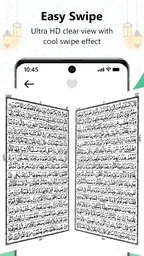
When I assess a Quran app, I first ask whether it supports a reliable reading habit, not whether it has the longest feature list. An offline reader is most valuable when opening it feels easier than finding a physical copy or sorting through other phone content. The app’s framing as a Quran experience for reading on a screen like a book suggests that its main job is to keep the text accessible and familiar, rather than turn reading into a complicated digital project.
That distinction helps set expectations. This is a reading app, not a broad religious-services suite. I would approach it as a practical digital companion for recitation and reading, not assume that it also covers every need around study, audio, translation, notes, or lesson planning. If your priority is simply having Quran text close at hand, its narrow purpose can be a strength. If you want one app to manage a full learning workflow, a more feature-rich alternative may suit you better.
What the offline focus changes in daily use
Offline access is not just a convenience for travel. It can help make reading less dependent on the conditions around you. You can decide to read during a break without first checking whether the network is working, and you do not have to treat a connection failure as a reason to postpone that moment. For a reader trying to build consistency, removing that small obstacle can matter more than extra tools that rarely get used.
A useful habit is to open the app while you still have a connection and make sure it is ready for the situation in which you plan to use it. That is a general precaution for offline reading, not a claim about a particular download control. For example, before leaving home, I would check that the Quran text opens as expected, then leave the phone in its usual reading setup. This simple test helps distinguish a genuinely dependable offline routine from an assumption based only on an app’s description.
Another practical tip is to make the app part of a specific daily cue: a short reading break after lunch, a few minutes before bed, or a quiet pause during a commute. A dedicated Quran reader can make that intention more visible than searching through a general browser or a crowded folder. The trade-off is that reading on a phone brings ordinary phone distractions with it. If notifications tend to interrupt you, silence them or use a focus setting before you begin.
Who is likely to appreciate this approach
I can see this working well for someone who wants an uncomplicated Quran-reading option on a phone and values access without relying on mobile data. It may also suit a reader who already has a preferred physical Quran but wants a backup for moments when carrying a book is awkward. Keeping a digital copy available can be useful in a bag-free outing or when plans change and a spare few minutes appear unexpectedly.
It is also a reasonable starting point for someone who has not settled on a digital reading routine. The app is free to install, carries an Everyone content rating, and has reached over one million installs. Its average rating is 4.2 from around 41,000 ratings. Those figures show that it has attracted a substantial audience, though popularity alone cannot tell you whether its presentation or reading experience will match your preferences.
I would be more cautious if you need a particular script style, adjustable text presentation, dependable bookmarking, audio recitation, translations, or detailed search. These are common reasons readers choose a more comprehensive Quran app, but I would not assume they are present here without checking the app itself. If one of those features is essential to your study, confirm it before moving your daily routine over. A focused offline reader is not automatically the best fit for someone comparing interpretations or working through lessons.
Version history, expectations, and practical trade-offs
The current release is version 1.3.0, and the app was released on April 15, 2022. That gives readers a concrete sense of its timeline, but it does not by itself reveal what changed between releases. I would not treat a version number as evidence of a newly added function or a major redesign. For an existing user, the useful question is more modest: does the current build still open the text reliably and support the way you read?
For someone who already uses it, the safest way to think about an update is as a reason to check the everyday basics again. Open a passage, confirm that the layout remains comfortable on your device, and test offline access before depending on it during a trip. This is a practical habit for any reading app, especially one whose main value is availability when a network is absent. It does not presume that the latest version changed the text or added tools.
The developer, genie islam, keeps the app’s identity closely tied to Quran reading rather than a broad collection of library content. That focus may help a reader who wants a direct route into the text. At the same time, the light description of its purpose leaves the actual experience dependent on what you find inside the app: how comfortable the pages are to read, how quickly you can return to a passage, and whether the available presentation suits your eyes.
Where a simpler app can create friction
The main limitation of a narrowly described reader is uncertainty about how well it handles the small tasks that shape long-term use. A person reading a few lines occasionally may be satisfied with a basic page view. Someone following a structured plan may need reliable progress tracking, quick navigation, or a way to mark a stopping point. I would test those needs early rather than assume that an offline Quran reader includes them.
Screen comfort is another personal issue. Reading for a few minutes on a phone can feel very different from reading a full page in print, especially if the text size or spacing does not suit you. Before choosing this as your primary copy, spend time with a longer passage in the actual conditions where you expect to read. Try it in daylight and in the evening, and notice whether you can keep your place comfortably. If the display tires your eyes or makes navigation cumbersome, a printed Quran or another app with more presentation controls may be the better choice.
There is also a difference between having Quran text offline and having every study resource offline. The app’s core appeal is offline reading, but that should not be confused with offline audio, translations, commentary, or search unless you have confirmed those tools in the app. Readers who need several resources together may prefer a more complete study app, while readers who simply want text available can avoid clutter by choosing a focused option.
The app is free, with in-app purchases ranging from $0.99 to $4.49 per item. That makes it sensible to explore the basic reading experience before paying for anything. I would first identify which part of my routine the free version supports, then consider a purchase only if a specific available item solves a real need. This is better than buying on the assumption that every paid option is essential or that it adds a particular feature.
How it compares with print and broader Quran apps
Compared with a physical Quran, a phone reader is easier to carry and can be available at moments when a book is not. Print has its own advantages: a familiar page, no screen notifications, and no need to manage a phone’s battery. I would not frame one as universally superior. If you already read comfortably from a printed copy, this app is best viewed as a portable complement. If your phone is always with you, the digital format may make spontaneous reading easier.
Compared with larger Quran apps, the advantage here is the clarity of the central use case: reading without depending on a connection. A broader app may combine audio, translations, study resources, and progress tools, but more functions can mean more menus and more decisions before reading. The right trade-off depends on whether you want a quiet digital book or an all-in-one study environment. For a reader who mainly wants the text nearby, a narrower tool can be easier to return to.
One non-obvious way to use it is as a continuity copy rather than a replacement. Keep your usual printed Quran or primary study app for deeper work, and use this offline reader when you are away from that setup. That reduces pressure on the app to do everything and gives it a clear job: make reading possible when your preferred resources are not convenient. It is a particularly sensible approach while you are still deciding whether the app’s page experience suits you.
What I would check before making it my regular reader
I would start with three practical checks. First, open the app in airplane mode to make sure the reading experience you need remains available. Second, read a passage long enough to judge the screen layout rather than relying on a quick glance. Third, look for the navigation or place-keeping tools you personally depend on. These checks answer the questions that matter more than a general promise of convenience: can you access the text offline, can you read it comfortably, and can you return to where you stopped?
For an existing user, the same checks provide a useful way to judge whether version 1.3.0 continues to fit. I would also keep expectations grounded: a current version is a snapshot of the app, not a guarantee about future improvements. If the reading basics work for you today, that is a stronger reason to keep it than speculation about features that may arrive later. If a crucial function is missing from your routine, choose an alternative that already provides it instead of waiting for an unconfirmed change.
Al Quran - Read Quran Offline has a clear place for readers who want a Quran-reading app that remains useful away from the internet. I would recommend trying it if your goal is portable, uncomplicated access and you are willing to judge its page experience for yourself. I would skip it as a primary study tool if you need a verified set of advanced learning features or extensive personalization. Its best role is practical and specific: a readily available reading companion, with the value of the experience resting on whether its simple approach matches the way you actually read.
What we like
- Offline access lets you read without an internet connection.
- A lightweight design can work well on older phones.
- Arabic text is useful for readers who prefer the original script.
- Bookmarks make it easier to return to a chosen passage.
- Daily reading can fit into short breaks throughout the day.
What could be better
- Screen glare can make long reading sessions uncomfortable.
- Small text may require frequent zooming on compact displays.
- Arabic text direction can be challenging for new readers.
- The app may not suit users seeking detailed study tools.
- Reading progress may not sync across multiple devices.





