
Zapp Chess: Online Chess Game review
 Analysis by Appsdrops
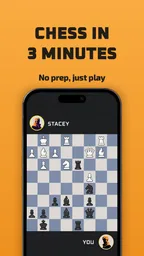
I see Zapp Chess as a chess app for people who want to get a game going quickly, not a course that asks them to study before they can enjoy themselves. Its appeal is the short, three-minute format: you can make a few decisions, see how a position develops, and return to whatever you were doing. That makes it easier to fit chess into a spare moment than a long, deliberate match.
That focus also sets expectations. This is a board game from DAB Games, and its central promise is quick play rather than a deep lesson in openings or endgames. If you already know the basic rules and want brisk games without a study plan, it is an appealing idea. If your main goal is to improve through analysis, structured instruction, or lengthy matches, I would compare it with a more teaching-oriented chess app before settling in.
What matters when choosing a quick chess app
For a short chess game, convenience is only part of the decision. The pace changes how you think: there is less room to replay every possibility in your head, so recognizing familiar patterns and choosing a sensible move matter more than perfect calculation. A fast format can be energizing, but it can also feel stressful if you prefer to consider each position carefully.
The useful question is not whether a short game replaces traditional chess. It does not. It is whether a compressed match gives you the kind of practice or entertainment you want today. I would treat Zapp Chess as a quick-play option for casual repetition, rather than assume it is a complete route to becoming a stronger player.
The game is free to download and is rated for Everyone. It has a 4.3 average from around 3,900 ratings, with more than 100,000 installs. Those figures suggest it has found an audience, but they do not tell me whether its pace suits a particular player; the best test is whether you enjoy making decisions under a short clock.
When the fast format is the point
A brief match works well when you have a small, predictable window: waiting for a friend, taking a break between tasks, or sitting down for a quick game before heading out. Instead of postponing chess because you cannot commit to a longer session, you can use the short format to keep the board familiar and your attention engaged.
There is a practical habit that helps: decide before starting whether you want to play for fun or focus on one skill. In a short game, trying to fix every weakness at once is unrealistic. You might instead pay attention to whether your pieces are defended, or make a conscious effort not to move instantly after an opponent’s threat. That small goal gives the match a purpose without turning it into homework.
Another useful trade-off is that speed encourages action but can reward impulsiveness. If you tend to move as soon as you recognize a familiar shape, pause long enough to check whether your opponent has a direct reply. That quick scan can prevent careless blunders while preserving the app’s brisk feel. It is a modest routine, not a substitute for deeper study.
Where Zapp Chess makes its strongest case
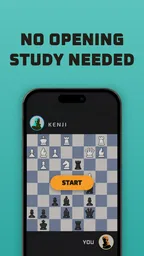
The clearest strength is its low barrier to starting. You do not need to arrive with an opening repertoire or a plan for the late game to enjoy a match. That is particularly welcome for someone who knows how the pieces move but finds chess culture intimidating, or for a returning player who wants to get back into the habit without first reading a guide.
The short-game emphasis also gives it a distinct role beside more traditional chess apps. A longer match is better when you want time to calculate, discuss a position, or settle into a serious contest. Zapp Chess makes more sense when you want a compact session and are comfortable accepting that some decisions will be imperfect. I would choose according to my mood, not expect one format to serve every purpose.
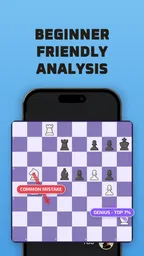
For a newcomer, the lack of pressure to learn openings first can be liberating. You can begin by noticing basic principles in play: develop pieces, protect your king, and avoid leaving material undefended. These are observations you can carry from one game to the next. The app’s fast premise makes it easier to play again, though it does not by itself guarantee that a beginner will understand why a position went wrong.
It is also a reasonable choice for someone who already plays casually and wants a change of rhythm. Familiar positions can appear quickly in chess, and repeated short sessions offer plenty of chances to practice recognizing them. I would focus on one recurring mistake after each match rather than judge my progress by wins alone. That keeps the experience useful even when a game ends in a frustrating blunder.
Where another kind of chess app may fit better
If your priority is instruction, look for an alternative built around lessons, puzzles, or reviewing completed games. Those tools are more suitable when you want explanations and a clear learning sequence. I would not choose Zapp Chess on the assumption that its quick format will teach openings or endgames in depth; its appeal is that you can play without making that study a prerequisite.
Likewise, players who dislike clock pressure may be happier with a slower format. A longer game gives you more breathing room to consider candidate moves and learn from the position as it unfolds. If you often feel that the timer makes you anxious rather than alert, that is a meaningful reason to use another kind of chess experience instead of trying to force yourself to enjoy a fast match.
There is also a difference between playing for a brief diversion and preparing for serious competition. A quick game can sharpen attention and keep chess enjoyable, but it is not the same as carefully analyzing a position or building a disciplined study routine. I would use it as a companion to slower play, not as evidence that I am ready for a formal match.
One point worth checking in your own use is whether the short pace leaves you satisfied. If you finish wanting to understand a tactical mistake, make a note of the position or the decision that bothered you and review it elsewhere. That turns a limitation into a useful boundary: Zapp Chess can supply the fast game, while a dedicated study tool can handle deeper reflection.
What to expect from cost and setup
The game is free, with optional in-app purchases priced from $0.49 to $149.00 per item. That wide range makes it sensible to treat purchases as optional rather than assume you need one to enjoy a quick match. I would start by playing without buying anything and only consider spending if I can identify a specific item I genuinely want. As with any game, checking the purchase prompt carefully is a good habit.
The current version is 2.0.202, and the minimum operating system requirement is 7.0. If you are deciding whether to install it on an older device, check that your system meets that requirement first. The release date is January 26, 2026, so the app is relatively new; I would give extra weight to how it feels in practice rather than assume a long history of refinement.
Switching from another chess app should be straightforward if all you want is a different pace: you can try a short match without changing how you think about the rules. The more significant cost is habit. If you are used to slow games, the quick format may initially encourage rushed moves; if you are used to lessons, you may miss having explanations close at hand. Treat the first sessions as a test of fit, not a verdict on your chess ability.
For everyday use, I would keep the app for moments when I have a few minutes and want direct play. I would switch to a slower or more educational alternative when I have time to concentrate, want to understand a mistake, or need guidance beyond simply making the next move. That division makes the choice clearer than asking one app to be both a casual pastime and a complete coach.
My recommendation: choose it for the pace
I would recommend Zapp Chess to casual players, returning players, and chess-curious people who want a quick match without first studying theory. DAB Games has made a clear choice to put immediacy ahead of a long learning process, and that is exactly what makes the game worth considering. Its Everyone age rating also makes it broadly approachable, though the fast pace still may not suit every player.
I would skip it if you want detailed instruction, patient analysis, or games where you can take your time with each move. The short format is not a flaw when speed is what you want, but it becomes a poor fit when careful thought is the main pleasure. A more traditional or lesson-focused chess app will serve that purpose better.
My practical advice is to try a few sessions with one simple aim: play briskly, but check for an immediate threat before committing to a move. If that balance feels enjoyable, the app can be an easy way to make chess part of a spare moment. If the clock leaves you tense or you finish wanting explanations, move to a slower or more instructional alternative instead. Choose Zapp Chess for accessible, compact play, not as a replacement for every way of learning and enjoying chess.
What we like
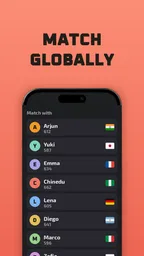
- Offers online matches against players around the world.
- Includes puzzles for practicing tactics between games.
- Lets you play chess without needing a physical board.
- Supports quick games for short breaks.
- Provides a way to challenge friends online.
What could be better
- A stable internet connection is needed for online play.
- Match quality can vary with opponent skill levels.
- New players may find the rules and tactics difficult.
- Waiting for an opponent may take time at quieter hours.
- Online play may expose younger users to unmoderated interactions.







