




Chess - Play and Learn Online review
 Analysis by Appsdrops
The first thing I like about Chess - Play and Learn Online is how quickly it can turn a spare moment into a real decision: I can start a game, face an opponent, and immediately have to choose whether to trade, defend, or take a risk. That makes this board game more engaging than a passive chess reference, but it also means the app works best when I’m ready to think rather than simply tap through a distraction.
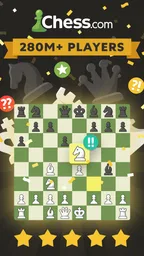
Chess.com has been making the game available on mobile for a long time, and the app now has a broad community behind it: it has over 100 million installs and an average rating of 4.7 from around 3.5 million ratings. It is free to download, rated Everyone, and includes optional in-app purchases. I see the purchases as something to consider only after deciding how regularly I’ll use the app; the basic appeal is being able to play and learn, not needing to buy anything before I can understand whether chess on a phone suits me.
Make the first move without turning it into a project
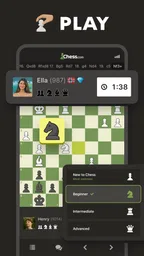
For a newcomer, the useful starting point is not to hunt for every tool at once. I’d begin with a simple online game, take time to inspect the board, and treat each move as a question: what can my opponent do next? The app’s focus on online play, tactics, puzzles, and analysis points toward a cycle of playing, noticing a mistake, and returning to the position with a clearer idea. That is more helpful than playing rapid games endlessly without reflecting on them.
The screen is a compact chessboard, so a phone is convenient for a quick match but not ideal for studying several variations at once. Before committing to a move, I recommend checking the opponent’s threats and the squares your own pieces have stopped protecting. On a small display, a move can look obvious while a diagonal or pinned piece is easy to overlook. Turning the phone or enlarging the board, when available in your setup, can make careful review more comfortable; the important habit is to pause before moving, rather than relying on a fast tap.
That first action can fit into ordinary routines. I might open the app while waiting for a friend, play a game during a quiet break, or solve a tactical position when I have only a few minutes. The distinction matters: a full game asks for sustained attention, while a puzzle is a better choice if I know I may be interrupted. If I’m likely to put the phone away halfway through a match, I’d choose a shorter commitment or practice instead of starting a game that deserves more concentration than I can give it.
Chess.com is the developer, and the app is a board game rather than a general-purpose learning course. That focus is a strength if I want to spend my time making chess decisions. It is less suitable if I’m looking for a broad collection of unrelated games or a relaxed activity with no need to study opponents’ replies. Chess can be social and entertaining, but even a casual match asks me to accept that a careless move may decide the outcome.
Choose a session that matches your attention
One practical way to get more from the app is to decide what the session is for before opening it. For a quick break, I’d pick a puzzle and focus on finding the idea rather than guessing the first forcing move. For a longer window, I’d play a game and save a little time afterward to ask where the position changed. This small choice reduces the common frustration of starting a serious match when I only have a moment, then leaving without learning anything from it.
New players should also resist treating every loss as proof that they need more theory. Often the useful lesson is local: a piece was left undefended, a check was missed, or a move created a threat without noticing the opponent’s stronger reply. I find that reviewing one turning point is more sustainable than trying to memorize a large opening system before I understand why the pieces belong on those squares.
Feedback that turns a mistake into a lesson
The app’s learning emphasis is most valuable when feedback connects to a decision I actually made. Puzzles give me a focused problem; analysis can help me revisit a game instead of letting the result be the only thing I remember. I would use those tools with a specific question—“What did I overlook here?”—rather than expecting an evaluation to teach me automatically. The point is to identify the idea behind a better move, not simply to collect a verdict that my move was inaccurate.
A useful review workflow is to replay a game from the first moment I felt uncomfortable. I can pause, identify the candidate moves I considered, and then use analysis to compare my choice with the alternatives. This reveals whether the problem was calculation, a missed threat, or a plan that no longer fit the position. It is a more actionable habit than reviewing every move in order, which can feel laborious and makes it easy to lose sight of the one decision that mattered most.
There is a trade-off here. Analysis can make chess feel clearer, but it can also tempt me to accept a recommended move without understanding it. A computer’s preferred line may depend on precise play that I would not find over the board. I get more value by asking what the move threatens and what response I would expect from a human opponent. If I can explain the idea in ordinary terms, the feedback has become learning rather than just a scorecard.
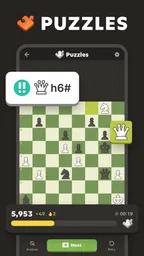
For someone who mainly wants to improve tactics, a short puzzle session can be easier to sustain than a full lesson or a long game. I’d still avoid rushing through positions just to finish more of them. Before moving, list the forcing options in your head—checks, captures, and direct threats—then look for the opponent’s best defense. That simple routine makes puzzles useful practice for real games, where the correct idea is rarely announced in advance.
What makes the next session worthwhile
The reward is not only winning. A close game can leave me with a question worth returning to, and a solved puzzle can reinforce a pattern I may spot later. When I lose, a productive review can turn the result into a concrete goal for next time, such as protecting loose pieces or checking forcing replies before launching an attack. That kind of progress is quieter than a streak, but it gives me a reason to open the app again that does not depend on winning every session.
Online opponents also change the feel of repeated play. Each game presents a different set of decisions, so familiar openings can lead to unfamiliar positions quickly. The community scale helps make online chess feel like a central part of the experience rather than an optional afterthought. Still, playing another match immediately after a frustrating loss is not always the best use of time. If I’m annoyed, I’m more likely to move impulsively; stepping back to review one mistake can be a better reset than trying to recover a result right away.
For a realistic everyday routine, I’d use one session to play and a later short session to revisit the most instructive moment. For example, after a match during a break, I could note that I missed a threat, then work on a puzzle when I have another few minutes. Separating play from review keeps each activity focused. It also prevents analysis from feeling like homework attached to every game, which matters if I want chess to remain enjoyable.
The app’s free entry point makes it easy to test this rhythm before considering optional purchases, which range from $1.00 to $229.99 per item. Those prices cover a wide range, so I would check the current purchase details carefully and decide based on what I actually use. I would not treat spending as a shortcut to playing better: regular attention to positions and thoughtful review are what make the practice meaningful.
Where it fits among chess alternatives
Compared with a physical chessboard, this app is much easier for finding an online opponent and switching from a game to puzzles or analysis in the same place. A real board is better for face-to-face conversation, relaxed moves without screen interruptions, and seeing the whole position at a glance. If that human, unhurried setting is what I want, a board with a friend is the better choice. If I want to practice when nobody nearby is ready to play, the app has the advantage.
Compared with a chess-only reference or a book, the app is more interactive: I can test an idea in a game and then inspect what happened. A book may be better when I want a structured explanation without notifications or the temptation to queue up another opponent. Likewise, a dedicated analysis setup may suit a serious student who prefers a larger screen and a deliberate study environment. I see this mobile app as a flexible everyday hub, not a replacement for every way of learning chess.
Its broad reach is both useful and a consideration. Finding a lively online chess environment is appealing, but a large community does not guarantee that every game will feel relaxed or evenly matched. If I’m new, I’d focus on learning from the positions rather than judging my ability by a run of results. The Everyone age rating makes the game broadly accessible, but parents may still want to guide younger players around online interaction and in-app spending in the same way they would with other connected games.
A repeatable loop, with one important caveat
The core loop is easy to understand: I make a move, see how the opponent answers, get a result or discover a mistake, and decide whether to play again or study the position. Puzzles offer a more contained reset; analysis gives a way to return to a game with fresh eyes. The next session begins because there is usually another idea to test, not because the board itself changes into a different kind of game. For people who enjoy improving through repeated decisions, that simplicity is a real strength.
The caveat is that chess rewards attention, and mobile convenience can encourage the opposite. Notifications, interruptions, and hurried taps can turn a thoughtful game into a string of blunders. I’d use the app when I can give a match enough focus, and choose a shorter learning activity when I cannot. That distinction makes the experience feel less frustrating and helps me leave each session with something useful, even when I do not win.
I recommend Chess - Play and Learn Online to anyone who wants a practical way to play chess online and connect games with puzzles and review. It is especially suited to curious beginners and returning players who can enjoy small, steady improvements. It is not my first recommendation for someone seeking a hands-off casual game, a screen-free chess experience, or a highly structured course as the only learning format. Used with a little patience, though, it makes the familiar board feel like an ongoing conversation: make a choice, learn from the reply, and come back with a better question.
What we like
- Lessons explain chess concepts in clear steps.
- Puzzles offer a focused way to practice tactics.
- You can play against friends online.
- Game analysis helps identify mistakes after a match.
- The app supports play against computer opponents.
What could be better
- Some lessons and tools require a paid membership.
- A stable internet connection is needed for online play.
- Beginners may find the range of features overwhelming.
- Analysis can be difficult to understand without chess experience.
- Match quality depends on finding a suitable opponent.







