Mahjong Blast review
 Analysis by Appsdrops
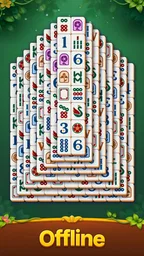
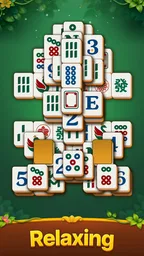
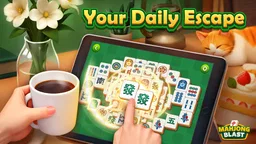
I like a board game that lets me settle into a short, quiet puzzle without asking me to learn a complicated set of rules first. Mahjong Blast is built around that kind of familiar tile-matching appeal: it is a mahjong solitaire game from Nebula Studio, with a focus on relaxing play and keeping your attention engaged. My practical take is that it makes most sense as an easygoing way to fill a break, rather than as a deep strategy game or a substitute for playing mahjong with other people.
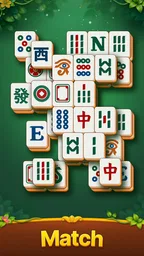
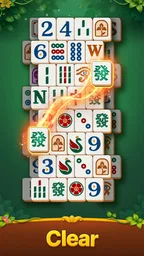
That distinction matters when deciding whether to install it. Solitaire mahjong is about clearing a layout by matching available tiles, not competing in the traditional multiplayer game. If you enjoy scanning a board, spotting a pair, and thinking a few moves ahead, the format can be satisfying. If you want social play, a long campaign, or a demanding ruleset, this is probably not the experience you have in mind.
Where a simple puzzle can still trip you up
The basic idea is easy to grasp, but the challenge comes from choosing which pair to remove. A match can look obvious while quietly blocking access to tiles beneath or beside it. I find that this is the useful tension in mahjong solitaire: each move is small, yet the order matters. Rushing through the first pair you notice can leave fewer workable choices later.
That makes the game a better fit for someone who enjoys visual puzzles than for someone who wants a completely passive screen to tap. Even in a relaxed session, it helps to pause and look across the whole layout before committing. I would treat a stuck board as a prompt to review the remaining exposed tiles rather than as a reason to tap faster.
One practical habit is to compare the number of visible matches before making a move. If a pair is easy to access in more than one place, consider whether removing one version might open a more useful route through the layout. This is not a special feature; it is a way to make the familiar solitaire format feel less like random matching and more like a deliberate puzzle.
The experience will also depend on what you personally find relaxing. Some players enjoy repeating a calm, tile-focused routine; others lose interest if a game does not keep introducing new kinds of decisions. Mahjong Blast is a board game, and its central appeal is the board itself. I would not choose it expecting the variety or narrative momentum of a large adventure game.
Setup checks before you settle in
The game is free to download, with optional in-app purchases listed from $1.49 to $12.99 per item. I would approach it as a free starting point and decide for myself whether any purchase is worthwhile after playing. If you are helping a child or sharing a device, it is sensible to review purchase controls in the device’s app-store settings before handing it over. The game’s content rating is Everyone, but that rating does not replace a household’s own rules about spending or screen time.
Before installing, check that your device meets the stated minimum operating-system requirement of 7.1. The current version is 3.1.2, so if the app does not install or open, first check the device’s available system updates and whether the app store offers an update. These are simple checks, but they can prevent wasted time trying to troubleshoot a puzzle game when the issue is actually device compatibility.
If an installation stalls, I would start with the basics: confirm that the device has a usable internet connection, enough available storage, and that the app store is responding normally. Then retry the download from the store rather than repeatedly tapping an unresponsive icon. If the game opens but seems to freeze, close it and reopen it once before trying more disruptive steps. These checks are general device troubleshooting, not a guarantee that every problem has the same cause.
It is also worth thinking about where you expect to play. A tile puzzle is naturally suited to small breaks, but a phone that is nearly out of battery or struggling with several demanding apps at once can make any game feel less smooth. I would close apps I do not need and make sure the device is charged if I plan to play for longer. That is a practical setup habit, not a special requirement of Mahjong Blast.
A more thoughtful way to play and recover a session
For a quick session, I would choose a moment when I can give the board a little attention rather than trying to play while switching constantly between tasks. A useful everyday scenario is waiting for a meal to finish or taking a short break between errands: one puzzle can give the mind something focused to do without requiring a long commitment. If I only have a few seconds, though, I would avoid starting when I know I will need to put the phone away immediately.
When a board feels blocked, take a breath and inspect the tiles still available to match. Look for pairs that are exposed and compare them with other matching options before choosing. The point is not to make every move perfect; it is to avoid clearing a convenient pair automatically when another choice might uncover more possibilities. This simple scan is a concrete way to make each turn feel more considered.
If you need to stop mid-session, use the game’s visible controls and the device’s normal app-switching behavior rather than assuming that closing the game will preserve every part of your progress. If the game reopens in a different state, first check its menus for an appropriate way to resume or restart. I would avoid repeatedly deleting and reinstalling the app as an early fix, since that can create more hassle and may not address the underlying issue.
For an unresponsive screen, try one careful tap and allow a moment for the game to react. Rapid tapping can make it harder to tell whether the first input registered. If the whole app appears stuck, close and reopen it; if the problem continues, restart the device and check for an app update. Should the issue persist after those steps, the app store’s support route is a more sensible next stop than guessing at hidden settings.
Another helpful workflow is to separate a puzzle mistake from a technical problem. If the board still responds but there are no pairs you can see, inspect the remaining exposed tiles and the layout before deciding the app has frozen. If taps do not register anywhere, that points more toward an app or device responsiveness issue. This distinction can save time, especially when a quiet game gives little feedback to tell you what is happening.
When another factor may be responsible
Not every slow download or failed launch is caused by the game. A weak connection, limited storage, an older operating system, or a temporary app-store problem can interfere before a puzzle even begins. If other apps are also struggling, I would troubleshoot the device or connection first. If only this game has trouble and the usual restart and update checks do not help, then it makes sense to seek app-specific support.
Likewise, if the game’s presentation feels cramped or hard to read on your particular screen, that may be a poor fit between the device and your preferences rather than a broken puzzle. I would try adjusting the device’s display settings if that helps with other apps, but I would not assume that every visual discomfort has a setting inside the game. If clear, large tiles are essential for you, test the experience before deciding to spend money on optional items.
There is also a difference between wanting a relaxing puzzle and wanting a game that continually pushes you. Mahjong Blast may suit the first mood, but a player looking for head-to-head competition, a broad range of board-game rules, or a demanding strategic challenge should compare it with alternatives designed around those goals. Traditional mahjong apps, for example, are a better direction if playing against other people and learning the full game are the priorities. A crossword or number puzzle may be a better choice if you want clues or calculations instead of visual matching.
How it compares with other board-game choices
Compared with a physical mahjong set, solitaire play removes the need to gather players and set up a table. That convenience makes a phone version easier to pick up during a spare moment, but it also changes the social character of the activity. I would choose Mahjong Blast when I want a solo tile puzzle, not when I want the conversation and shared decisions of a tabletop game.
Against other digital board games, its appeal is narrower but clearer: it centers on matching tiles and reading a layout. That focus can be a plus if you do not want to learn a new system every time you open an app. The trade-off is that players who crave changing objectives or interaction with opponents may find the format repetitive. Before installing, ask yourself whether you enjoy returning to the same core kind of decision. If the answer is yes, the straightforward premise is a strength; if not, another board-game style may hold your attention longer.
The game has an average rating of 4.8 from around 2.6 million ratings, and it has over 100 million installs. Those figures point to a widely used title, but popularity alone cannot tell you whether its pace and puzzle style match your taste. I would use them as context, then judge the game by the kind of session I actually want: a calm solo board, rather than a competitive or story-driven experience.
Who I would recommend it to
I would suggest Mahjong Blast to someone who already enjoys solitaire puzzles, likes visual pattern recognition, and wants a board game that can fit into ordinary gaps in the day. It is also a reasonable option for a player who would rather focus on one familiar activity than learn a complicated collection of rules. Since the game is free to download and rated Everyone, it is easy to consider, while the optional purchases make it worth keeping spending preferences in mind.
I would be more cautious recommending it to someone who gets frustrated by a puzzle that can require careful planning, or who expects every session to feel substantially different. It is not the right pick if you specifically want multiplayer mahjong, a competitive ladder, or a deep tactical game. Those are not flaws so much as different expectations, and choosing the right kind of game matters more than choosing the most popular one.
Nebula Studio’s Mahjong Blast is a straightforward choice when I want a quiet tile puzzle and a reason to slow down for a few minutes. Its strongest practical quality is that the central activity is immediately understandable, while still rewarding a little patience about which pair to clear next. The main trade-off is that the focused format will not satisfy everyone. If a solo mahjong solitaire board sounds like the kind of small, thoughtful break you enjoy, Mahjong Blast is worth trying; if you want social play or broader strategic variety, I would look elsewhere.
What we like
- Quick rounds make it easy to play during short breaks.
- Simple controls are approachable for new Mahjong players.
- Tile-matching puzzles offer a relaxing way to unwind.
- Gradually harder boards provide a steady challenge.
- The familiar Mahjong format is easy to understand.
What could be better
- Some layouts can become difficult without careful planning.
- Repeated tile patterns may feel monotonous over time.
- Small tiles can be harder to distinguish on compact screens.
- Progress may depend on completing many similar puzzles.
- The game may be less appealing to players seeking a story.







