



Tap Color Pro: Color By Number review
 Analysis by Appsdrops
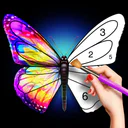
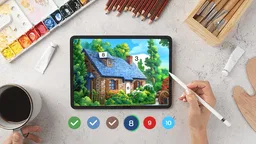
I find Tap Color Pro: Color By Number most appealing when I want a small, quiet task rather than a game that demands planning or quick reactions. It is a board game built around filling numbered spaces with colors, so the central pleasure is watching a picture come together one tap at a time. That makes it easy to pick up during a break, though it also means the experience is deliberately more soothing than challenging.
A calm coloring routine, with a clear spending boundary
Tap Color Pro is made by Tap Color Studio and is free to download. It has an average rating of 4.5 from around 220,000 ratings, with roughly 26,000 written reviews and over 50 million installs. Those figures suggest that the format has broad appeal, but they do not tell me whether its particular picture selection will suit every player. I would treat it as an accessible coloring pastime, not as a substitute for a deep board-game campaign.
The app is suitable for everyone, which fits its simple tap-to-color premise. Its current version is 7.7.6, and it requires Android 7.0 or later. The game is also available for iOS. These practical details make it easy to judge whether a device can run it, while the uncomplicated interaction makes it approachable for someone who has never tried a color-by-number game.
The important purchase distinction is that free installation does not mean every possible purchase is free. In-app purchases are listed at prices ranging from $0.99 to $49.99 per item. I would not assume that paying is necessary to enjoy the basic idea, nor would I assume that every picture or convenience is available without cost; the listed purchase range alone cannot establish what each item offers. Before buying anything, I would check the item’s description and price in the app store and decide whether it addresses a real need.
What the format does well
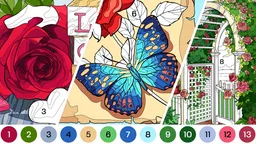
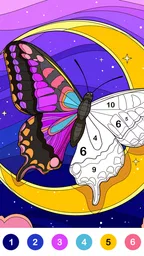
Color-by-number works because it removes the blank-page problem. Instead of choosing a palette and deciding where every shade belongs, I can focus on locating a numbered area and filling it. That small reduction in decisions is useful when I am tired, commuting, or taking a short pause between more demanding tasks. The reward is visual and gradual: a collection of tiny actions becomes a finished image.
That routine suits people who like coloring but do not want to lay out pencils, keep track of paper, or plan a composition. It can also be a low-pressure activity to share nearby: one person can suggest a section while another taps it in. I would still describe it as a solo-friendly pastime rather than a social board game, because its appeal comes from the individual coloring process, not from competing with another player.
A practical tip is to treat each session as a stopping point rather than trying to finish an image in one sitting. If I have only a few minutes, I can make a little visible progress and leave the rest for later. That makes the game easier to fit into ordinary life and prevents a relaxing activity from turning into a chore. The trade-off is that players who want a clear win condition, tactical choices, or a meaningful challenge may find the basic loop too repetitive.
Progress without turning it into pressure
The satisfaction here is completion rather than mastery. I would approach each picture as a series of small tasks, not as a test of speed or skill. That difference matters: a relaxed coloring game can feel pleasant precisely because it does not ask me to optimize every move. If I start measuring enjoyment only by how quickly I finish, I risk making its gentlest quality feel like a race.
For a realistic everyday use, imagine waiting for a meal to cook or sitting through a quiet stretch of an evening. A color-by-number session can occupy that gap without requiring a long setup or a complicated plan. I would keep the phone’s sound and notifications in mind if I were using it to unwind, but I would not count on the game itself to create a distraction-free environment. The best fit is a player who can enjoy a simple, self-paced activity and stop when the moment is over.
One useful way to keep the routine comfortable is to choose a picture based on the time and attention I actually have, rather than opening the game with the expectation of completing something immediately. Small sessions are a strength for casual play, but they can also make progress feel slow if I am eager to see a full image. If that gradual reveal does not appeal to me, a traditional digital painting app, where I can place broad strokes freely, may feel more direct.
There is also a difference between progress and pressure. A numbered coloring task gives me a sequence of spaces to fill, but I would not read that sequence as a reason to keep playing longer than I want. For anyone trying to limit screen time or spending, setting a personal stopping point before opening the game is sensible. That is a general habit, not a claim about a particular timer or control inside the app.
Fairness, purchases, and the right comparison
Because this is a coloring game rather than a head-to-head contest, competitive fairness is not the main question. There is no reason to judge it by whether one player can buy an advantage over another. The more relevant question is whether the free experience feels worthwhile to someone who only wants to color, and whether any optional purchase is clear enough to make an informed choice. The verified purchase facts establish that paid items exist and span a substantial price range; they do not establish what any particular purchase unlocks.
That uncertainty is worth handling calmly rather than filling in with guesses. I would look at the item name, its stated contents, and the final price before confirming a purchase. If the description does not make the value clear to me, I would skip it. I also would not treat a high install count or strong average rating as evidence that a purchase is necessary, or that every player will like the same content.
Compared with a physical coloring book, this game is easier to carry and does not require art supplies, but it replaces freehand choice with numbered areas. Compared with a general drawing app, it asks for less creative decision-making and offers a more guided activity, while giving me less freedom to invent my own image. Compared with strategic board games, it is much lighter: the pleasure is in coloring and completion, not outthinking an opponent. Those distinctions make it easier to know what sort of alternative to choose.
If I wanted unrestricted artistic control, I would pick a drawing tool. If I wanted layered tactics, player interaction, or a changing challenge, I would choose a different board game. If I simply wanted a guided, low-effort way to pass a short break, Tap Color Pro has a clearer case. The best alternative depends on whether I value freedom, competition, or a soothing sequence of small actions most.
Who will enjoy it, and who may not
I would recommend trying it to someone who likes coloring, enjoys visible progress, or wants a gentle phone activity that does not rely on fast reflexes. It may also suit a family member looking for a straightforward game, given its everyone rating and simple premise. The experience is especially appealing when the goal is to relax for a few minutes, not to build a long-term strategy or chase a difficult score.
I would be less enthusiastic about it for someone who gets bored repeating a basic interaction, wants a strong sense of competition, or expects every part of a free game to be included without optional purchases. Someone who prefers to choose every color and make each mark freely may also feel constrained by the numbered format. In those cases, a sketching app or a more tactical board game is likely a better match than trying to force a coloring routine to become something it is not.
Another useful distinction is whether you want the app to provide the creative idea or simply the canvas. Here, the numbered picture supplies much of the structure, so the player’s role is mainly to complete it. That can be comforting when decision fatigue is the problem, but unsatisfying when the fun comes from inventing a design. Knowing which side of that divide you prefer is a better guide than the popularity figures.
My trust verdict
My overall view is positive but specific: Tap Color Pro is a sensible choice for a casual color-by-number routine, not an all-purpose game. Tap Color Studio’s title has attracted a large audience, and its 4.5 average rating offers a useful sign of general reception, though neither popularity nor ratings guarantee that its style will click for me. I would try it for the relaxed coloring loop, then decide whether the available experience feels satisfying before considering any purchase.
The fairest way to approach its spending is to separate the free download from the paid items and make each decision deliberately. The listed in-app prices run from $0.99 to $49.99 per item, so I would pay attention rather than tap through casually. Since the price range does not explain the contents or value of an individual item, my trust comes from checking each offer for myself, not from assuming what it contains.
In short, I would recommend it to a friend who wants calm, guided coloring in spare moments, while being clear that it is not the right pick for competitive play or open-ended art. Its strength is an easy-to-understand activity that can fit into a small break. Its limitation is the same simplicity: if numbered coloring stops feeling satisfying, there may be little else in the core idea to hold your attention. That makes it a good, low-pressure trial for the right person, with spending best kept intentional.
What we like
- Numbered cells make it easy to pick up and play.
- A wide range of pictures offers options for different moods.
- Coloring provides a relaxing break from daily routines.
- Completed artwork can be shared with friends.
- The simple controls suit players of various ages.
What could be better
- Small areas can be difficult to tap accurately.
- Some pictures may require watching ads to unlock.
- Hints can be limited during harder coloring sessions.
- The app may feel repetitive after extended play.
- Frequent prompts can interrupt the coloring flow.







