




Yatzy Blitz: Classic Dice Game review
 Analysis by Appsdrops
I like dice games that make it easy to settle in for a quick round without asking me to learn a stack of rules first. Yatzy Blitz: Classic Dice Game is a mobile board game built around that familiar appeal: roll, decide which dice to keep, and try to make useful combinations before your chances run out. It is free to download, rated for Everyone, and made by Unicorn Board Games. My first impression is that it is best approached as a compact game of choices rather than a test of luck alone. The dice are unpredictable, but how I use each roll matters.
What to expect from a quick dice game
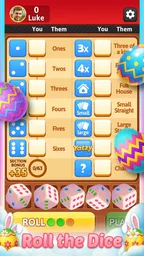
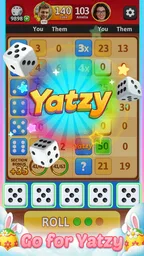
If you have played Yatzy or a similar scorecard dice game, the basic rhythm should feel familiar. A turn gives you a chance to roll and then choose whether to hold onto useful dice or try again for a better combination. The aim is to fill scoring opportunities thoughtfully, not simply to chase the biggest-looking roll. That makes each turn short, but rarely automatic.
The game’s short store description calls it Yatzy Blitz, and that captures the brisk, casual positioning better than a promise of a deep board-game campaign would. I would think of it as a convenient way to enjoy a few focused turns: during a break, while waiting for someone, or when I want a game that does not require a long session to feel complete. It is a board game in the dice-and-scorecard sense, rather than a sprawling strategy title.
The key pleasure is the small decision after each roll. A pair might tempt me to pursue a matching set, while a spread of different values may be more useful for another scoring option. Holding a promising result feels safe, but it can also close off a chance to improve. The interesting part is choosing what to protect and what to risk, especially when a turn is not going my way.
That balance makes it approachable without making every choice trivial. A new player can start by recognizing simple matches and gradually learn to value flexibility. I do not need to memorize an elaborate rulebook before the first meaningful turn; I can understand the basic loop by playing and then sharpen my decisions with experience.
Getting started without overthinking it
After installing, I would begin by looking at the game’s turn and scorecard layout before rushing through the first roll. The useful first question is not “How do I get the perfect throw?” but “Which scoring opportunity am I willing to pursue?” That change in mindset helps because the dice do not promise a perfect result, and a workable plan is often more valuable than chasing an unlikely one.
On an early turn, I recommend choosing one straightforward goal and following it for the available rolls. If the dice already show a promising match, keep the relevant values and see whether another roll improves the combination. If they do not, avoid treating every turn as a rescue mission. Learning how the scoring choices fit together is more useful than trying to optimize every decision immediately.
One practical habit is to pause before rerolling and count what you would actually be giving up. Keeping several dice just because they look encouraging can leave too little room to improve the result; rerolling everything can discard a solid start. I find it easier to make a sensible choice when I name the target first, even silently: “I’m keeping these for this kind of result.” That simple routine makes the game feel more deliberate.
For a first session, I would treat a completed scorecard as success even if the final score is modest. The point is to see how a choice early in a turn affects what remains possible, and to notice which scoring options are worth taking when a roll is merely acceptable. That gives a newcomer a real sense of progress without requiring a winning streak.
How to turn a promising roll into a useful result
A common beginner trap is to keep chasing a specific combination after the dice have already made a different opportunity attractive. For example, if an initial roll contains a useful pair but the next result does not strengthen it, ask whether the remaining choices on the scorecard offer a better destination. Changing course is not failure; it is a way to avoid spending a turn pursuing a result that has become unlikely.
Another useful tip is to think about the whole scorecard, not only the current roll. A result that seems unremarkable in isolation may still be worth recording if it fills a difficult slot and leaves better chances for later. Conversely, saving every desirable category for a future perfect roll can create pressure near the end. I prefer a flexible approach: take a reasonable result when it solves a genuine problem, but avoid settling automatically when a stronger path is still plausible.
This is where the game offers more thought than its simple premise suggests. You are making decisions with incomplete information, and every reroll changes the range of outcomes. The strategy is not about controlling luck; it is about limiting avoidable mistakes. A small pause before committing can be more valuable than playing faster.
For an everyday example, imagine opening the game while waiting for a coffee order. I would play one round at a comfortable pace, use the first few turns to learn which combinations I can realistically complete, and stop once the scorecard is done. If I only have a short window, that is a more satisfying plan than starting with the expectation of a long competitive session. The compact turn structure suits brief gaps better than games that demand continuous attention.
Where newcomers can get confused
The main source of confusion in a Yatzy-style game is usually not the dice but the scorecard. A player may see a promising roll and assume that the obvious category is always the best place to record it. In practice, the best choice depends on what is still open and what you are likely to need later. I would take a moment to read the available options each turn rather than tapping the first one that looks familiar.
It is also easy to mistake repeated rolling for a guarantee of improvement. A reroll is a chance, not a promise, and a good starting position can become worse. When I have a result that already fits a useful category, I compare the potential gain from another attempt with the value of simply banking a solid score. That risk-versus-security decision is the core of the game, not a flaw to be solved.
New players may also feel they have made a bad choice whenever a later roll would have produced something better. That is hindsight, not proof that the earlier decision was wrong. The sensible question is whether the choice made sense with the dice and scorecard available at the time. Thinking this way makes the game less frustrating and helps me learn from patterns instead of blaming every unlucky outcome.
If you are accustomed to board games with direct interaction, keep expectations measured. This is a dice-focused experience, so the tension comes from managing your own choices rather than negotiating, bluffing, or building a shared board with other people. For someone who wants a social table game, a multiplayer title designed around conversation may be a better fit. For a quiet solo-style break, the familiar roll-and-score loop is the attraction.
What the wider app experience means for your choice
The game is free to download, with in-app purchases listed from $0.99 to $99.99 per item. That range is worth knowing before handing a device to a child or allowing purchases casually. The Everyone age rating makes the basic content suitable for a broad audience, but it does not remove the need for a grown-up to manage spending settings on a shared device. I would approach the purchase options as optional rather than assume they are necessary to understand the dice game.
Its average rating is 4.7 from around 101,000 ratings, with roughly 2,800 written reviews and over 1 million installs. Those figures suggest that many players have tried it and responded positively, though they cannot tell me whether its exact pace or presentation suits my own habits. The developer is Unicorn Board Games, and the current version is 1.0.61. It was released on September 28, 2023, and requires Android 7.0 or later.
Compared with a physical dice set and paper scorecard, the app removes the need to track results by hand and makes it easy to start a round wherever I have my phone. The trade-off is that a physical game can be more social and flexible: people can talk through decisions, change house rules, or share the scorekeeping. Compared with more elaborate digital board games, this one is easier to pick up, but it is not the choice I would make when I want a campaign, a large strategic map, or a story to follow.
It is also a better fit for players who enjoy repeating a simple ruleset and improving their judgment than for anyone who quickly tires of dice variance. There will be turns where the roll refuses to cooperate. If that unpredictability feels irritating rather than entertaining, a puzzle game with more direct control may be a better use of your time. If you enjoy making the best of imperfect options, the same uncertainty is what gives each round its small tension.
What to try after your first round
Once I understand the basic scoring choices, my next step is to pay attention to one decision pattern at a time. In one round, I might focus on avoiding unnecessary rerolls; in another, I might watch how early choices affect the options left later. This is more useful than trying to become an expert immediately, because it turns each game into a small lesson rather than a pass-or-fail test.
I would also set a natural stopping point. A completed round gives the session a clean finish, which is handy when playing in short breaks. If I have more time, I can start another with a specific goal, such as making fewer impulsive holds. If I am playing on a shared phone, I would check purchase controls before letting someone else explore the app, particularly a child, even though the game itself is rated for Everyone.
For a first-time user, my recommended path is simple: install it if you want a familiar dice game, start a round without worrying about the score, read the scorecard before each commitment, and treat rerolls as calculated chances. That route makes the first session reassuring and gives you a meaningful success: understanding why a choice helped, even if luck did not deliver the ideal result.
Overall, I would recommend Yatzy Blitz: Classic Dice Game to someone who wants an accessible board-style diversion with enough decision-making to reward attention. It works particularly well in short, casual sessions and gives newcomers room to learn without a complicated setup. I would skip it if I wanted rich social interaction, deep long-term strategy, or a game with little dependence on chance. For everyone else, its best quality is that a few dice can make a quiet spare moment feel like a small, satisfying challenge.
What we like
- Quick rounds make it easy to play during short breaks.
- Familiar dice rules are simple for new players to learn.
- Dice rolls add an enjoyable element of chance.
- The classic format offers a relaxing change from complex games.
- A compact game design suits casual play on mobile.
What could be better
- Luck can outweigh careful decisions in individual rounds.
- Repeated play may feel predictable over time.
- Small dice may be harder to tap accurately on some screens.
- Frequent interruptions can make a round less enjoyable.
- Players seeking deep strategy may find the rules too simple.







