Wheelie Master: Moto Ride 3D review
 Analysis by Appsdrops
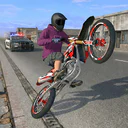
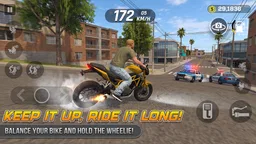
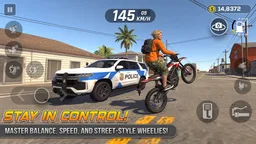
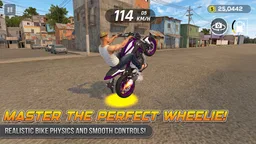
Getting the hang of a wheelie-focused racing game can take a little patience: a small change in timing or movement may be enough to throw off a run. Wheelie Master: Moto Ride 3D keeps its central idea easy to grasp—ride through city traffic and work on mastering wheelies—so it is approachable at first glance, while leaving room for trial and error as you play. I like that direct premise, especially for short sessions when I want an arcade-style driving challenge rather than a complicated racing setup.
Getting Started Without Guesswork
The first useful step is to treat the opening moments as a chance to learn the game’s feel, not as a test you have to ace immediately. A wheelie requires control, and traffic adds another thing to watch. If an attempt ends quickly, that does not necessarily mean the game is broken or that you have missed a hidden step. Try again with a lighter touch and pay attention to how your bike responds.
It also helps to make sure the game has finished loading before you judge its responsiveness. On a phone that is busy with other tasks, closing unused apps and reopening the game can be a sensible first check if play feels sluggish. These are general device steps rather than special requirements for this title, but they can help separate a temporary performance hiccup from a challenge that simply takes practice.
Wheelie Master: Moto Ride 3D is free to play, and its age rating is Everyone. The game is developed by Wayfu Game Studio and sits in the racing genre, with a focused hook built around wheelie riding in city traffic. That narrow focus may suit players who want to jump into a specific driving challenge; anyone expecting a broad collection of racing modes should keep the premise in mind before installing.
When a Run Does Not Go to Plan
In a game built around maintaining a wheelie while navigating traffic, it is natural for some attempts to end before you feel ready. Rather than changing several things at once, make one adjustment per retry. Ease into the controls, watch the road, and give yourself a moment to understand what caused the previous attempt to falter. A deliberate retry is more useful than tapping through the same approach in frustration.
If the controls seem unresponsive, check the simple possibilities first. Make sure your fingers are reaching the intended on-screen area, remove anything that might be obstructing the display, and avoid switching between apps during an active run. If the issue persists, close and reopen the game. Restarting the device is another general troubleshooting option, particularly when other apps are also acting unusually.
Connection problems can be easy to blame on a game even when the cause is elsewhere. If a screen takes longer than expected to load, check whether your connection is working in another app, then try again when it is stable. If the rest of the device is functioning normally and only one run goes badly, it is more likely worth treating that as part of the learning curve than as a technical fault.
Simple Setup Checks
Before installing, check that your device meets the game’s minimum operating-system requirement: Android 7.1. Keeping the operating system reasonably up to date can also help with general compatibility, though it is wise to leave enough free storage for normal app operation. If an installation stalls, checking available space and retrying through the app store are straightforward first steps.
After installation, launch the game when the device is not under heavy load. If it starts slowly, give it a little time before repeatedly tapping the screen. Should it freeze or close unexpectedly, reopen it once; if the problem returns, restart the device and check for an available app update. These steps are common fixes for mobile apps and do not assume a particular cause.
It is also worth checking that your device’s touch screen is clean and behaving normally. A missed input can feel like a control problem, especially in a game where timing matters. Try the screen in another app; if touches are missing there too, the issue may be with the device rather than the game. If the problem happens only here, a fresh launch or reinstall may be a reasonable next step, provided your device is set up to retain anything you want to keep.
Finding a Comfortable Play Rhythm
My practical advice is to keep early sessions relaxed. The game’s central activity is easy to describe, but repeating a wheelie successfully through traffic takes attention. Short attempts make it easier to notice whether you are improving and prevent a frustrating streak from turning into a long, unfocused session. Once the basic rhythm feels more familiar, you can decide whether you want to spend more time chasing a cleaner ride.
Try to focus on one thing at a time: your balance, your timing, or your awareness of traffic. That is a general way to approach a precision-based game, not a claim that the title includes a tutorial or specific training mode. If the game provides guidance on screen, use it; otherwise, learn from each attempt and keep the next adjustment small.
For a player looking for a casual motorcycle challenge, this focused approach can be appealing. There is no need to understand a complicated premise before starting: the point is to ride through city traffic and become a wheelie master. The straightforward idea is the game’s strongest selling point, while the same concentration on one activity may feel repetitive to players who prefer varied objectives.
When the Device or Connection May Be Involved
Not every rough session points to a problem with the game itself. If the entire phone is running slowly, other apps are crashing, or touch input is unreliable across the screen, start with the device. Close background apps, restart the phone, and check whether the issue appears elsewhere. If it does, troubleshooting the handset is more sensible than repeatedly reinstalling a single game.
Likewise, if an installation or loading step seems stuck, confirm that the app store is functioning and that your connection is stable. Switching between Wi-Fi and mobile data may help identify a connection issue, where available. Avoid making repeated purchases or installation attempts while a store screen is still processing; wait for the current action to finish before trying again.
In-app purchases are available, with listed items ranging from $1.99 to $9.99 each. Since spending is optional, players who want to keep play free should review purchase prompts carefully and use their device’s purchase controls if needed. This is a useful setup consideration for families as well as anyone who prefers to avoid accidental spending.
What to Expect from the Game
The game has attracted over ten million installs and holds an average rating of 4.6 from around forty-two thousand ratings, with about two hundred seventy reviews. Those figures suggest that it has reached a substantial audience, but they cannot tell you whether its particular style will match your taste. The best indicator is the premise itself: this is a racing game centered on wheelies and city traffic, not a general-purpose motorcycle simulator.
Its release date is June 11, 2025, and the current version is 1.49. Those details can be handy when checking that you have the current build or comparing what appears on your device with the app store. If something behaves unexpectedly, updating through the store is a sensible check before trying more involved troubleshooting.
As with any mobile game, your experience can depend on the phone, its current workload, and the quality of its touch input. A smooth setup will not make every attempt easy, though; the game’s challenge is part of the appeal. If you are unsure whether a rough start is normal, give yourself a few calm retries before deciding that the controls or performance are at fault.
My Practical Verdict
I see Wheelie Master: Moto Ride 3D as a clear, casual choice for players who want a wheelie challenge without a complicated premise. Its free entry point makes it easy to try, and its Everyone rating gives it broad age suitability. The main thing to bring is patience: riding through traffic while working on a wheelie is a focused activity, so a few awkward attempts are part of getting comfortable rather than an automatic sign that something is wrong.
If the game runs poorly, begin with the basics: check the Android requirement, free some space if needed, close other apps, and relaunch. If touch input or performance is also unreliable elsewhere on your phone, look beyond the game. For a stable device and a player who enjoys repeating a compact driving challenge, this is an easy title to understand and a reasonable one to sample. If you want lots of different racing activities, its deliberately narrow wheelie-and-traffic focus may not hold your attention for as long.
What we like
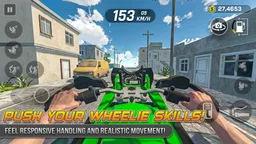
- Responsive controls make steering feel direct and easy to learn.
- Short rides suit quick play sessions.
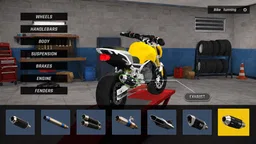
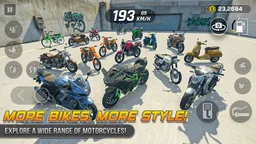
- Multiple motorcycles offer variety in handling.
- Stunts add a satisfying challenge to each ride.,3D environments give the gameplay a clear sense of motion.
What could be better
- Precise wheelies can take practice to master.
- Repeated routes may feel familiar over time.
- Some bikes may require extended play to unlock.
- Touch controls can feel sensitive during sharp turns.
- Ads may interrupt the flow of play.







