


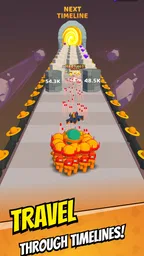
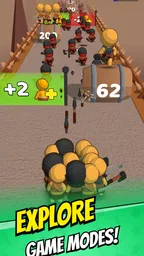

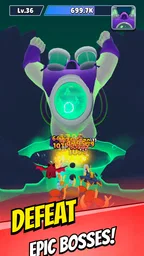
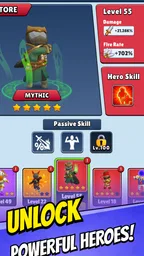
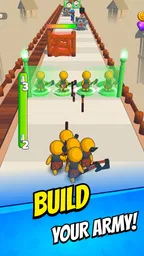
Timeline Up review
 Analysis by Appsdrops
I like the idea behind Timeline Up: a racing game framed around moving through different timelines, rather than simply asking you to master a conventional track. That gives it an immediately understandable hook for short play sessions. Still, a neat premise does not remove the usual mobile-game friction. If a race feels confusing or progress stalls, it helps to separate what the game is asking of you from problems caused by your device or connection.
Getting oriented when a run feels unclear
Timeline Up is a free racing game from Rollic Games, released on January 15, 2024. Its store summary describes evolving through timelines, while the short description is simply “Timeline Up.” Those phrases communicate the broad theme, but they do not explain the moment-to-moment rhythm. My advice is to treat the opening sessions as an orientation period: pay attention to what changes from one section to the next, and avoid assuming that every part of the experience works like a traditional lap-based racer.
That distinction matters if you arrive expecting a familiar driving simulator. Timeline Up is better approached as a mobile racing game built around progression and changing stages, not as a substitute for a detailed motorsport game. The central appeal is the sense of moving forward through a sequence of eras or timelines. If you enjoy seeing a run develop and adapting as its setting shifts, that premise can make brief sessions satisfying. If you mainly want realistic handling, extensive vehicle tuning, or the depth of a full racing career, you may be happier with a different kind of game.
When I hit a confusing point in a casual game, I try one small change at a time instead of repeatedly tapping or restarting. First, I look for what the screen is currently asking me to do. Then I watch for whether the next attempt behaves differently after a deliberate action. This is useful here because a game organized around progression can make a new stage feel like a failure when it is actually a transition or a change in what you need to notice.
There is also a practical difference between being stuck and simply not liking the pace. If you can make progress but find the repetition tiring, that is a preference issue rather than something to troubleshoot. A quick racing game can be enjoyable precisely because it avoids a lengthy setup, but that same simplicity may not satisfy players who want control over every detail of a race.
Small checks before restarting
Before closing the game, I would check whether the current screen has finished responding and whether a visible prompt or transition is still underway. Give it a moment, then try a single tap where the game appears to invite input. Repeated tapping can make it harder to tell whether the game registered the first action, especially if the display is briefly busy.
If the controls seem unresponsive, check the basics outside the game as well: make sure the device is not in the middle of a system interruption, that the screen is registering touches normally, and that the game has not been pushed into the background. These are ordinary checks, not claims about a special Timeline Up setting. They can help identify whether a missed action belongs to the game or to the device.
It is worth keeping expectations realistic about hardware compatibility. The listed minimum operating-system requirement is version 7.0, and the current version is 17.10.0. That gives you a useful starting point when deciding whether an older device is a likely source of trouble, but meeting a minimum does not guarantee every device will feel equally smooth. If the game runs but feels awkward, compare its behavior after closing other demanding apps and reopening it rather than immediately assuming your progress or account is at fault.
Timeline Up is rated for Everyone, which makes its stated age suitability broad. That does not mean every player will enjoy the same style of play; a child, a casual adult, and a racing enthusiast can have very different expectations. I would still supervise spending on a shared device, since the game is free to download but offers in-app purchases ranging from $0.99 to $99.99 per item. If you are setting it up for someone else, check the device’s purchase controls before handing it over.
Recovering a session without making things worse
When a run does not seem to register, I prefer a simple recovery sequence: pause long enough to see whether the screen changes, return to the game only after it responds, and then make one fresh attempt. If that does not help, close and reopen the app. This is a sensible general workflow for a mobile game, but it is not a promise that every interrupted session can be restored exactly where it left off.
That limitation is important for people who play in fragments. If you are squeezing in a run while waiting for a bus, keep enough time to reach a natural stopping point rather than assuming an interruption will preserve everything. A call, notification, low battery, or app switch can break the rhythm of any mobile game. I would avoid deliberately testing several interruptions in a row while you are trying to understand whether the game has saved progress.
A second useful habit is to distinguish a repeatable issue from a one-off delay. If the same action fails across multiple attempts, note what you were doing just before it happened. If it only happens once, reopening the app may be enough. This does not require technical knowledge, and it prevents a common mistake: changing several device settings at once, then having no idea which change mattered.
If you are considering a reinstall, treat it as a last resort rather than the first fix. Before removing any game, think about whether the progress you care about is safely preserved and whether you can access the same device or account afterward. I would not assume that a reinstall automatically repairs a particular issue or that it will retain every part of a session. Try the less disruptive steps first, especially if the problem is limited to one slow or interrupted run.
When the cause may be outside the game
Not every rough session points to Timeline Up itself. A crowded device, an unstable connection, a system update, or a screen that is missing touches can all make a game feel unreliable. If other apps are also lagging or failing to respond, that is a strong reason to check the device before blaming one racing game. Conversely, if everything else works normally and the same problem repeats only here, the app becomes a more plausible part of the picture.
Connection trouble can also be easy to misread. If something appears not to load, first check whether your connection is working in another app, then try again when it is stable. That is a general diagnostic step, not a claim that every part of Timeline Up requires an internet connection. I would avoid switching networks repeatedly during an active run, because the resulting interruption can muddy the evidence about what actually caused the issue.
Storage and background activity are worth considering when a device has been under strain. Closing apps you are not using and making room on a nearly full device are reasonable housekeeping steps, but they are not guaranteed fixes. If the problem disappears after that, you have a useful clue; if it remains, you have ruled out a couple of common sources without making a drastic change.
For a player deciding whether to install it, the wider reception offers some context without settling the question for you. The game has an average rating of 3.9 from around 108,000 ratings, with roughly 4,000 written reviews and more than 10 million installs. I read that as evidence of a sizable audience and a mixed enough response that personal taste matters. A number cannot tell you whether the timeline-based progression will hold your attention, so I would judge it by whether the first sessions feel enjoyable rather than by popularity alone.
Who will enjoy its particular kind of racing
I would recommend Timeline Up to someone who wants a light racing game that can fit into short breaks and who likes the idea of progression changing the context of play. It is a reasonable choice when you want something less involved than a simulation, and the free download lets you try the basic experience before deciding whether it suits you. Its appeal is not that it offers every racing feature; it is that the timeline premise gives its forward movement a distinctive frame.
Consider an everyday situation: you have a few minutes before a train arrives and want a game that does not demand a long, carefully planned session. Timeline Up may fit that gap if you enjoy quick bursts and can stop after a natural break. If you are frequently interrupted, though, do not count on an interrupted run behaving like a bookmarked race. Choose a time when you can finish a stretch comfortably, and keep your expectations modest about how much depth a short-session game needs to provide.
Compared with the usual alternatives, the trade-off is clear. A conventional arcade racer may be a better fit if you want familiar track competition and a more direct focus on driving. A racing simulator is the better choice if you care about realism, careful vehicle control, and a deeper sense of technique. Timeline Up sits closer to casual progression: it is for players curious about advancing through changing timelines, not for anyone looking for a complete motorsport package.
That also makes it an easy game to skip without missing a must-have tool or essential service. If repetition quickly puts you off, if you want to tune a car in detail, or if you dislike games whose main draw is moving through successive stages, a different racing title will likely serve you better. I would also be cautious about treating optional purchases as a shortcut to enjoyment; the core question is whether the basic loop is fun for you.
My practical verdict
After weighing the premise against the likely use case, I see Timeline Up as a casual racing option with a specific hook rather than a broad, all-purpose racer. Rollic Games gives it a simple idea to communicate—progress through timelines—and that can make it appealing when you want a quick change of pace. Its main weakness is also tied to that simplicity: players seeking elaborate driving systems or a strong sense of simulation may find the experience too limited.
I would start with the free version, play a few relaxed sessions, and notice whether the changing timeline concept keeps you curious. If a screen seems stuck, check for an unfinished transition, make one deliberate input, and try a clean restart before changing device settings or reinstalling. If problems recur across the same action, compare with how the rest of your device behaves. That approach is more useful than assuming every hiccup is either a game bug or user error.
My recommendation is to try it if you want accessible, short-form racing with a progression theme, but to choose a more traditional racer if precise driving depth is your priority. The game’s 3.9 average and large player base suggest it has found an audience, yet they cannot predict whether its particular rhythm will click for you. For me, the right test is simple: does moving through its timelines make a spare few minutes more enjoyable? If yes, it has earned a place on your device; if not, there is no need to force it.
What we like
- A clear timeline makes it easy to follow events in chronological order.
- Useful for organizing milestones and tracking progress over time.
- The focused layout keeps key dates easy to scan.
- Can help users spot gaps or overlaps in a sequence of events.
- A timeline format suits both planning and reviewing past activity.
What could be better
- Large timelines may become difficult to scan.
- Entering dates and details can take time.
- The layout may offer limited flexibility for complex projects.
- Users may need to update entries manually to keep information current.
- A timeline view may not suit tasks that lack date-based milestones.







