

Skyline Bowling review
 Analysis by Appsdrops
I like bowling games best when they give me a reason to think about each shot without turning a spare moment into a lesson in physics. Skyline Bowling sits in that casual sports-game space, with a stylized take on bowling and maps that give its lanes a different feel from a plain, repeated alley. It is free to start, and its special abilities suggest a more playful approach than a straight simulation. My overall impression is that it is worth a try if you want short, skill-oriented sessions, but it is less suited to anyone looking for a realistic bowling simulator or a clearly documented competitive ruleset.
Bowling with a playful twist
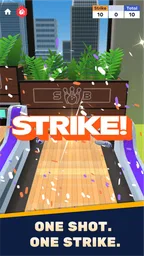
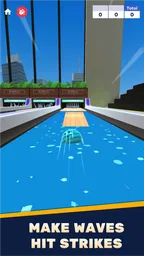
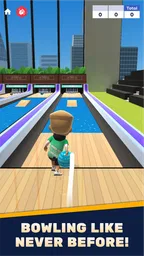
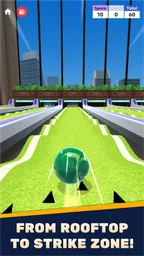
Made by VOODOO, this is a sports game built around bowling rather than a broad collection of athletic activities. That focus is useful: you can pick it up with a simple goal in mind—send the ball down the lane and improve your result—without learning a roster of controls or a complicated career structure first. The unusual maps and special abilities are the parts that distinguish it from familiar mobile bowling games, where the main variation is often simply the look of the alley.
I would treat the setting as arcade bowling, not as a substitute for the real sport. A conventional bowling simulator is usually the better choice if you want a close recreation of lane conditions, detailed ball behavior, or practice that transfers to a physical game. Here, the appeal is more immediate: the theme invites experimentation, and the abilities give the game room to feel different from a basic roll-and-repeat routine. That trade-off is sensible for a quick mobile game, though it may disappoint players who want realism above all else.
The game is listed as free, with optional in-app purchases ranging from $0.49 to $134.99 per item. That is a wide span, so I would approach purchases carefully and check the exact item and cost in the app store before buying. The existence of purchasable items does not, by itself, tell me what they do or whether they affect play. I would not assume that paying is necessary—or that purchases are purely cosmetic—without seeing the relevant item details in the game.
Its Teen content rating is another practical point for families. I would use that rating as a starting signal, not a substitute for checking the store page and the experience on the device a young player will use. If you are considering it for a teenager, the clearest spending precaution is to review purchase settings and make sure the player knows to ask before buying anything.
What makes a session engaging
The most useful way to approach a game like this is to treat each lane as a small problem rather than simply aiming for speed. I would take a moment to notice what has changed on a map before committing to a shot, then use an ability only when it addresses that specific situation. That habit makes the special mechanics feel like decisions instead of buttons to press automatically. It also helps separate a genuinely better attempt from one that succeeded by chance.
For a short session between errands or during a break, the format sounds more appealing than a long sports game that expects sustained attention. You can set yourself a modest goal—make a cleaner attempt than the last one, or test whether a particular approach works on a different map—and stop when the break is over. The game’s bowling focus makes that kind of self-directed session easy to understand, even if you do not know much about the sport.
One practical tip is to change only one part of your approach at a time. If you alter your aim and also trigger an ability on the same attempt, it becomes hard to tell which choice helped. Keeping one variable steady gives you a better sense of how a map or ability affects your result. This is a small way to make progress feel earned, especially in an arcade game where the unusual setting can otherwise make outcomes seem unpredictable.
Progress, pressure, and spending
The purchase range is worth noticing, but it should not be mistaken for proof of pay-to-win design. The available facts establish that there are in-app purchases and give the range of listed item prices; they do not establish what each item contains, whether it changes performance, or how progression works. I therefore would not advise spending as a shortcut to better results. First play enough to decide whether the core bowling loop is enjoyable, then inspect any purchase in context and ask whether it offers something you actually want.
That approach is especially useful if you tend to feel pressure to keep up with a leaderboard or unlock everything in a game. I would set a personal limit before opening a purchase screen, and I would avoid buying an item just because a difficult round made it tempting. If a purchase is optional and the game remains fun without it, patience is the safer choice. If a particular item is unclear, leave it alone until its effect and price are understandable.
There is also a difference between progress that comes from learning and progress that comes from spending. In a bowling game, refining timing and aim is usually the more satisfying kind, because you can recognize the improvement in your own decisions. Since the exact progression and purchase effects are not established here, I would judge the game by whether it lets you enjoy those small skill gains, rather than assume that a particular unlock path or competitive advantage exists.
How fair does competition feel?
Skyline Bowling’s maps and special abilities could make matches less straightforward than ordinary bowling, but that does not tell me how the game handles competitive balance. I would want to see how abilities are presented in play and whether opponents appear to have comparable options before making a firm call about fairness. A distinctive mechanic can add strategy, but it can also make results harder to read if players do not understand what influenced a shot.
If you are mainly interested in competing, try to separate your own consistency from the outcome. Pay attention to whether you can repeat a useful shot and whether a loss seems connected to a decision you could change. That is a better test of a fair-feeling game than judging it from one frustrating round. For a player who wants standardized ten-pin rules and a straightforward comparison of skill, a conventional bowling simulator may offer a clearer competitive framework.
I also would not treat the popularity figures as evidence that competition is balanced or that the game suits every player. The game has over one million installs, and its average rating is 4.5 from around twelve thousand ratings. Those figures suggest that many people have tried it and that the overall reception is positive, but they cannot answer individual questions about matchmaking, purchase influence, or how much variety a regular player will find.
Who should give it a try
I would recommend trying it if you enjoy casual sports games, like experimenting with unusual settings, and are happy to judge a game by a handful of short sessions before deciding whether to stick with it. It may be a good fit for someone who wants a bowling theme without the demands of a realistic simulation. It is also approachable as a quick distraction: you can focus on a single shot and use your own small goals to make a session feel purposeful.
For example, imagine you have ten minutes while waiting for a friend. Rather than start a story-driven game you cannot finish, you could open this one, try a few rolls, and concentrate on how a different map changes your choices. If an ability is available, use it deliberately rather than on every attempt. Even without a long play session, that gives you a useful sense of whether the game’s arcade twist is enjoyable to you.
I would skip it if you want detailed real-world bowling practice, dislike special abilities in sports games, or prefer a competitive game whose rules and balance are easy to evaluate from the outset. It may also be a poor fit if seeing optional purchases would make you uncomfortable, particularly if you are choosing a game for a younger player. The free price makes trying it easy, but it does not remove the need to pay attention to purchase prompts and spending controls.
Compatibility and a sensible trial
The current version is 3.30.2, and the stated minimum operating system is Android 8.0. Before installing, I would check that your device meets that requirement and that you are viewing the correct store page for your platform. The game is free to download, so the most sensible test is to play first and decide whether the core experience earns a place on your home screen before considering any optional purchase.
When you try it, pay attention to three things: whether aiming feels understandable, whether the maps make you adjust your choices in an interesting way, and whether the special abilities add decisions rather than confusion. Those are more useful personal checkpoints than trying to finish everything quickly. If the game’s unusual bowling style clicks, you will have a clear reason to return; if the shots feel arbitrary or the extra mechanics get in the way, a more traditional bowling game will probably suit you better.
My trust verdict
At the time of writing, Skyline Bowling has been available since May 16, 2023, and its presence in the sports category fits its bowling-centered play. I see it as a casual arcade option with a clear point of difference: unusual lanes and abilities, rather than a promise of strict simulation. That makes the game easy to understand as a try-before-you-commit download, while leaving room for personal preference about how much novelty you want in a sports game.
My advice is to start with the free experience, keep purchases deliberate, and decide based on how satisfying the shots feel after you have tried more than one kind of map. The rating and install count show that it has found an audience, but they are not a guarantee that its particular style will suit you. If you want quick bowling sessions with room to experiment, I think it is worth testing. If your priority is realistic technique or transparent competitive balance, I would choose a more conventional alternative instead.
What we like
- Bright visuals make the lanes easy to follow.
- Short rounds suit quick play sessions.
- Bowling controls are simple to learn.
- A range of lanes adds visual variety.
- The familiar sport makes the game easy to pick up.
What could be better
- Physics can feel inconsistent on some shots.
- Progress may rely on repeated play.
- Some content may require in-app purchases.
- The gameplay can become repetitive over time.
- Ads may interrupt the experience.







