


Carrom Pool: Disc Game review
 Analysis by Appsdrops
Carrom Pool: Disc Game makes a good first impression by turning a familiar tabletop pastime into a quick mobile contest. I like that its appeal is easy to understand: line up a striker, judge the angle, and try to send your discs into the pockets before your opponent does. The board stays at the center of the experience, so there is little clutter between deciding on a shot and taking it. If you want a multiplayer carrom game that feels more like a brisk match than a long sports simulation, this is an inviting place to start.
A tabletop look built for quick matches
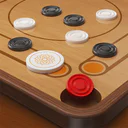
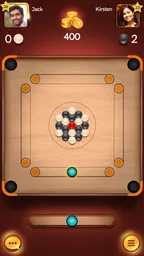
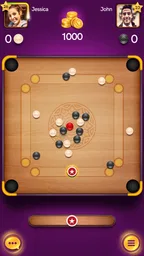
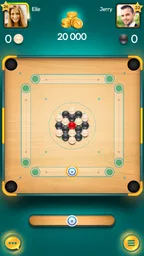
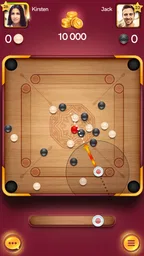
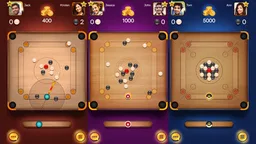
The visual language is rooted in the carrom board rather than a realistic sports venue. That is a sensible choice: the playing surface and discs need to remain readable while you aim, and decorative detail should not distract from the line of a shot. In my view, the game’s strongest art-direction decision is that it keeps the physical idea of carrom recognizable even on a small phone screen. The result feels like a compact board game first and a mobile competition second.
That focused setting also gives the game a distinct mood. There is no need to learn a stadium, roster, or elaborate fictional world before playing. You are immediately thinking about the board, the pieces, and how to make a useful next move. The simplicity is a real advantage for short sessions, though anyone looking for a deep sports career or a strongly narrative setting should choose a different kind of game.
The presentation is made by Miniclip.com, and the game sits in the sports category despite its tabletop scale. That label makes sense in the competitive sense: each turn is about control, precision, and responding to another player. It does not play like a conventional team sport, and that difference is part of its charm. I can recommend it to someone who enjoys competitive sports games but would rather make careful individual shots than manage a whole match of moving players.
Readable boards, with room for personal taste
Carrom is a game where small visual details have practical value. If the pieces are hard to distinguish or the board is too busy, it becomes harder to judge a shot. Here, the restrained tabletop framing supports the central task: look at the arrangement, decide what to target, and plan the striker’s path. When you are playing on a phone during a break, that clarity matters more than elaborate scenery.
There is a trade-off, of course. The board-based setting does not offer the variety of environments found in some racing or action sports games. If you need a changing backdrop to keep your attention, the visual loop may feel plain over time. I see that as a preference issue rather than a flaw in the concept: the game prioritizes legible play over spectacle, and that makes sense for a title built around precise shots.
Sound and the pace of a turn
The game’s rhythm comes mainly from the turn structure. You assess the current layout, take a shot, and then react to how the board has changed. That natural pause between decisions makes it easier to play in short bursts than a fast, continuous sports match. I find this particularly useful when I have a few spare minutes and want a contest that still rewards attention without demanding a long uninterrupted session.
Sound can help make a tabletop game feel tactile, but I would not choose this title primarily for its audio. The appeal is in the visual feedback of a shot and the changing positions of the discs. If you prefer playing quietly, the core experience still makes sense as a board-and-aim challenge. If sound is important to your enjoyment, it is worth trying a match for yourself rather than assuming that audio will be the main source of atmosphere.
The measured pace is not the same as low pressure. A single shot can change which options are available, and a rushed decision may leave an opponent with an easier opportunity. I suggest treating each turn as a small puzzle: identify the most useful target, check what might happen after contact, and avoid taking a difficult shot just because it looks dramatic. That approach makes the match feel more deliberate without turning a casual game into homework.
How the mechanics reward patience
The central skill is aiming with intent rather than simply striking whatever disc is closest. Before a shot, I recommend looking for a route that accomplishes something useful even if it does not go exactly as planned. A direct attempt at a pocket may be tempting, but a safer move that improves the next position can be the wiser choice. This is one of the more satisfying parts of carrom on a touchscreen: the board gives you a visible problem, and the result teaches you to read similar situations better.
A practical habit is to pause briefly after every turn and notice what changed. Did the shot open a path, block one, or leave a piece awkwardly placed? Keeping that small mental record is more helpful than repeating the same kind of shot regardless of the layout. It also gives beginners a way to improve without needing a formal tutorial routine: focus on one decision at a time, and learn from the board your last shot created.
There is a limit to how much control a mobile player may feel in a precision game. Aiming on a touchscreen can be less comfortable than handling a physical striker, especially if you prefer fine, deliberate inputs or play on a small display. If your first few shots do not land where you expected, try slowing down and making the aiming gesture carefully rather than swiping harder. Players who strongly prefer tactile tabletop controls may still find a physical carrom board more satisfying.
The multiplayer format is the main reason to keep returning: the opponent gives each board state a human consequence, and a familiar shot can become less predictable when someone else is making choices too. But multiplayer also means the experience depends on how much you enjoy competing. If you want a solo puzzle with a fixed solution, this may not be your best fit; if you like adapting to another player’s decisions, the format has more staying power.
Who will enjoy it, and what to consider
I would point casual board-game fans toward it, particularly anyone who already understands the basic appeal of carrom: simple rules, careful aim, and the satisfaction of a well-placed shot. It also suits sports-game players who want something lighter than a full match simulation. A realistic everyday use case is playing one or two rounds while waiting for a friend or taking a short break. The turn-based feel makes that more convenient than a game that expects sustained, fast reactions.
On the other hand, I would skip it if what you want is a deep single-player campaign, a broad range of athletic events, or a constantly changing action pace. This is a focused board game, and its strengths come from repetition and small decisions rather than from adding a new sport or setting each session. Someone who tires quickly of aiming and position-based play may not find enough variety in its central loop.
Compared with the usual alternatives in mobile sports games, Carrom Pool is less about reflexes and more about angles and restraint. Compared with other casual board games, it feels more directly competitive because the key action is a physical-style shot rather than a sequence of abstract turns. That makes it an appealing middle ground for people who like sports rivalry but do not want the complexity of managing teams, equipment, or long fixtures.
Practical details before you install
The game is free to install, and it includes optional in-app purchases ranging from ten cents to nearly one hundred dollars per item. I recommend deciding in advance whether you are happy to play without spending, especially if you are downloading it for a younger player. The content rating is Everyone, which makes the presentation broadly accessible, but the purchase options are still worth keeping in mind when choosing how the game is used.
It first arrived on March 26, 2019, and the current version is 19.6.1. It requires Android 8.0 or later. Those details matter if you are installing on an older device, but they do not change the central question: do you enjoy aiming, reading a board, and competing through small tactical choices? The game has reached more than 500 million installs, with a 4.4 average from 8.1 million ratings and 8.2 thousand written reviews. That scale suggests broad interest, though your own enjoyment will depend much more on whether the carrom loop suits you.
A focused mood that serves the game
My overall impression is that Carrom Pool: Disc Game succeeds by keeping its setting, presentation, and mechanics pointed in the same direction. The board-focused art makes the pieces easy to follow; the measured turns leave room to think; and the competitive format gives each shot a reason to matter. It is not a sprawling sports package, and it does not need to be. Its best sessions come from noticing a promising angle, resisting an impulsive shot, and seeing how the board changes after the striker moves.
I would recommend it to a friend who wants an accessible competitive game for short breaks and enjoys improving through practice. I would suggest a different option to someone who wants constant action, a solo story, or the feel of a physical board under their hands. For everyone in between, the free entry point makes it easy to try, while the optional purchases are a reason to stay deliberate. When I want a quick contest that rewards patience more than speed, this is a satisfying choice.
What we like
- Quick matches make it easy to play during short breaks.
- Offline play lets you practice without an internet connection.
- Simple controls are approachable for new players.
- Several game modes add variety beyond standard matches.
- Customizable pieces give progression a personal touch.
What could be better
- Online matches require a stable internet connection.
- Ads can interrupt the flow between games.
- Competitive matches may feel unforgiving for beginners.
- Progression can take time without in-app purchases.
- Random matchmaking may pair players with very different skill levels.







