






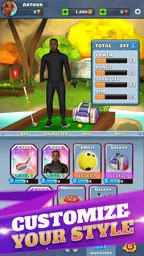

Mini Golf Club-PvP Multiplayer review
 Analysis by Appsdrops
Mini Golf Club is a sports game built around quick mini golf matches, with a focus on playing against friends and competing on the leaderboard. Its appeal is easy to understand: a familiar, low-pressure activity becomes a little more exciting when someone else is aiming for the same bragging rights. I like that the idea is approachable even if you don’t usually play sports games. You can come for a casual round and still have a reason to care about each shot.
Getting started without the guesswork
Before settling in for a match, check that your device can run the game. The current version is 1.1.8, and the minimum operating system is Android 8.0. On iOS, check the app store’s compatibility details for your particular device before installing. A quick compatibility check is more useful than troubleshooting a game that cannot run properly on the hardware in the first place.
The game is free to download, with optional in-app purchases priced from $0.99 to $99.99 per item. That range is worth noticing before handing your phone to a child or tapping through purchase screens in a hurry. I’d treat any optional purchase as a deliberate choice rather than part of the basic setup. Mini golf is best enjoyed when the focus stays on the round, not on accidental spending.
Once installed, take a moment to get comfortable with the controls and the game’s on-screen cues before inviting friends into a match. That small pause can prevent the familiar first-round stumble of trying to work out what a button does while everyone else is waiting. If you’re playing together, make sure each person has the game ready and understands how to join the same session using the options shown in the app. I wouldn’t assume that a friend has completed setup just because they have started downloading it.
A smooth first session starts with compatible devices, a stable connection, and everyone ready before the match begins. These are ordinary checks, but they solve many of the delays people blame on a game. If the game does not open, first confirm that the device meets the operating-system requirement and that the installation has finished. If it opens but a shared match is slow to get going, check that the players are online and try again after the connection settles.
Why a match can feel stuck
In a multiplayer game, the most frustrating moments often happen before the fun starts: a friend cannot connect, the group is not quite together, or a screen seems to be waiting. It’s tempting to assume the game is broken, but the cause can be as ordinary as a weak network or one player not being ready. I’d begin with the simplest checks instead of repeatedly tapping buttons or restarting in the middle of a session.
Make sure the players are using a reliable internet connection, then give the game a moment to respond. If one person is on a patchy connection, switching to a stronger network may help. You can also ask everyone to close and reopen the game if a session appears unresponsive, then try joining again. These are general troubleshooting steps rather than a guarantee, but they’re sensible first moves for an online game.
It also helps to distinguish a slow connection from a control issue. If the game responds but a shot doesn’t go where you intended, pause long enough to inspect the controls and try a careful practice attempt. Mini golf rewards a little patience; rushing through the first interaction can make the game feel less intuitive than it really is. I prefer to learn the basic rhythm before worrying about leaderboard results.
Players may also arrive with different expectations. Some will want a relaxed game with friends, while others will focus on competing. The store describes PvP mini golf on courses and leaderboard competition, so the social contest is central to the pitch. If your group is mainly looking for a solo experience, it’s worth being clear about that before everyone installs the game. Shared expectations make it easier to enjoy what the game is designed to offer.
Recovering a session calmly
If a round stops responding, try a simple recovery sequence: wait briefly, check the connection, and then reopen the game if necessary. If you return to a match, look for the game’s visible options rather than assuming that every session can resume in exactly the same way. Avoid repeatedly starting new attempts while the original screen is still loading; that can make it harder to tell whether the game has recovered.
When the issue affects only one player, have that person check their connection and restart the app while the others wait. If everyone is affected, it may be more efficient for the group to take a short break and try again together. This keeps troubleshooting straightforward and avoids blaming a particular device without evidence. For persistent problems, checking for an available app update through the app store is a reasonable next step.
After updating, reopen the game and try a fresh session. If a problem continues, note what was happening when it occurred: whether the game failed to launch, a match did not connect, or the controls behaved unexpectedly. A clear description is more useful when seeking help than a general report that “the game is broken.” Keep any account or device details private when asking for assistance in public spaces.
That practical approach matters because a quick multiplayer game depends on several things working together: the app, the device, the network, and the other players’ readiness. One weak link can interrupt the flow, even if the game itself is functioning normally. I’d avoid making multiple changes at once; test one simple fix, then see whether it helped. That way, you can identify the likely source instead of making the setup more confusing.
When the game may not be the problem
Not every delay points to a fault in Mini Golf Club. A device with limited free space, an unstable network, or an operating system below the stated Android requirement can affect how an app behaves. Other apps running at the same time may also use device resources or network bandwidth. Closing apps you’re not using and reconnecting to a dependable network are low-risk checks that can improve the overall experience.
For Android players, the stated minimum is version 8.0. If your device is below that, compatibility is a more likely concern than a temporary gameplay glitch. If the game has been installed for a while, check whether the app store shows an update, and make sure the device itself has completed any pending restart or system update you already planned to install. Avoid unofficial downloads or drastic device changes just to test a casual game.
For a group match, also consider whether everyone is trying to join at the same time or whether one player has not finished setting up. A quick message to the group can save several rounds of repeated attempts. If only one person has trouble, have them check their own connection and app state first. If the problem is widespread, wait and retry later rather than assuming that reinstalling is the only answer.
Purchases deserve a separate bit of care. The game is free to play, but optional items have listed prices ranging from $0.99 to $99.99. Review the confirmation screen before approving any transaction, and use the purchase controls available on your device if you want to manage spending. That’s especially sensible when several people share one phone or tablet. A relaxed game session should not turn into an unexpected charge.
What the game does well
The strongest part of the concept is its simplicity. Mini golf is immediately recognizable, and playing against friends gives each shot a social purpose without requiring a complicated sports setup. The store’s emphasis on fun PvP games with friends and leaderboard competition suggests a casual contest that can fit into a short break or a longer gathering. I find that combination more inviting than a game that asks new players to learn a long list of systems before they can enjoy a round.
The audience is broad, too. The content rating is Everyone, so the game is positioned for a general audience. That does not remove the need for adults to supervise device use or purchases, but it does make the basic theme easy to share across age groups. If you’re introducing the game to a family member or a friend who doesn’t usually play mobile games, mini golf is a friendly starting point.
Its reach is another sign that the premise has found an audience: Mini Golf Club has over 1 million installs, around 174,000 ratings, and a 4.6 average. Those figures give prospective players a useful sense of the game’s visibility, but they don’t guarantee that every player will enjoy it. I’d take them as context, then decide based on whether multiplayer mini golf sounds like the kind of quick competition you actually want.
BoomBit Games is the developer, and the game is free to install. The main practical consideration is that free access sits alongside optional purchases, so players should keep an eye on purchase prompts. If you’re choosing a game for a group, explain that distinction before playing. It’s a small detail, but it helps everyone start with the same expectations.
Who should give it a try
Mini Golf Club makes the most sense for players who enjoy casual competition and want a simple game to share with friends. It may suit a quick match between other activities or a friendly challenge where the leaderboard adds an extra reason to play. If your priority is an elaborate sports simulation, this lighter mini golf setup may not be what you’re looking for. If you want an accessible head-to-head idea, the concept is easy to get behind.
The best way to approach it is to keep the first session uncomplicated: check compatibility, install through your usual app store, confirm that everyone has a working connection, and learn the controls at an unhurried pace. If something goes wrong, troubleshoot one thing at a time. That sensible routine takes the pressure off and gives the game a fair chance to deliver its central promise: a fun match with friends and a spot to chase on the leaderboard.
Overall, I see Mini Golf Club as a straightforward pick for social mobile gaming rather than a demanding sports title. Its appeal rests on familiar mini golf, friend-versus-friend play, and the extra nudge of leaderboard competition. The free download makes it easy to try, while optional purchases are worth keeping in mind. Get your group ready before starting, stay patient if a connection hiccup appears, and the game has the ingredients for an enjoyable casual contest.
What we like
- Quick matches make it easy to play in short sessions.
- PvP gives each course a competitive edge.
- Simple controls are easy for newcomers to learn.
- A wide range of courses keeps rounds varied.
- Progression offers goals beyond individual matches.
What could be better
- Precise shots can take practice on tricky terrain.
- Online matches depend on a stable connection.
- Some upgrades or items may require in-game currency.
- Players who prefer solo play may find PvP limiting.
- Course hazards can make outcomes feel unpredictable.







