
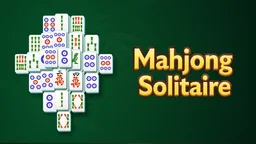
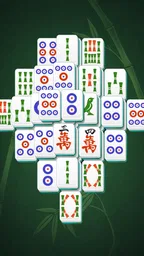
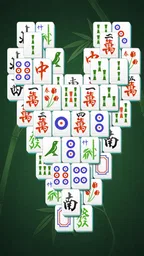
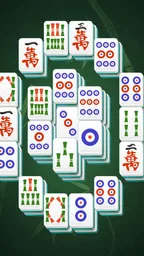

Mahjong for Seniors review
 Analysis by Appsdrops
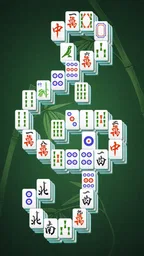
I like tile games best when they give me a quiet puzzle to focus on without turning every session into a race. Mahjong for Seniors is aimed at that kind of play: a board game built around matching tiles, with daily puzzles and the option to play offline. My impression is that it suits people who want a familiar, unhurried pastime more than players looking for a deep campaign, head-to-head competition, or a steady stream of new mechanics.
Relaxed tile matching, with room to play at your own pace
This is a board game from Appgeneration, designed around the simple pleasure of scanning a layout, spotting a pair and deciding what to clear next. The appeal is easy to understand: a puzzle can fill a short break, and offline play makes it practical when you are away from a reliable connection. I would consider it for a commute, a waiting room or a quiet evening when I want something more absorbing than scrolling but less demanding than a strategy game.
The title calls out seniors, but I would not treat that as a reason other adults should skip it. The basic matching format is approachable across ages, and the game’s content rating is Everyone. Its audience is better defined by what someone wants from a game: clear, familiar tile play and a gentle pace, rather than fast reactions or complex rules. If you enjoy Mahjong solitaire-style puzzles, the presentation and rhythm matter more than the age label.
Mahjong for Seniors is free to download, with optional in-app purchases priced from $0.99 to $12.99 per item. That is useful to know before settling in: the basic price of entry is zero, but the app also offers paid items. I would decide whether to spend based on what is actually available in the game and whether it improves your own sessions, not on an assumption that purchases are needed to enjoy tile matching. The purchase range is confirmed; the individual items and what they provide are not detailed here, so I would inspect the in-app purchase screen before paying.
What the puzzle rhythm feels like
Tile matching looks simple until a board has several plausible moves. A useful habit is to pause before clearing an obvious pair and check whether it is blocking tiles you may need later. That small bit of planning can make a layout feel like a puzzle instead of a reflex exercise. I find this style especially satisfying when I can give it a few uninterrupted minutes, but it also works as a short reset between tasks.
Daily puzzles give the game a natural reason to return without requiring a long-term commitment. They suit a routine: open the game when you have a break, try the day’s layout, and stop when you are done. I would not approach that routine as a streak to protect or a chore to complete. The strongest reason to come back is whether solving another board remains relaxing, not whether a calendar creates pressure.
Offline play is one of the more practical parts of the package. It means the game can fit situations where a connection is inconvenient, such as travel or a spot with patchy service. I would still open it while connected before relying on it for a trip, particularly if I wanted to see the daily puzzle first. The confirmed offline option is valuable, but it does not by itself tell me how every online-linked element behaves away from a connection.
Progress without turning play into a race
The available picture is centered on classic tile matching and daily puzzles, not on a competitive ladder or a story campaign. That makes the game a reasonable choice for someone who wants to improve by noticing patterns and making more careful selections. A concrete way to get more from a board is to scan for pairs that unlock other choices, rather than clearing whichever match catches the eye first. This is a practical strategy for tile layouts generally, not a promise that the app includes a particular hint or undo tool.
That distinction matters because a relaxed puzzle and a progression game satisfy different needs. If you want levels that steadily introduce new rules, a narrative, or a clear collection goal, this may feel sparse. If you want a familiar board that can be picked up and put down, its straightforward format is a strength. I would choose it for a calm session, not as my main game when I want a sense of long-form achievement.
There is also a useful trade-off in the lack of pressure implied by this kind of play. A slower pace leaves space to think, which is helpful for casual players and anyone learning the matching logic. On the other hand, people who enjoy timers, competitive scores or demanding tactical constraints may find the experience too gentle. I would not recommend it as a substitute for a more challenging strategy title if difficulty and mastery are the main attractions.
How it compares with other Mahjong options
Compared with a physical Mahjong set, this app is more convenient for a solo puzzle break: there is no need to arrange pieces or find another player. That convenience comes with a different kind of experience. Digital tile matching is best for quick, self-contained decisions; it does not reproduce the social play or full table rules associated with traditional Mahjong. If you are hoping to learn that multiplayer game, look for an app specifically built around its table-based rules.
Compared with other Mahjong solitaire apps, the useful point of distinction here is the combination of daily puzzles and offline play, alongside a title and positioning that speak directly to seniors. I would judge the fit by whether the tiles are comfortable for you to read and whether the pace feels pleasant on your own device. Those are personal factors, and I would try a brief session before deciding it should become a regular part of your routine.
For someone choosing between this and a general-purpose puzzle game, the choice is simple: pick this when tile recognition and a familiar Mahjong-style layout are the draw. Choose a word, number or logic puzzler instead if you want a different kind of mental task. The game’s focus is an advantage for fans of the format, but it does not make it a broad puzzle collection.
Spending, fairness and what I would check
The purchase information gives a clear range, from $0.99 to $12.99 per item, but it does not establish which items are offered, whether any affect puzzle access, or how purchases change play. I would not infer that paid items provide an advantage, nor assume that everything is available without payment. Before buying, I would read the item descriptions in the app and confirm that the purchase is something I actually want. That is the fairest way to assess spending without guessing about the game’s design.
There is no verified competitive mode to weigh against purchases, so I would not frame fairness in terms of paid advantages over other players. For a solo board puzzle, my practical fairness question is whether the free experience is enjoyable on its own and whether a purchase is clearly optional for my needs. The game is free to start, but the presence of paid items means anyone trying to avoid spending should pay attention during installation and play.
Likewise, details such as whether a particular item removes an interruption, unlocks content or changes convenience should be checked in the app rather than assumed. I would be cautious about treating the listed price range as a complete explanation of the purchase model. It tells me the possible price span per item, not what each item does or whether it is necessary. That limit does not make the game a poor choice; it simply means I would base a purchase on its actual description.
Who should give it a try—and who may prefer something else
I would recommend trying it if you enjoy quiet tile puzzles, want something that can work offline, or are looking for a game that can fit into a small pocket of free time. It may also suit someone introducing a relative to digital puzzle play, provided the person is comfortable using the device and likes matching games. A realistic routine might be to play one puzzle after lunch, put the phone away, and return another day without needing to remember a complicated storyline.
I would steer away if you want multiplayer Mahjong, detailed progression systems, or a game that tests speed and competitive skill. I would also think twice if you dislike optional purchases in free games; the existence of paid items may be a distraction even if you never intend to use them. In that case, a paid-once puzzle or a different app with a purchase model you prefer could be a better fit.
For readability, I would test the board on the device you plan to use rather than relying on the age-oriented name to guarantee a particular visual setup. Comfort depends on screen size, eyesight and personal preference. If the tiles are easy for you to distinguish and the layout feels uncluttered in practice, the game’s unhurried format can be pleasant. If not, another tile app with a more suitable display may serve you better.
A well-established option, with a straightforward promise
The game was released on October 30, 2020, and its current version is 5.21. It has an average rating of 4.6 from around 82,000 ratings, with roughly 4,600 written reviews and over 5 million installs. Those figures suggest that it has reached a substantial audience, though popularity cannot tell me whether its tile size, pace or purchase options will suit a particular person. I would use them as context, not as a substitute for trying the game.
Its age rating is Everyone, and the minimum operating system is 10. Those details make compatibility and suitability easier to check before installation, especially if you are setting it up on an older device or for a family member. The developer is Appgeneration; I would still review the purchase prompts and the on-device experience myself, since those are the parts that matter most to an individual player.
My overall view is that this is a focused, low-pressure way to enjoy digital tile matching. The daily puzzles provide a reason to return, and offline play adds practical value for short sessions away from a connection. The main caveat is that the confirmed purchase range does not explain what each paid item offers, so I would look before spending. If you want calm Mahjong-style puzzles rather than competition or a deep progression system, Mahjong for Seniors is an easy game to consider; if those other features are what keep you engaged, a different kind of puzzle game will be a better match.
What we like
- Large tiles make matching easier to see on small screens.
- Relaxed play suits short sessions at a comfortable pace.
- Simple rules make it approachable for new players.
- Offline play lets you enjoy puzzles without internet access.
- Hint options can help when you get stuck.
What could be better
- Some layouts may be difficult to solve without undoing moves.
- Ads can interrupt play between puzzles.
- Small touch targets may cause accidental tile selections.
- Repeated layouts can make longer sessions feel less varied.
- Sound effects may need to be muted for quiet play.







