


MadOut 2: Grand Auto Racing review
 Analysis by Appsdrops
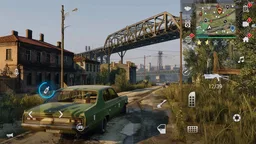
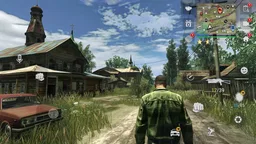
I see MadOut 2: Grand Auto Racing as a particular kind of racing game: one for players who want driving to share the stage with an unruly city and a criminal-life theme, rather than a clean circuit and a stopwatch. That mix gives it a rougher, more open-ended appeal than a conventional track racer, but it also means the experience can feel less focused. I’d recommend it to someone curious about a big, chaotic driving playground; I would not pick it for a calm, finely tuned racing session.
What the city asks of you
MadOut 2 is a free racing game from MadOut Games LLC FZ, and its Mature 17+ rating is worth taking seriously. The gangster framing and crime theme are central to its identity, not a small cosmetic detail around ordinary car races. If you are choosing a game for a younger player, or you simply prefer racing without that setting, this is an easy reason to look elsewhere.
The scale of its audience is striking: it has passed 100 million installs, with an average rating of 4.2 from around 1.2 million ratings. Those figures suggest broad appeal, but they don’t guarantee that its particular blend of driving and urban disorder will suit you. In my view, the useful question is not whether it is popular; it is whether you enjoy a less polished, more unpredictable kind of racing session.
The first friction point is expectation. If you arrive looking for the precise lap-by-lap discipline of a traditional racing game, a large city built around cars and crime may feel scattered. If you are happy to treat driving as part of a wider sandbox mood, that same lack of focus can be the attraction. I’d decide which kind of session I want before installing: structured competition or room to mess around.
Why the first session can feel rough
MadOut 2’s appeal depends on accepting that the city’s bustle and the racing are intertwined. The result is less about repeatedly chasing a perfect racing line and more about reacting to an environment that can be chaotic. That makes a short session easy to start, but it can also leave a player unsure what to prioritize if they expected a clear sequence of tightly directed races.
My practical advice is to give the game a few minutes without judging it by the standards of a track-focused racer. Pay attention to whether you enjoy the feel of driving around a busy setting, rather than asking immediately whether every moment is a polished race. If the city atmosphere is not doing anything for you, pushing through longer sessions is unlikely to change the basic appeal.
There is also a tonal trade-off. The gangster premise gives the game a distinctive personality, but it may be tiring if you only want cars and speed without crime-themed framing. This is not a case where I would recommend ignoring the premise and hoping the rest feels neutral; it is better to treat the theme as part of the purchase decision, even though the game itself is free.
Getting started without unnecessary frustration
The game’s current version is 21.31, and the minimum operating-system requirement is Android 8.0. Before troubleshooting a launch problem, I would check that the device meets that baseline and that the game has finished installing through the app store. Those are ordinary first checks, but they prevent the frustrating cycle of repeatedly opening an incomplete or incompatible installation.
Because MadOut 2 is free to download but offers in-app purchases ranging from $0.49 to $99.99 per item, I’d also make a simple spending decision before handing over a device. If the player is a child or shares a phone with family, review the device’s purchase controls first. That is a sensible safeguard for any game with optional purchases, and it avoids letting an impulsive tap decide the budget.
For a first run, I’d keep the setup uncomplicated: install through the normal store, allow the installation to finish, then open the game with a reliable connection if one is available. I would avoid changing several device settings at once if something goes wrong. One change at a time makes it easier to tell whether the issue was a temporary connection hiccup, a device limitation, or simply an installation that needs another attempt.
A useful low-effort test is to try the game when you have enough time to let it settle, rather than during a rushed break with a weak signal and several apps competing for attention. That is not a special requirement of MadOut 2; it is a way to make setup problems easier to diagnose. If it works in a calmer situation, the earlier trouble may have come from the conditions around the session rather than the game itself.
Recovering a session when something goes wrong
If the game hangs or closes, I would start with the least disruptive steps: close it, reopen it, and check whether the connection is stable. If the problem persists, restart the device before reinstalling anything. Reinstallation is a later step because it takes more time and can disrupt access to local app data; I would not make it the first reaction to one bad launch.
When a session feels sluggish, I’d close other demanding apps and try again before assuming the game is broken. A busy device can make an already chaotic driving game feel worse, and the visual impression of poor responsiveness can be hard to separate from the game’s own hectic pace. If the same problem continues after a clean restart, checking for an available update in the app store is more sensible than repeatedly tapping through the same failed launch.
There is a helpful distinction between a one-off failure and a repeatable one. If MadOut 2 only fails once, I would not immediately clear data or reinstall. If it consistently fails at the same point, note what you were doing and whether the connection or device conditions changed. That gives you a clearer basis for deciding whether to try a basic reset or seek help, instead of losing time to random fixes.
I would be especially cautious about deleting app data as a first-line fix. It may remove locally stored information, and there is no good reason to take that risk before simpler steps. Likewise, avoid unofficial downloads offered as a shortcut around a problem. Using the normal app store keeps the installation path straightforward and reduces the chance of adding a separate security or compatibility issue.
When the device or the moment is the real problem
Not every disappointing session points to a defect in the game. If the phone is already struggling with other apps, has little free space, or is running hot, a demanding driving session may be an unhelpful test. I would close unused apps, give the device a chance to cool, and try again later. If the game still behaves poorly while other apps run normally, then it makes more sense to focus on the game installation or its compatibility.
Connection problems can also masquerade as game problems. If the experience changes alongside a weak or interrupted connection, test again somewhere with a steadier signal before reinstalling. Conversely, if the game launches normally but you simply dislike the loose, chaotic feel, that is a matter of taste rather than something a settings tweak can solve. Recognizing that difference saves a lot of pointless troubleshooting.
There is a practical everyday scenario where MadOut 2 makes sense: you have a stretch of free time, want to drive around a crime-themed city, and are in the mood for an unpredictable session rather than a measured race. It is less appealing when you have only a minute, need a quiet game, or want to make steady progress through clearly structured races. I’d choose according to the mood, not just the fact that it is a racing title.
How it compares with familiar racing choices
Compared with the usual track racers, MadOut 2 trades some of their focus for a broader city-and-crime atmosphere. A circuit game is generally the better fit when I want clean competition, consistent routes, and a sense of improvement tied to racing performance. MadOut 2 is the more interesting option when the setting and freedom to drive around matter as much as the race itself.
It also differs from a straightforward driving simulator. The gangster premise gives the experience a more exaggerated, action-oriented identity, so players seeking a calm lesson in realistic road manners should look elsewhere. The trade-off is clear: MadOut 2 can feel memorable because it is not another tidy lap racer, but that distinctiveness will not compensate for its rougher, less disciplined feel if you value precision above atmosphere.
Its scale helps explain why so many players have tried it, but popularity is not the same as universal polish. Around 12,000 written reviews sit alongside that huge audience, and I would read player comments with a practical eye: look for recurring remarks about the specific device or experience you care about, rather than assuming every complaint applies to your setup. The most useful comparison is still your own preference for sandbox-style driving versus tightly controlled races.
Who I’d recommend it to
I’d suggest MadOut 2 to adults who enjoy car games with a rowdy urban setting and do not mind that the experience is not built around pristine track racing. It is also a reasonable choice for someone who wants a free game to sample before deciding whether optional purchases matter to them. Since the game is free to download, you can judge its feel directly, while keeping the purchase range in mind rather than treating every extra as necessary.
I would skip it if you want a polished, predictable racing routine, dislike crime-themed content, or are choosing a suitable game for someone below the Mature 17+ age rating. I would also pass if you tend to get frustrated when a game’s central appeal is chaos rather than consistency. In those cases, a conventional racing title is likely to offer a more satisfying use of your time.
My practical verdict
MadOut 2: Grand Auto Racing is a distinctive free racing game with a clear identity: cars and a crime-themed city, rather than a pure circuit challenge. It launched on May 1, 2017, and its continuing version 21.31 shows that the game has remained an active part of its app-store presence. I’d approach it as a sprawling, rough-edged alternative, not as a direct substitute for a precision racer.
My recommendation comes with a condition: enjoy the setting and accept that the experience can be messy. Check device compatibility, protect against accidental purchases, and try basic recovery steps before taking drastic action if a session misbehaves. If the city’s unruly driving is what you want, it is worth trying; if you want clean laps and dependable structure, a more focused racing game is the better choice. Its best quality is also its main limitation: the freedom and disorder are the point.
What we like
- The open world gives you room to explore at your own pace.
- A wide vehicle selection adds variety to races and exploration.
- Online modes let you compete and interact with other players.
- Vehicle upgrades offer ways to tune performance to your style.
- The sandbox supports free roaming beyond structured races.
What could be better
- The large world can feel empty between activities.
- Touch controls may take time to get used to.
- Online play can be affected by unstable connections.
- The game may run poorly on older devices.
- Ads and in-app purchases can interrupt play or add costs.







