






Galaxy Bowling 3D review
 Analysis by Appsdrops
I like bowling games when they make it easy to take a few turns without asking me to plan an evening around them. Galaxy Bowling 3D is a sports game from Winterlight that brings bowling to a mobile screen, with a space-themed identity rather than the look of a plain alley simulator. Its appeal is straightforward: it is free to try, approachable for casual play, and focused on a familiar sport that most people can understand quickly.
That simplicity is also the right way to judge it. This is not a substitute for a full bowling venue, nor would I pick it for a detailed coaching experience or an elaborate sports campaign. I would consider it when I want a low-commitment game to dip into, especially if I enjoy aiming, timing, and chasing a better result over a few repeat attempts.
What you get before spending anything
The game is free to download, while optional in-app purchases range from $0.99 to $4.99 per item. That makes the initial decision easy: you can try the game without paying an upfront purchase price. I would treat the listed purchase range as a reason to check what each offer does before buying, rather than assuming that spending is necessary to enjoy the basic experience.
That distinction matters for a casual sports game. If you only want to bowl now and then, free access may be enough to decide whether its feel suits you. If you find yourself returning often, an optional purchase may seem more worthwhile, but I would base that choice on what is actually offered in the game and how much you play—not on the assumption that paid items automatically improve the core experience.
Galaxy Bowling 3D is rated for Everyone, so its subject and presentation are aimed at a broad audience. It has a 4.5 average from around 84,000 ratings and more than 10 million installs. Those figures suggest that it has reached a large casual audience, though popularity alone cannot tell you whether its controls or pace will suit your own preferences.
A familiar sport with a distinct presentation
The bowling premise gives the game an immediate advantage over sports titles that require learning a complicated ruleset. You already know the basic goal: send the ball down the lane and try to knock down the pins. The title’s 3D, galaxy-themed framing gives it a more playful identity than a straightforward recreation of a local bowling alley.
In my view, that makes it best approached as a compact mobile game, not as a detailed simulation. People looking for the atmosphere of a real bowling night—friends sharing a lane, the sound and feel of the venue, and the social ritual around each frame—will still prefer going out. On a phone, the attraction is convenience: the game can fit into a short pause when setting up a real match would be impractical.
The game first released on June 21, 2011, and its current version is 15.51. That long history helps explain why it is an established name in mobile bowling, but it is not, by itself, proof that every part will feel modern to every player. I would judge it by whether the current build runs on my device and whether the actual bowling interaction feels satisfying, rather than expecting a new release’s presentation simply because the version number is current.
How I would fit it into an ordinary day
A realistic use case is a short wait: I have a few minutes before an appointment, open the game, and try to improve on a previous result rather than committing to a long session. Bowling works well for that kind of stop-and-start play because the goal is clear and each attempt has an obvious outcome. If I have only a moment, I can leave the game and return later instead of needing to keep track of a complicated story or team setup.
Another useful way to approach it is as a friendly pass-around game. If someone nearby is curious, the bowling idea needs little explanation, so it can be easier to share than a game built around extensive menus or specialized knowledge. I would still check the actual mode and turn flow before promising a group experience; the sport’s familiarity does not automatically mean every possible multiplayer arrangement is included.
For a more deliberate session, I would focus on consistency rather than simply repeating throws at random. Pay attention to how the game responds to your aim and release, then change one part of your approach at a time. This is a practical way to tell whether a miss came from your targeting or timing, and it helps make another attempt feel like a test rather than a guess. I would not assume that mobile controls reproduce the precision of a physical bowling approach, so small adjustments are more useful than expecting every throw to behave exactly like a real one.
Where the value comes from—and where it stops
The strongest value here is access to a recognizable sports activity without an upfront price. You can find out whether mobile bowling is something you actually enjoy before considering any optional purchase. That is a sensible arrangement for a game whose main appeal depends on a personal preference: some players enjoy repeating a skill-based action, while others lose interest once the basic goal is familiar.
The tradeoff is that the broad idea may not provide enough variety for someone who needs constant new objectives. If you want a career structure, extensive customization, deep simulation, or a strong social competition scene, do not assume those are present just because the game has a large audience and a long-running release history. I would look for a title that explicitly centers the feature you care about most, whether that is realistic lane play, organized online competition, or a progression-heavy sports campaign.
There is also a difference between a bowling game and a bowling lesson. A mobile game can let you experiment with aim and timing, but I would not use it as a reliable guide to real-world technique. The screen changes how distance and movement feel, and tapping or swiping is not the same as handling a ball. For a casual diversion, that is no problem; for someone trying to improve their actual game, in-person practice or coaching is a better use of time.
Because optional purchases are available, I would avoid buying anything until I had played enough to know what I want from the game. The practical check is simple: first see whether the free experience keeps you interested, then look at the exact item and decide whether it addresses a real need. If you are only opening the game occasionally, spending may add little to your enjoyment. If you play regularly, you can make a more informed decision after seeing how the available offers fit your habits.
Who is most likely to enjoy it
I would recommend giving it a try if you like bowling, want a sports game with an immediately understandable objective, or need something that can occupy a short break. It is also a reasonable choice for a casual player who does not want to pay before discovering whether the basic activity clicks. The Everyone age rating makes it suitable for a broad range of players, though individual preferences about screen time and purchases still belong to the person using the device.
It is less suitable for someone who expects a detailed real-world simulation or wants a game built around long-term competitive structure. It may also be a poor fit if you dislike repetition: bowling naturally returns to the same central task, and the fun depends on whether refining an attempt feels rewarding to you. If your favorite sports games are fast team contests with changing situations, a bowling title may feel too deliberate.
Before installing, I would also check device compatibility. The listed minimum operating system is 7.1, so the game is aimed at devices meeting that requirement; a newer device is no guarantee that every individual player will like the controls, but compatibility is a useful first check. If storage or performance is a concern, it is sensible to confirm the app behaves well on your own device before deciding to keep it.
My verdict: try it free, then decide
For me, Galaxy Bowling 3D makes the most sense as a free, low-pressure way to see whether mobile bowling is satisfying on your phone. Its established audience and strong average rating are encouraging signs, but they are not a promise that it will match your taste. The useful question is whether you enjoy taking another shot, adjusting your approach, and trying to do a little better.
I would install it for short sessions, casual play, or a quick bowling-themed distraction. I would skip it if I were specifically shopping for a deep simulation, a real-world training tool, or a feature-rich competitive sports game. The optional purchases make sense only after the free experience has earned your interest. My recommendation is to start without spending and let the game prove its value through the way it feels to play.
What we like
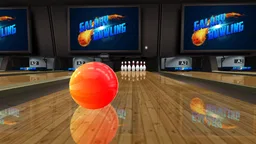
- Realistic 3D lanes make each frame feel immersive.
- Several ball designs add a personal touch.
- Multiple game modes offer variety beyond standard bowling.
- Simple controls make it approachable for newcomers.
- Works well for short play sessions.
What could be better
- In-game ads can interrupt the experience.
- Some extras may require in-app purchases.
- Touch controls can feel imprecise on small screens.
- Gameplay may become repetitive over time.
- A stable connection may be needed for some features.







