





eFootball™ review
 Analysis by Appsdrops
I approached eFootball™ as a football game to play in short bursts as well as a competitive hobby, and its appeal depends on how you like to interact with a match. The essentials are familiar: build up an attack, read the opponent’s movement, and try to turn a brief opening into a goal. What matters just as much, though, is whether the on-screen action and controls suit your hands, eyes, and available time. My overall impression is that KONAMI’s game offers a substantial mobile football experience, but it is not equally comfortable for every player or every setting.
Finding your way around the match
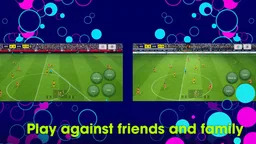
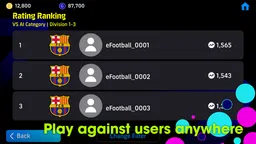
The game sits firmly in the sports category, and its central purpose is easy to grasp even if you are new to it: play football against other people, including users around the world. That makes the first decision less about learning what the game is and more about deciding how much depth and competition you want from a mobile football title. If you enjoy reading opponents and refining your play, there is a reason to keep returning. If you only want an occasional, low-pressure kickabout, the competitive framing may feel like more commitment than you need.
The interface has to serve a lot of action in a small space. During play, your attention is divided between the ball, teammates, defenders, and the controls. I recommend starting at a pace where you can watch the screen rather than immediately trying to play aggressively. A few cautious matches help you notice which parts of the display you naturally track and whether the touch controls feel manageable. That small adjustment period is useful even for people who already know football games: mobile play asks you to make decisions while your fingers partly cover the field.
For navigation, I found it helpful to treat the game as something to learn in layers. First get comfortable with moving and making basic choices in a match; then pay attention to the ways you lose possession or fail to create a clear chance. This is more useful than trying to master every possible action at once. A player who understands why a pass was intercepted can make a practical change next time, while someone who simply taps faster may repeat the same mistake.
The game has attracted a broad audience: it has more than 100 million installs, and its average rating is 4.1 from around 19 million ratings. Those figures suggest that it reaches well beyond a small group of football-game specialists, but they do not mean every player will find the controls intuitive. A large audience can include very different expectations, from people looking for a quick match to people who want an ongoing competitive challenge.
Learning the controls without rushing
One useful habit is to separate observation from action. In a crowded moment, take a fraction of a second to check where your next option is before committing to a pass or run. That sounds simple, but it matters more on a touchscreen than it does with a controller, where buttons are easier to locate by feel. If you often make an input you did not intend, slow the match down mentally and focus on one decision at a time instead of trying to react to every movement on the pitch.
It is also worth noticing whether your usual grip changes during play. Holding a phone tightly can make repeated taps less precise, while shifting it mid-match can distract you at the worst moment. I would settle into a comfortable position before starting a serious game and use a low-stakes session to see whether your thumbs can reach the actions you need without stretching. This is a practical test, not a promise that the layout will work for every hand size.
Touch play, vision, and sensory load
Football is a fast visual sport, and that is both the game’s strength and its challenge on a phone. The ball can move quickly, players cluster together, and a useful passing lane may appear briefly. If small moving details are difficult for you to follow, or if a busy screen makes it hard to distinguish the important action, the experience may take more effort than a slower sports game. Try playing when you are alert and in good light before deciding whether that visual pace suits you.
There is a real trade-off between keeping your eyes on the field and looking down to confirm a touch. A more practiced player can spend less attention on the controls and more on positioning, but that familiarity takes time. I would not judge your ability from a first match: unfamiliarity can make the screen feel busier than it later does. At the same time, persistence will not necessarily solve every difficulty. If you need large, high-contrast visual targets or a slower pace to play comfortably, this may simply not be the right football game for you.
Sound and the surrounding environment also affect how easy it is to stay focused. In a noisy place, it can be harder to concentrate on the match; in a quiet shared space, audio may not be appropriate. The safest way to assess this is to try a short session in the setting where you actually expect to play. Do not assume that a match that feels manageable at home will feel just as manageable while travelling or multitasking.
When a mobile match fits the day
The strongest everyday use case is a dedicated break: you have a few minutes, can hold your phone steadily, and can give the match your attention. A commute with interruptions, a walk between appointments, or a moment when you need to respond to people around you is a poorer fit. Football’s momentum makes it frustrating to have your focus pulled away just as you are defending or building an attack. I would choose a more pause-friendly game if my play time were likely to be repeatedly interrupted.
For someone deciding whether to install it, the practical question is not only “Do I like football?” but “Can I give a live match enough attention to enjoy it?” If the answer is yes, it can be a satisfying way to bring football into spare time. If you mostly want to dip in for a few seconds at a time, the game’s real-time demands may turn those short opportunities into unfinished or frustrating sessions.
The worldwide player focus gives matches a competitive dimension that a solo, offline-style football experience does not offer in the same way. That can be exciting when you want to test your decisions against another person. It also means that the experience is less suited to someone seeking a predictable opponent or a calm practice routine every time. I would choose a more self-paced alternative if avoiding competitive pressure matters more to you than playing against other people.
Access and practical limits
eFootball is free to download, with in-app purchases ranging from $0.19 to $109.99 per item. I would approach those purchases deliberately rather than treating them as a necessary first step. Start by finding out whether you enjoy the match feel and can comfortably use the controls; spending money cannot make a crowded screen easier to follow or remove the need to concentrate. If you are setting the game up for a younger player, it is sensible to discuss purchases before play, even though the content rating is Everyone.
The game has been available since May 23, 2017, and the current version is 11.1.1. It requires Android 7.0 or later. These details help with basic device planning, but a compatible operating system alone does not guarantee that the game will feel comfortable on a particular screen or suit a person’s motor and sensory needs. I would test it on the device you intend to use rather than assuming that the same control experience carries over to every phone or tablet.
One of the more useful ways to evaluate fit is to use a short personal checklist after a few sessions: Can I see the action without leaning closer? Can I make the inputs I intend without changing my grip? Can I play in the places where I have free time? If one answer is no, adjust the situation first—find a steadier seat or a quieter moment. If the same barrier remains, a slower or less touch-intensive football game may be a better choice.
Players who enjoy learning from opponents may value the game’s competitive emphasis, while players who want relaxed, interruption-proof sessions may prefer something with a more forgiving pace. That is not a judgment about skill. It is a question of context and comfort. A person can love football and still decide that a fast touchscreen match is not the right way to enjoy it.
My inclusive verdict
KONAMI’s eFootball™ is worth trying if you want a free mobile football game built around matches with players around the world and you are comfortable giving the screen sustained attention. Its scale—more than 100 million installs—and the steady interest reflected in its ratings make it an established option in the genre, not a niche experiment. But broad popularity should not be confused with universal ease of use.
My recommendation is conditional rather than automatic. Give it a fair trial in a comfortable setting, learn the controls gradually, and decide based on how your eyes and hands feel during actual play. I would recommend it to a football fan who enjoys competitive matches and can focus for their duration. I would steer someone toward a slower, more pause-friendly alternative if rapid visual changes, touch precision, or interruptions are likely to make play tiring. The best fit is the one that lets you enjoy football without having to fight the way you access it.
What we like
- Core matches are free to play.
- Online events provide regular competitive challenges.
- Team tactics let you shape your playing style.
- Controller support is available on compatible devices.
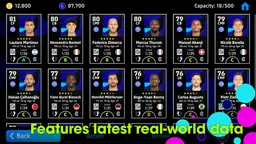
- Player development adds depth to squad building.
What could be better
- An internet connection is required for most features.
- Online play can feel uneven when connections are unstable.
- Building a strong squad may take considerable time.
- Frequent updates can require substantial storage space.
- Touch controls may take time to master.







