





2 Player Games - Offline review
 Analysis by Appsdrops
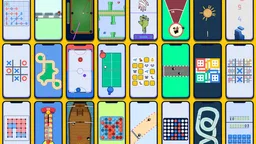
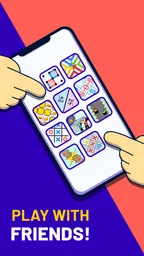
When two people are sharing a phone or tablet and want a quick way to play together, a board-style game can turn a quiet moment into a bit of friendly competition. 2 Player Games - Offline is presented as a collection of multiplayer games for friends and family, with a simple premise that makes it easy to understand who it is for: people who want to play together rather than take turns managing a complicated setup. I find that focus appealing for households, where a shared device is often more practical than asking everyone to install and learn a separate game.
A shared device, a shared game
The idea behind this two-player game is refreshingly direct. Its short description is “2 Player Games,” and the broader store summary emphasizes multiplayer play for friends and family. That makes the app a natural candidate for a shared-use situation: a pair of siblings looking for a quick match, friends passing time together, or family members trying to add a little play to a break. Rather than framing itself as a solo challenge, it puts playing with another person at the center.
That distinction matters when choosing a game for a household. A title designed around shared play can be easier to introduce than one that expects every person to maintain a separate routine or compete from separate devices. Here, the appeal is the prospect of having a game ready when two people are together. The app is free to download, so it is straightforward to consider as a casual option before deciding whether it suits the way your household likes to play.
I also like how clearly the basic use case comes across. There is no need to sell the idea as a deep strategy experience or a long-term hobby: it is a board-category game built around two-player entertainment. That makes expectations easier to set. I would approach it as a convenient shared activity, especially for short windows of free time, rather than assume that every household member will want to make it their main game.
Getting started as a pair
For a shared-device game, the first question is less about individual profiles and more about whether both players can agree on when and how to use the device. The app’s central purpose gives the pair a common starting point, but families will still want to decide who gets the device, how long a play session should last, and whether the game is appropriate for the moment. Those simple expectations can prevent a casual match from turning into an argument over whose turn it is to keep playing.
Because the game is meant for two players, it naturally encourages coordination before a match begins. Players need to be together and ready to play, so it works best when both people can settle in at the same time. I see that as a small but useful social advantage: the game can become an activity people share, not just another screen competing for each person’s attention. A parent and child, for example, can use the shared play as a chance to spend a few minutes together, while siblings can agree on a session and then hand the device back.
It is still worth setting a few household boundaries before installing any game on a device that several people use. Decide whether younger players may open it on their own, whether play is limited to certain times, and who is responsible for keeping the device available to others. These are ordinary family agreements rather than special features of the app, but they make a difference when one phone or tablet serves several people. Clear expectations help preserve the app’s role as a shared pastime instead of a source of device disputes.
Taking turns and keeping play friendly
Games played side by side can be an easy way to practise taking turns, handling a win or loss, and communicating clearly. That is especially true in a household where players have different ages or experience levels. I would encourage players to agree on a friendly tone before they start: keep the competition light, explain rules patiently when needed, and let the other person enjoy the match rather than rushing them. Those habits make a shared game more welcoming, whatever the players’ skill levels.
The title’s emphasis on multiplayer play makes it suitable for people who want an activity they can enjoy together, but that does not automatically mean every pair will have the same idea of fun. One person may want a close contest, while another just wants to laugh and pass the time. A quick conversation about what both players are in the mood for can make a difference. It can also help families decide whether the game fits a short break, a waiting period, or a relaxed evening at home.
Shared-device play also benefits from a simple handoff routine. Players can agree to put the device away after a match, let someone else use it, or save it for another moment when both are available. This is particularly helpful when the phone or tablet is used for school, work, or other household needs. The app’s two-player focus makes it easy to think of play as a joint activity with a natural stopping point, even when the family itself supplies the rules for when to stop.
Age context and household trust
The game has an Everyone content rating, which gives families a useful general indication of its intended audience. I would still treat that rating as a starting point rather than a substitute for parental judgment. Every child is different, and parents may want to look at the game together before deciding whether it belongs on a shared device. That is a sensible approach for any app, particularly when younger children may have access to the same phone or tablet used by adults.
Trust in a shared device is also about making purchases understandable. The game is free, and it offers in-app purchases priced between $1.99 and $5.99 per item. That is relevant for households where children can use the device, even if the main reason for installing the app is simply to play together. Parents should discuss whether purchases are allowed and use the device’s own purchase settings as appropriate. A clear rule is often easier for children to follow than an assumption that every in-app option is automatically available.
For adults, the same conversation can prevent confusion when multiple people use one account or device. Make sure everyone knows whether purchases require permission and who is responsible for approving them. I would avoid treating “free” as a promise that no spending is possible; it describes the download price, while optional purchases are a separate consideration. With that distinction made clear, families can decide whether the app fits their budget and household rules without making assumptions about what another player might do.
What its popularity suggests
2 Player Games - Offline has reached over one million installs and holds a 4.6 average from around 6,300 ratings. It also has around 110 written reviews. Those figures suggest that plenty of players have taken an interest in its straightforward two-person premise, though popularity by itself cannot tell you whether a particular family will enjoy it. The more useful question is whether your household wants a simple shared game and whether two players can regularly use the same device at the same time.
Soup Ent is the developer, and the game’s current version is 1.5.9. It was released on March 15, 2025, and requires Android 7.1 or later. Those details are useful when checking whether an Android device is compatible, especially if a household relies on an older phone or tablet. The game is also listed as free to download, with optional in-app purchases, so it can be considered without an upfront purchase while still calling for sensible spending boundaries.
These practical details make the app easier to evaluate as a household choice. Compatibility matters when a device is shared across different family members, and the age rating gives parents a starting point for their decision. The popularity figures offer a little context, but I would put more weight on the actual use case: a pair of people who want to play together, a device they can share, and clear expectations about time and spending.
Where it fits into everyday family life
A shared game works best when it fills a particular need instead of becoming a default answer to every quiet moment. This one may suit a short period when two people are already together and want something playful to do. It may also work as a way for friends or relatives to connect around a common activity. The board-game framing gives the experience a familiar feel, while the two-player description keeps the intended social setup easy to grasp.
I would be more cautious about recommending it as a substitute for a broader collection of family activities. A digital game can be enjoyable, but households may want to balance screen time with conversation, outdoor play, reading, or traditional board games. The best fit is probably a deliberate shared session: decide who is playing, agree on when to finish, and put the device aside afterward. That approach keeps the game in its place as one option among many, rather than letting it dictate the family’s routine.
It is also worth thinking about whether the device itself is comfortable for both players to share. A common screen means players need to sit or stand together and cooperate around the same piece of hardware. That can be a plus for family interaction, but it may not suit people who prefer private play or who are not in the same room. The app’s promise is most compelling when both players are ready to be present and make the game a joint activity.
My household verdict
Overall, I see 2 Player Games - Offline as a clear, approachable option for friends and family who want a two-person game on a shared device. Its strongest appeal is the straightforward multiplayer focus: it gives a pair a reason to play together instead of asking each person to set up a separate experience. The Everyone rating and free download make it easy to consider, while the optional purchases mean parents should still establish a spending rule before children use it.
For a household, the app is most likely to work well when the device-sharing rules are already clear. Decide who can play, when the phone or tablet needs to be available for other uses, and whether in-app purchases are permitted. Then let the game serve as a small shared activity rather than an open-ended claim on the device. Those boundaries are not complicated, but they can make a casual match feel fair to everyone who shares the screen.
If you want a family-friendly two-player game for moments when two people are together, this one is worth considering. Its purpose is easy to understand, its audience is broad, and its focus on friends and family fits a shared-use setting naturally. I would recommend it most to players who value quick, social fun and are happy to coordinate around one device. With sensible household rules in place, it can be a simple way to turn a spare moment into time spent playing together.
What we like
- Offers a variety of quick games for two people on one device.
- Works offline without requiring an internet connection.
- Simple controls make the games easy to pick up.
- Short rounds suit casual play and quick breaks.
- Useful for entertaining friends or family while traveling.
What could be better
- Both players need to share the same device.
- Some games may feel repetitive after repeated play.
- The game selection may not suit every player's tastes.
- Small screens can make shared play feel cramped.
- Ads may interrupt the experience.







