






Yahoo Mail: Email & Planner review
 Analysis by Appsdrops
I would choose an email app by asking a practical question: does it help me stay on top of messages without making ordinary tasks feel like work? Yahoo Mail is a communication app from Yahoo, and its appeal is less about replacing every tool on a phone than about making a busy inbox easier to manage. In my experience, it is most useful when email is where plans, reminders, receipts, and personal conversations already land.
Yahoo Mail is free to install, rated for Everyone, and has been available since 2010. It has a 4.2 average from around 8.9 million ratings, with more than 100 million installs. Those figures suggest a widely used service, but they are not a guarantee that its layout or workflow will suit you. I would treat it as a strong everyday option to try, not an automatic choice for every kind of email user.
Choose it for the way you actually handle email
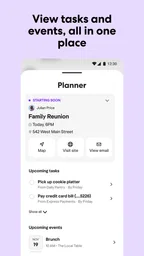
The first decision is whether you want a focused mailbox or a broader place to keep everyday correspondence organized. Yahoo Mail is designed for people who receive a mix of messages and want the inbox to feel less like an undifferentiated pile. Its emphasis on organizing mail alongside events and tasks makes sense if you often turn a message into something you need to do later.
That combination can be handy even if you do not want a full productivity system. A note about a school meeting, a booking confirmation, and a message from a relative all call for different follow-up. Keeping your email routine in one familiar app can reduce the small friction of switching between a mailbox and a separate planner for every minor commitment.
The trade-off is that combining these roles will not appeal to everyone. If you want email to be a quiet, minimal utility, extra organizational surfaces may feel like clutter rather than help. If your work depends on advanced team collaboration or a tightly controlled corporate setup, a work-focused service may be the more natural fit. I would choose Yahoo Mail for personal or mixed everyday use, not simply because it can hold messages.
Where it earns a place in a daily routine
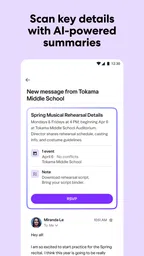
One useful way to use it is as a capture point for small commitments. Imagine checking your inbox while waiting for a bus and finding a message about a weekend appointment. Instead of relying on memory, you can treat the email as something to organize and follow up on, then return to the rest of your messages. That is a modest workflow, but it addresses a real problem: important details often get buried because people read a message and assume they will remember it.
Another non-obvious benefit is that inbox organization is not only about cleaning up old mail. It can help you make the next action visible. I would set aside a short moment each day to deal with messages that require a reply, a decision, or a later reminder, rather than repeatedly reopening the inbox to search for them. The app is most helpful when you use its organizational approach consistently; no email client can compensate for an inbox you never review.
It can also suit someone who wants a familiar personal mailbox for several parts of life. Keeping family conversations, shopping messages, and appointments within one email routine is convenient, particularly for people who do not want to maintain a separate app for every small task. The useful distinction is not that every message belongs in a planner, but that some messages should prompt an action instead of remaining unread or forgotten.
What the experience does not solve for you
Organization still takes judgment. An inbox can be easier to scan and still become overwhelming if you subscribe to too many mailing lists, keep every notification, or never archive anything. I would periodically remove messages that no longer matter and unsubscribe from recurring mail that I do not read. That kind of housekeeping is more effective than expecting a new app to make an overloaded inbox manageable by itself.
There is also a difference between convenience and a complete planning system. If you need detailed project tracking, shared task ownership, or a strict work calendar, I would not assume that an email app’s event and task emphasis can replace dedicated tools. Yahoo Mail can help connect everyday correspondence with follow-up, but it is not the right choice merely because your workload is complicated.
For privacy-sensitive or workplace mail, the right choice depends on the rules and accounts you need to use. I would check that the service fits your organization’s requirements before moving work correspondence into a personal email workflow. The same caution applies if your current account is tied to a school, employer, or family arrangement: convenience on a phone is not worth losing access to an address that others rely on.
How it compares with other kinds of email apps
Compared with a deliberately minimal email client, Yahoo Mail puts more emphasis on organizing a busy personal inbox and connecting messages to everyday plans. A minimalist alternative may be preferable if you mainly want to read and send mail with as few extra decisions as possible. The better option depends on whether you see organization as useful support or as an interruption.
Compared with a work-centered mail and calendar suite, Yahoo Mail makes more sense as a personal communication hub than as the foundation for a company’s processes. Workplace tools can be a better fit when colleagues need shared calendars, administrative controls, or coordinated document workflows. I would not move a team to a personal mailbox just to simplify one person’s phone routine.
It also differs from using a separate task manager beside a basic email app. Keeping correspondence and follow-up closer together can save small amounts of effort, while separate specialist apps may offer a clearer home for complex projects. If your to-do list is mostly simple reminders prompted by incoming messages, the combined approach is appealing. If tasks involve multiple people, dependencies, or long-running projects, a dedicated manager is likely easier to maintain.
Switching is more than installing an app
Trying Yahoo Mail is straightforward because the app is free, but switching your everyday email routine deserves more care than a quick download. Before changing what you check first, make sure you can still reach any important existing accounts and know which address friends, services, and workplaces use to contact you. An app can organize mail; it does not automatically make different email identities interchangeable.
I would begin by using it for one clear purpose, such as keeping personal correspondence and routine appointments in view. For a while, check both your old and new routines so that an important message does not fall between them. Then decide whether the organization feels natural enough to become your default. This gradual approach is less frustrating than moving everything at once and discovering that a habit, account, or notification you depended on is missing.
There is a financial detail worth keeping in mind: the app is free, while in-app purchases range from $0.99 to $119.99 per item. I would not treat those purchases as necessary to get started. First see whether the everyday mailbox and organization meet your needs, then consider any paid option only if you understand what it adds and actually want it.
Who should choose it—and who should pass
I would recommend Yahoo Mail to someone who wants a well-established personal email app and likes the idea of keeping messages, plans, and small follow-ups in a more organized routine. Its scale is notable: it has around 595,000 reviews alongside its large rating base. That history offers reassurance that many people use it, but your own test should focus on whether you can find messages quickly and whether the added organization helps rather than distracts.
I would also consider it for a person whose day is full of ordinary, scattered details: a family message that needs a reply, an appointment to remember, and a receipt worth keeping. The app can make sense when email is already the place those details arrive. My practical tip is to create a simple habit around it: review messages that need action, deal with the immediate ones, and give later tasks a clear place so they do not depend on memory.
I would skip it if you want an especially bare-bones inbox, need a specialist system for team projects, or are required to use a particular work-managed service. It may also be a poor fit if you are happy with your current app and rarely lose track of messages or plans; switching for its own sake adds effort without solving a real problem.
My recommendation after weighing the trade-offs
For everyday personal email, Yahoo Mail is a sensible option when you want organization to do more than keep messages in a single stream. I like the idea of connecting incoming correspondence with the plans and tasks it creates, especially for people who prefer one regular place to check. Its main strength is practical convenience, not a promise to replace every calendar, task manager, or work tool.
My advice is to try it with a specific routine rather than judging it by a crowded inbox on the first day. Use it to manage a manageable slice of daily email, notice whether you can act on important messages more reliably, and decide whether its approach feels comfortable. If it reduces missed follow-ups without adding fuss, it is worth keeping. If you find yourself wanting fewer organizing features or more specialized collaboration, choose an alternative built around that need instead.
What we like
- Supports multiple email accounts in one inbox.
- Built-in unsubscribe tools help reduce unwanted newsletters.
- Customizable swipe actions speed up routine email tasks.
- Search filters make it easier to find older messages.
- Includes storage options for large attachments.
What could be better
- Some features require a paid subscription.
- The free version displays advertising.
- The interface can feel crowded with promotional content.
- Advanced settings may take time to locate.
- Email organization tools may differ across account providers.





