



Workvivo review
 Analysis by Appsdrops
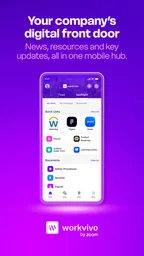
When a company’s updates are scattered across email, chat, and word of mouth, it is easy to miss what matters. Workvivo is meant to give employees one place to follow internal communication and workplace activity. I see its strongest use as a shared starting point for keeping up with an organization, rather than as a replacement for every tool people use to get their jobs done.
From scattered updates to a shared starting point
Workvivo is a free business app from Workvivo, built around employee engagement and internal communication. That focus makes it different from a general-purpose messaging app: the goal is not simply to send a quick note to a colleague, but to help employees stay connected to what is happening across their organization.
That distinction matters most in larger or distributed workplaces, where not everyone hears the same news at the same time. A team member working away from an office, for example, may need a dependable place to check for company updates instead of relying on someone to forward an email or mention an announcement in a meeting.
The practical starting condition is simple: open the app when you want to catch up on the organization’s internal conversation. The value depends on whether your employer actively uses Workvivo and keeps its communications there. If the organization treats it as a living communication space, it can help make company news feel less remote. If updates remain scattered elsewhere, the app has less to offer.
Following the flow without turning it into another inbox
My preferred way to use an internal platform like this is to check it deliberately at a natural pause in the day, such as before starting work or after a team meeting. That makes it easier to separate company-wide context from the messages that need an immediate response. It also avoids expecting an engagement app to behave like a real-time support channel.
A realistic example is an employee who works remotely and wants to understand what colleagues and the wider organization are discussing. They can use Workvivo as a place to catch up, then take any task-specific conversation back to the team’s usual work channel. The useful outcome is not that every exchange moves into one app; it is that the employee has a clearer route to shared organizational context.
The key workflow distinction is “keep me informed” versus “help me complete this task.” Workvivo is aimed at the first. If a message needs a rapid back-and-forth, a dedicated messaging or project tool may be more suitable. Treating the app as the answer to every communication need risks creating yet another place employees feel obliged to monitor.
That is also why I would look at how an employer uses it before deciding whether it will improve day-to-day communication. A well-maintained internal space can make important updates easier to find and give employees a common point of reference. A quiet or inconsistently maintained one can feel like an extra stop with little practical payoff.
Where the handoffs matter
Internal communication rarely ends when someone reads an announcement. A company update may give employees context, but a manager may still need to explain what it means for a particular team, and colleagues may need to coordinate the work that follows. Workvivo’s role is most convincing at the first handoff: helping information reach employees before it is interpreted and acted on locally.
For example, if a team hears about a change that affects its routine, the app can serve as the place to become aware of the news. The next step should be a direct conversation with the relevant manager or team, especially if the change affects responsibilities or timing. Keeping that boundary clear avoids assuming a broad internal post answers every individual question.
This split is a strength when an organization wants employees to have a shared source of context without forcing every operational discussion into the same space. It is a limitation when people expect the app itself to connect an announcement to a precise task workflow. In that case, the team’s existing project or messaging tools remain important, and employees need to know which channel is authoritative for each kind of work.
For someone joining a workplace, this handoff can be particularly useful. They can first get a sense of the company’s internal conversation, then ask their manager which channels are used for urgent requests, team decisions, and formal notices. I would not assume that one engagement app automatically replaces onboarding conversations or local team guidance.
What a successful routine looks like
The result I would look for is less about spending more time in an app and more about reducing the effort of staying informed. An employee should be able to make Workvivo part of a simple routine: check for relevant organizational context, identify anything that needs follow-up, and move that follow-up to the right person or work channel.
There is a useful trade-off here. A shared communication space can help people feel closer to company-wide activity, but it can also compete for attention with email and chat. I would avoid checking every channel continuously. Instead, use Workvivo as a purposeful catch-up point and reserve faster tools for conversations where delay has a cost.
That approach is especially sensible for employees who do not sit near colleagues or who are not naturally included in office conversations. It can give them a more direct way to follow internal activity. For a small team that already shares information clearly in person or through one well-managed work channel, however, adding another destination may offer little benefit.
Workvivo is not a universal fix for poor communication. An organization still has to decide what belongs there, keep messages understandable, and make clear where employees should take questions. If those habits are missing, a new platform cannot supply them on its own.
How it compares with familiar alternatives
Compared with email, an employee engagement platform is better suited to shared organizational conversation than to a private, tightly scoped exchange. Email remains useful when a message needs a clear recipient or a familiar record. The trade-off is that important company context can become mixed in with individual requests and routine correspondence.
Compared with workplace chat, Workvivo’s purpose is less about instant coordination and more about keeping employees connected to internal communication. Chat is often the more natural choice when a colleague needs a quick answer. Workvivo makes more sense when the goal is to follow what is happening across the organization rather than to interrupt a specific person for a decision.
It also differs from a project-management tool. Those tools are useful for assigning work, tracking progress, and coordinating deliverables. An employee communication space can provide context around the organization, but it should not be mistaken for a task board. If your main problem is lost ownership or unclear deadlines, choose a tool designed for managing work rather than expecting an engagement app to solve it.
For employees, the best setup may be a combination: Workvivo for organizational awareness, the team’s chosen chat tool for quick coordination, and a project tool for tracked work. That arrangement only works if the employer makes the boundaries clear; otherwise, updates can be duplicated and people may not know where to look.
Where the flow can break
The biggest friction point is dependence on workplace participation. Employees cannot get much value from an internal communication space if their organization does not use it consistently. Even when it is active, too many disconnected channels can dilute attention, so the app’s usefulness is tied to the communication habits around it.
Another possible mismatch is personal preference. Some people want company updates gathered in one place; others would rather receive only essential information through established channels. If you dislike checking an additional app, ask whether your employer expects it to be a primary source for internal news before making it part of your routine.
Workvivo is rated Teen, and it has an average rating of 4.3 from around 4.8 thousand ratings. It has more than a million installs, which suggests it has found a substantial audience, though those figures cannot tell an individual employee whether their own organization will use it well.
The app was released on December 8, 2017, and its current version is 7.828. It requires Android 9 or later. These details are useful when checking whether an older device can run it, but the more important decision is still organizational: will your employer make it a meaningful place to communicate, or will it duplicate channels you already use?
Who I would recommend it to
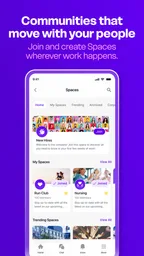
I would recommend Workvivo to employees who want a dedicated place to follow company communication, particularly if they work remotely, across locations, or outside the informal conversations where office news often travels. It is also a reasonable choice for employers trying to give internal communication a more visible home.
I would be more cautious if you need a tool primarily for urgent messaging, detailed project tracking, or private one-to-one coordination. Those needs are better handled by tools built around those jobs. I would also skip adding it to my routine if my workplace does not actively maintain it; an unused communication space is not worth checking out of habit.
My overall view is that Workvivo is most useful as one deliberate stage in a larger communication workflow: it helps employees catch up on the organization, while managers and teams handle the specific decisions and work that follow. If your employer gives it a clear purpose and keeps it active, that division can make daily communication feel more joined up. If not, a well-used existing channel is likely the better choice.
What we like
- A familiar social feed makes workplace updates easy to browse.
- Employee profiles help colleagues find people across the organization.
- Recognition tools let teams celebrate contributions publicly.
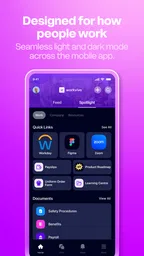
- Mobile access keeps workplace news available away from a desk.
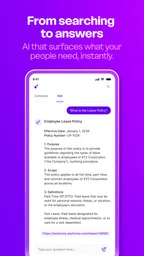
- Search helps users locate posts and shared resources.
What could be better
- The experience depends on the employer setting up the platform.
- Some features may be unavailable under certain company plans.
- Frequent notifications can feel distracting without careful settings.
- The feed may feel quiet when colleagues rarely post.
- Workvivo is less useful for people outside participating organizations.





