
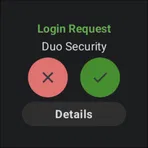

Duo Mobile review
 Analysis by Appsdrops
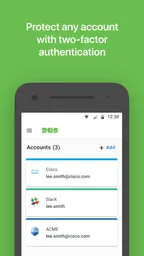
Two-factor authentication is easy to appreciate in theory and less fun when you are tired, in a hurry, or trying to sign in with one hand. Duo Mobile is built for that everyday moment: it helps approve sign-in requests for accounts protected by Duo and can also store time-based verification codes for other services. I find it most useful when it is treated as part of a broader sign-in setup, rather than as a magic fix for every login problem.
Clear enough for a quick sign-in
The main job is simple: when a service asks for a second check, open the app and respond to the request or retrieve a code. That focused purpose keeps the experience easier to understand than security apps that combine authentication with password storage, identity monitoring, and other tools. For many people, fewer competing features means less to work out at the exact moment they need access.
The app’s business category makes sense because organizations commonly use Duo to protect work accounts, but it is not limited to a workplace login. The developer is Cisco Systems, Inc., and the app can be useful wherever a service supports its authentication methods. A key distinction is that Duo Mobile does not independently grant access: the organization or service must first set up the account and require a compatible verification step.
That setup relationship is worth understanding before relying on it. If your employer has enrolled your account, follow its instructions to connect the app; if you are adding a personal account, check that the service supports the kind of code Duo Mobile can store. The app is not a universal replacement for every provider’s dedicated sign-in process.
For readability, I like the narrow focus. A verification prompt is a small task, and a tool that keeps that task prominent is easier to use under pressure. Still, the experience depends partly on how the account has been configured. A push request and a manually entered code are different workflows, so it helps to learn which one your account uses before you are trying to meet a deadline.
One practical habit makes a noticeable difference: keep the app available and make sure you know how to reach the code or approval prompt before starting an important sign-in. That is especially useful when you are switching between a work app and an authentication screen on the same phone. It reduces fumbling, though it does not remove the need to have the phone with you.
Navigation that favors a single task
I would recommend Duo Mobile to someone who wants an authenticator rather than a general security dashboard. Once an account is enrolled, the useful question is usually “Where is the request or code?” rather than “Which section of the app should I explore?” That is a good fit for occasional users who may not remember a complicated interface from one login to the next.
There is a trade-off: a simple app cannot compensate for confusing instructions from an employer or service. If enrollment steps are unclear, a first-time user may not know whether to scan a setup code, accept an invitation, or contact an administrator. I would resolve that setup question while signed in to the account being protected, rather than waiting until access is urgently needed.
Different abilities and ways of interacting
Authentication involves more than reading a screen. A person may have limited dexterity, low vision, difficulty distinguishing sounds, or may simply be carrying bags while trying to approve a login. Duo Mobile’s usefulness in these situations depends on the method enabled for the account and on the phone’s own settings. I would not assume every verification route is equally convenient for every user.
A push approval can avoid typing a code, which may help when entering characters is slow or awkward. On the other hand, a request that needs to be noticed and tapped is not automatically easier for someone with limited vision or motor control. A time-based code offers another route, but copying it accurately and returning to the sign-in screen can be a frustrating extra step, particularly when the phone interface or the service’s login page is difficult to navigate.
If you use larger text, screen magnification, voice control, or other phone-level accessibility settings, it is sensible to test the complete sign-in path rather than judging the app in isolation. The app is only one part of that path: the login page, notification presentation, and the organization’s configuration also affect whether the process works smoothly. Where possible, try a routine sign-in with the settings you actually use before depending on it for an urgent task.
Sound and attention matter too. A notification can be easy to miss in a noisy place or while the phone is muted. If your account supports a code-based option, knowing where to find it can provide a useful alternative to waiting for a prompt. That does not mean every account offers identical choices, so check the options available in your own setup rather than assuming a fallback exists.
When and where access works best
Consider a normal workday: you leave a meeting, open a laptop to retrieve a document, and are asked to verify the sign-in on your phone. If the phone is nearby and the account is enrolled, approving the request can be quicker than retrieving a separate hardware token or waiting to access another device. This is the kind of small interruption Duo Mobile is designed to make manageable.
The same workflow can be less convenient while travelling, when your phone battery is low, or when you have left the device in another room. An authenticator tied to a phone makes the phone part of your access plan. I recommend thinking through what you would do if the device were unavailable, especially for work accounts where an administrator may need to help restore access. Security is useful only if you can also recover access through an approved process.
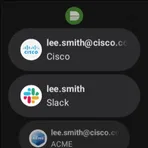
For someone who signs in across several services, storing compatible verification codes in one app can be simpler than keeping a different authenticator for each account. But services vary: some rely on Duo-managed push approval, while others may use time-based codes or their own verification tools. If your workplace mandates Duo, that requirement usually outweighs personal preference; for a personal account, choose the method the service supports and that you can operate reliably.
Compared with SMS codes, an authenticator app can keep the verification step within a dedicated app instead of relying on a text arriving at the right moment. Compared with a hardware security key, it avoids carrying a separate physical item but makes access dependent on the phone. A password manager that also generates codes may be more convenient for someone who already uses one and wants fewer apps, while Duo Mobile is a more natural fit when an organization specifically uses Duo or when a separate authenticator is preferred.
Scale, cost, and day-to-day expectations
The app is free, rated for Everyone, and has an average rating of 4.1 from around 87,000 ratings, with about 6,300 written reviews. More than 50 million installs suggest it is used at a broad scale, although popularity alone does not tell you whether it will match your organization’s sign-in process. It was released on May 3, 2011, and version 4.125.0 is the current version. It requires iOS 12 or later.
Those details make it approachable to try, but the most important practical question is compatibility with the account you want to protect. Before moving your sign-in routine to it, confirm that the service supports Duo Mobile and complete its enrollment steps. If you are setting it up for work, your IT team’s instructions should take precedence, because its configuration determines how verification is presented.
One less obvious trade-off is separation. Keeping verification in a dedicated app can make the login step distinct from the service you are entering, which some people prefer. It also means switching between apps or screens, and that extra movement can be a real nuisance when a login page times out quickly or when you are using a device with limited dexterity. I would test this handoff with the accounts you use most, not just during initial setup.
Where the friction remains
Duo Mobile is not the right choice if you expect it to manage passwords, fix weak account-recovery procedures, or protect accounts that do not support its methods. Nor is it ideal for someone who cannot reliably keep a phone charged or available and has no approved backup route. In those circumstances, a service-supported hardware key, another authenticator, or an organization’s recovery process may be a better fit.
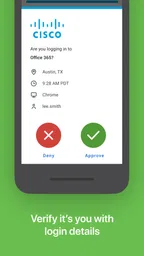
There is also a human-factor risk: an approval prompt is meaningful only if you initiated the sign-in. If a request appears unexpectedly, do not approve it just to clear a notification; check whether you were actually logging in and follow your organization’s guidance if the request seems unfamiliar. This simple pause matters because convenience should not turn verification into an automatic tap.
For users with access needs, the remaining barrier may not be the app’s core task but the whole chain around it: receiving a prompt, recognizing it, switching back to the service, and completing enrollment or recovery. If one part is difficult, ask the organization or service about an alternative verification method before you are locked out. A workable alternative is more valuable than a theoretically convenient setup that you cannot use consistently.
My inclusive verdict
I would recommend Duo Mobile to people whose workplace or chosen services already use it, and to anyone who wants a focused place for compatible verification codes. It keeps the security task fairly direct, can reduce reliance on text messages for supported accounts, and works well when the phone is close at hand. Its straightforward purpose is a genuine strength for people who do not want a crowded security app.
I would be more cautious if you have difficulty noticing notifications, tapping small controls, switching between apps, or keeping a phone available throughout the day. Those concerns do not automatically rule it out, but they make a real-world test important. Try the sign-in flow with your usual accessibility settings, confirm which alternatives your account allows, and learn the recovery route before you need it.
Overall, Duo Mobile is a practical authenticator, not a universal answer to account security or accessibility. I like it most when an organization has configured it clearly and the user has a dependable phone-based routine. If that describes you, it can make repeated sign-ins feel less cumbersome; if it does not, a different supported method may offer a more reliable path to the same account.
What we like
- Supports two-factor authentication for many third-party accounts.
- Can approve login requests with a single tap.
- Works offline when generating time-based passcodes.
- Offers encrypted cloud backup on supported devices.
- Lets users add accounts by scanning QR codes.
What could be better
- Restoring backed-up accounts may require access to the original phone number.
- Some services require extra setup beyond scanning a QR code.
- Push approvals depend on an internet connection.
- Losing the device can make account recovery difficult.
- The interface provides limited guidance for troubleshooting login issues.





