



Indeed Job Search review
 Analysis by Appsdrops
When I look for work on a phone, the biggest frustration is rarely a lack of listings. It is sorting through enough possibilities to find the ones that fit, then keeping track of applications without letting the search take over the day. Indeed Job Search is built for that broad, ongoing task. I find it most useful as a practical starting point: a place to explore openings, compare roles, and return to a search when I have a few spare minutes.
What the app is best at
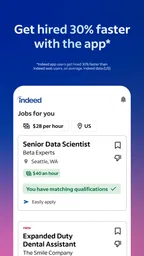
This is a free business app from Indeed Jobs, aimed at people who want to search for work from a mobile device. Its purpose sounds simple, but the value comes from having a large job-search destination close at hand rather than relying on scattered searches across unrelated sources. Indeed has more than 100 million installs, and its average rating is 4.7 from around 14 million ratings, with roughly 296,000 written reviews. Those figures suggest broad use, though they cannot tell me whether a particular listing or application process will suit you.
I would use it whether I were actively applying or only testing the market. Someone who has a job but wants to see what similar roles are available can browse without turning the search into a full-time project. A recent graduate can explore different job titles and learn how employers describe entry-level work. For a person who needs a new role quickly, the app can make it easier to check opportunities during a commute or a break, provided they still take time to verify each posting and prepare a thoughtful application.
Quick checks are useful, but good decisions take longer
My expectation for speed is modest and practical: opening a job-search app should help me get to relevant results without making every check feel like a desktop research session. Indeed is suited to that short-burst pattern. I can use a small window of free time to scan roles, note promising options, and come back later for a closer read. I would not treat quick browsing as a substitute for reviewing the full requirements or tailoring an application.
Search quality depends as much on the words I use as on how quickly results appear. A broad title may bring up roles with very different duties, while a narrow title can miss employers using another name for the same kind of work. I get more useful results by trying both the title I would normally use and a related phrase, then comparing the responsibilities rather than judging a listing by its headline alone.
Location needs the same care. A role that looks relevant may still be impractical because of travel, schedule, or the meaning an employer gives to a location label. I would check the actual job details before saving time for an application. This is especially worthwhile when a search returns many similar postings: the extra read can reveal that two titles that look alike involve different expectations.
Handling a busy search without losing the thread
Heavy use is where a job-search app can either reduce friction or create a second inbox to manage. If I were applying to several roles, I would keep a simple external note with the employer, position, date, and next step. That small habit helps me avoid rereading the same listing or forgetting whether I have already contacted an employer. It also gives me a dependable overview if I am comparing opportunities across more than one service.
A realistic everyday routine might be to check openings over breakfast, set aside a few that seem relevant, and revisit them after work when I can read the requirements carefully. I would then prepare each application separately rather than sending the same generic material everywhere. The app makes the discovery part easier to fit into the day; the judgment and editing still need my attention.
When the search gets crowded, I find it helpful to divide the work into passes. First, remove roles that clearly do not match location or basic requirements. Next, compare the remaining descriptions for duties, schedule, and qualifications. Only then decide which applications deserve the time to customize. This is more effective than opening every result and trying to make a decision immediately, especially when titles are similar.
One trade-off of a large job-search destination is that volume can feel like progress even when the results are not a good fit. I would resist applying simply because a listing is easy to reach. A shorter list of well-matched roles is often more useful than a long queue of applications that I cannot personalize. Indeed works best for me as a discovery tool, not as a promise that every search will produce a suitable opening.
Reliability means checking the listing, not just the app
For reliability, I separate two questions: can I return to the search, and can I trust every detail in a job post without checking it? The first is a normal expectation for a mobile job-search tool; the second deserves caution on any platform that brings together opportunities from many employers. I would read the employer name, responsibilities, location, and application instructions closely, and look for inconsistencies before sharing personal information or committing time.
If the app feels slow or a page does not load as expected, I would avoid repeatedly tapping through the same action. I would pause, check my connection, and reopen the search when it is practical. For an important application, I would keep a copy of the résumé or other material I plan to submit outside the app as well. That way, a temporary interruption does not turn into lost work or force me to reconstruct an application from memory.
I also recommend keeping a separate record of completed applications. A quick note about when I applied and what I sent makes follow-up more organized, whether the employer responds through the app or elsewhere. It is a simple safeguard, not a criticism of the service: job hunting involves several organizations and communication channels, so one place should not be the only record I rely on.
How it compares with other ways to search
Compared with checking employer career pages one by one, Indeed is more convenient for discovering a range of openings in one place. The trade-off is that a direct employer page may provide a clearer view of that organization’s roles and application process. I would use Indeed to find possibilities, then consult an employer’s own materials when I want to understand the organization or confirm the next step.
Compared with a professional networking service, this app is more directly focused on finding jobs rather than building a public professional presence. That makes it a sensible choice if the main task is browsing opportunities. If networking, industry discussion, or maintaining a professional profile is central to your search, a networking app may complement it better. I would not expect one tool to replace every part of a job hunt.
Local recruiters, specialist boards, and personal referrals can also be stronger routes in particular fields. A broad search is a useful baseline, but niche work may be advertised in places that are more focused on that profession. I would start with Indeed when I want a wide view, then add specialist sources if the results feel too general or do not reflect the work I am targeting.
Device fit and everyday constraints
The app is listed for Everyone and has a minimum operating-system requirement of version 8.0. Its current version is 300.0.0. Those details make it easier to judge basic compatibility, but they do not guarantee the same experience on every phone. If your device is older or short on storage, I would keep the operating system and app updated where possible and leave enough room for ordinary phone use. I would also avoid assuming that a search app needs to remain open all day; brief, intentional checks are usually a more manageable routine.
For readers concerned about speed, stability, or battery use, I would judge the app on their own device rather than assume a particular performance level. A weak connection, a busy phone, or an older operating system can affect the feel of any mobile search. If performance becomes distracting, try a smaller search session and close other demanding tasks before deciding the app itself is the problem. The key is whether it lets you review and act on listings comfortably in your usual conditions.
The main device constraint is not technical so much as practical: a phone is convenient for scanning, but a larger screen can be easier for comparing long descriptions or editing application materials. I would use the app to find and shortlist roles, then switch to a computer when I need more room to review details or refine documents. That division of labor keeps the mobile experience focused instead of asking it to do every part of the process.
Who should choose it, and who may not need it
I would recommend it to anyone who wants a convenient, broad place to begin a job search, especially people who need to check openings in short sessions or are still working out which roles suit them. It can also help someone already applying keep discovery separate from the more deliberate work of tailoring applications. The app is free, which makes it easy to try as one part of a wider search routine.
I would be less enthusiastic if you expect the app alone to identify the perfect position, verify every employer, and manage every application detail for you. It cannot replace careful reading, independent checks, or a personal tracking method. It may also be less useful as your only source if your field relies heavily on specialist boards, referrals, or direct recruitment. In those cases, use it alongside the channels that are specific to your work.
My performance verdict: Indeed is a convenient mobile starting point, not a shortcut around the careful parts of finding a job. I like its fit for quick searches and broad discovery, while its volume makes disciplined filtering important. Indeed Jobs has built an app that can slot into an everyday routine, but I would pair it with employer checks, a simple application log, and a more comfortable editing setup when needed. If you want a free way to explore a wide range of roles and are willing to judge each one for yourself, it is worth trying; if you need a tightly specialized search or a complete application-management system, another source or a combination of tools may serve you better.
What we like
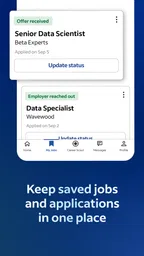
- Save job listings to review and apply for later.
- Set up alerts for roles that match your search criteria.
- Read company reviews before deciding where to apply.
- Track the status of applications from your account.
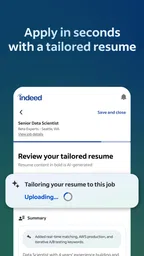
- Upload a résumé to speed up applications to eligible jobs.
What could be better
- Some listings may be outdated or already filled.
- Application steps can vary between employers.
- Job recommendations may not always match your experience.
- Some employers require creating an account on their own site.
- Sponsored listings can make search results harder to scan.





