
Workstream US review
 Analysis by Appsdrops
Workstream US is a business app for the people who keep hourly teams moving: employees who need to handle work-related tasks on a phone and managers coordinating a shift-based workforce. I see its appeal less as a general-purpose office tool and more as a focused mobile companion for jobs where schedules, messages, and HR tasks compete with the pace of a busy day. That focus can make it easier to approach than a broad workplace platform, but it also means the experience depends on whether your employer uses Workstream as part of its process.
Workstream US is developed by Workstream.is and is free to install. It has an average rating of 3.5 from around 150 ratings, with more than 100,000 installs. The app is rated for Everyone, and its current release is version 2.12.17 for Android 8.0 and later. Those figures give a sense of its reach, but they do not tell the whole story: for an employee, the practical question is whether the app helps make a shift-based workplace easier to navigate, including for people who need different ways or moments to access work information.
Finding the important information on a small screen
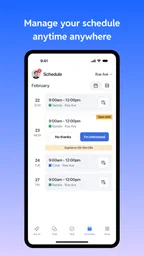
A mobile HR app has a different job from a desktop employee portal. On a phone, the useful thing is being able to get to work information while away from a computer, without having to search through a sprawling system built for office administrators. Workstream US is positioned for that on-the-go context. I would judge its navigation by how quickly an employee can find the task they came for, rather than by how many tools are packed into the interface.
For hourly staff, clarity matters because app use often happens between other responsibilities. Someone checking a shift detail before leaving home should not have to interpret a dense page or remember a complicated route through menus. A manager looking up a team-related item during a busy period has the same need for a direct path. If you are evaluating the app for a workplace, try it with the actual questions staff ask most often: where to check relevant work information, how to locate a pending task, and what to do when something needs a manager’s attention.
That test also reveals an important trade-off. A mobile-first HR tool can reduce dependence on paper, messages scattered across personal phones, or a desktop system that staff rarely open. But an app is only simpler if the information is organized in a way employees can understand. If a worker has to ask a supervisor what a screen means, the app may have moved the paperwork without removing the confusion. I would make the first few minutes of a trial a guided walkthrough, not an assumption that every employee will immediately know where to go.
The app’s business focus is valuable here: it is intended for workplace needs, rather than being a generic chat or calendar that staff must adapt for HR. That distinction can help teams keep work tasks separate from personal apps. Still, I would not treat a dedicated app as automatically easier for everyone. Familiarity with smartphones varies, and a person who rarely uses apps may need a clear explanation of the purpose of each step before they feel confident handling work information independently.
Designing a workflow that does not rely on one kind of user
Readable navigation is not just a visual issue. It is also about giving people a predictable route and reducing the need to hold several instructions in memory. A useful rollout tip is to show one common task at a time, then let employees try it themselves while a manager is available. That is more inclusive than delivering a long set of instructions during a team meeting and expecting everyone to remember the sequence later.
For workers who prefer written guidance, a short internal note with the names of the relevant app areas can help. For employees who learn by watching, a brief demonstration may be more effective. I would keep both approaches available, because a single training style can leave people behind even when the app itself is intended to be straightforward. The point is not to assume that someone has a particular ability or level of comfort; it is to let them reach the same work task through a clear explanation and a manageable practice opportunity.
Different abilities, different ways of using the app
Phone interaction can be demanding for people with limited dexterity, tremors, pain, or difficulty making precise taps. It can also be tiring for anyone using a device one-handed while commuting or moving between job duties. I cannot claim a particular accessibility feature for Workstream US without seeing it in use, so I would not promise that every control or workflow works equally well for every person. Instead, I recommend testing the actual tasks employees need to complete on the devices they use at work.
A practical check is to ask whether key actions remain manageable when someone is not in an ideal setting: can they take their time, review what they are doing, and recover if they choose the wrong item? For a worker with motor or visual needs, it is worth trying the app alongside the phone’s own accessibility settings and asking the employee whether the interaction feels comfortable. If a necessary action is difficult, the employer should provide another way to complete it rather than making app use a test of physical ability.
Sensory needs deserve the same attention. A phone may be used in a noisy kitchen, a bright outdoor area, or a workplace where taking a call or listening to audio is impractical. Text-based access can be more useful in those moments, while a screen that is hard to scan can become an obstacle. Employers should avoid assuming that a notification will be seen or heard immediately. For time-sensitive work, a sensible backup is to make sure staff know whom to contact if they cannot access or interpret an app message.
Another non-obvious point is that access is shaped by the workplace’s expectations, not only the interface. If employees are expected to check a phone during a shift but cannot safely or reasonably do so at their station, the app’s convenience may not translate into real access. I would agree on a suitable time and place for staff to handle HR tasks, and make sure people who do not have a personal phone available are not left without a practical route to the same information.
Using it when the workday is moving
Consider a worker preparing for an upcoming shift while riding home or taking a break. A mobile HR app can make that moment more convenient than waiting to log in on a shared office computer. But convenience depends on the conditions: a crowded bus, a dim break room, a low battery, or a short break can all make careful reading and navigation harder. My advice is to use the app for tasks that fit the moment and reserve complex or sensitive work for a calmer setting where the employee can concentrate.
For a manager, the same principle applies in reverse. Checking a work item on a phone may be quicker than returning to a desk, but a small screen is not always the right place to resolve a complicated staff issue. Workstream US can be part of a mobile workflow without being the whole workflow. Teams should decide which tasks are suitable for quick phone use and which are better handled in person or through a more complete workplace process.
That distinction helps answer a common concern: is this a replacement for every existing HR channel? I would not assume so. It is best considered a mobile option for teams that already use Workstream, not a universal substitute for direct conversations, manager support, or any established process that employees depend on. Before relying on it for essential communication, a workplace should make clear how staff can get help if they cannot sign in, have trouble understanding a task, or do not have reliable access to a device.
Where it fits, and where it may fall short
The usual alternatives are a desktop HR portal, shared spreadsheets, paper notices, or general messaging apps. A desktop portal can be more comfortable for detailed work and larger screens, but it is less handy for staff who rarely sit at a computer. Paper can be immediately visible, yet it is difficult to keep current and private. A group chat may feel familiar, though important work details can get buried among unrelated messages. Workstream US occupies the mobile HR space between those options, with its main advantage being that it is designed around work rather than improvised from a personal messaging tool.
That does not make it the right choice for every organization. A team that needs a highly customized HR system, complex reporting, or workflows that depend on a desktop may find a mobile-focused app insufficient as its main platform. Likewise, a workplace that has not agreed on how staff should use phones during shifts may end up with an app that is installed but rarely opened. The employer’s rollout, staff support, and clarity of process matter as much as the app itself.
Its average rating of 3.5 suggests that prospective users should approach it with sensible expectations rather than assuming every experience is effortless. Ratings can reflect different workplaces, devices, and needs, so I would not use that figure alone to decide whether it is suitable. A small pilot with employees from different roles is more informative: ask them to complete a realistic task, notice where they pause, and invite feedback from people who use assistive settings or prefer not to rely on a phone for work.
Version 2.12.17 is the current release, and Android users need version 8.0 or newer. That makes compatibility worth checking before a workplace asks everyone to adopt the app, especially if staff have older devices. The app is free to install, but I would still separate that from the broader question of whether it suits the employer’s setup. A free download does not remove the need for training, support, or an alternative route for employees who cannot use it comfortably.
A fair test before asking a team to depend on it
If you are an employee, first ask whether your manager actually uses Workstream for your workplace and what tasks you are expected to handle there. That avoids installing a tool without knowing what it is meant to do for you. Then try it in a low-pressure moment, not for the first time when a shift is about to start. If a screen or process is unclear, raise that early; a quick explanation from a manager may solve a setup issue, while repeated difficulty may point to a need for a different way to complete the task.
If you are a manager, do not measure success only by the number of installations. Check whether staff can find the information they need, whether they understand what action is expected, and whether the workflow works for employees with different comfort levels and abilities. One useful practice is to keep a non-app contact route visible during the transition. That protects workers from being stranded when a device is unavailable or the app is not accessible to them in a particular situation.
I would be cautious about making the app the only channel for an urgent or important instruction unless the team has confirmed that everyone can receive and act on it. Mobile access can make routine HR work more convenient, but no app should become a barrier to asking for help. The best outcome is a flexible system: people who find the app useful can use it, while those who need assistance or another format still have a straightforward way forward.
My inclusive verdict
Workstream US makes the most sense for hourly teams that want a phone-based way to engage with workplace HR tasks and already have an employer using Workstream. Its strongest practical case is the ability to bring work-related actions closer to where staff are, rather than making every employee rely on a desk or informal messages. I would recommend considering it as a useful mobile channel, not as proof that a workplace has solved access and communication for everyone.
For employees, it is worth trying if your workplace has a clear purpose for it and someone can help you get comfortable with the workflow. For managers, the key is to test the app with real staff needs, make room for different ways of learning and interacting, and keep an alternative available when a phone is not the right tool. That balanced approach is especially important for people with sensory or motor needs, workers with limited device access, and anyone whose role makes phone use difficult during a shift.
Overall, I see Workstream US as a potentially helpful business app whose value depends on thoughtful use by the whole workplace. It is a better fit than paper-only routines or scattered work chats when a team wants a dedicated mobile HR route, but a desktop system or direct support may be preferable for detailed tasks or employees who need a different format. I would recommend it to teams willing to make access part of the rollout, rather than simply asking everyone to download it and hoping the rest falls into place.
What we like
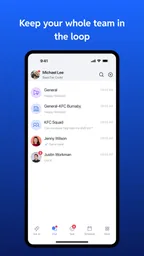
- Keeps work conversations organized in one place.
- Supports quick communication between team members.
- Helps frontline staff stay connected across shifts.
- Provides a central space for workplace updates.
- Can make team coordination easier on the go.
What could be better
- Requires a reliable internet connection for real-time updates.
- Notifications may become distracting during busy shifts.
- Useful features depend on coworkers adopting the app.
- Access to some tools may depend on employer settings.
- Workplace messages can blur boundaries after hours.





