
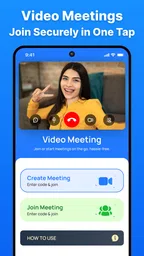


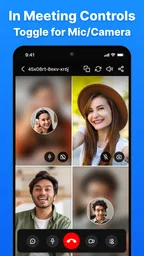

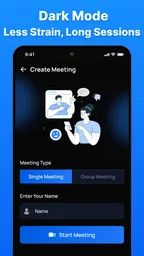
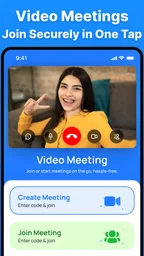

Video Meeting - Meeting review
 Analysis by Appsdrops
Choosing a video meeting app is usually less about finding another call button and more about making a conversation easy to start, comfortable to follow, and simple to carry through to a useful outcome. Video Meeting - Meeting takes a focused approach to that everyday job: it is built for video calls, with the stated appeal of secure meetings, HD calls, and no time limits for teams and one-to-one conversations. I see that as a practical promise for people who want to spend their attention on the discussion rather than watching a clock.
A straightforward way to start a conversation
The first thing I’d expect from a communication app like this is a clear path from “I need to talk” to actually talking. The name keeps the purpose plain, and the short description does too: this is a video meeting app, not a broad social platform trying to do everything at once. That narrow focus can be welcome when you need a call for work, a conversation with one other person, or a team discussion and don’t want to sort through unrelated tools.
For a one-to-one call, the ideal workflow is uncomplicated: decide what needs discussing, connect with the other person, and keep the conversation going until you have reached a natural stopping point. For a team, the same idea applies, but with more people bringing questions and updates into the room. Video Meeting - Meeting presents itself as suited to both situations, so its appeal is easy to understand even before you get into the details: it aims to serve quick personal conversations as well as collaborative meetings.
I also like that the central pitch is about the experience of the call itself. HD video is a meaningful goal for meetings where facial expressions, visual context, or simply feeling present matter. The “no time limits” angle addresses a familiar source of friction: a discussion can run long when the topic needs it, without the advertised experience forcing everyone to wrap up at an arbitrary point. Those claims make the app sound especially relevant for longer conversations and teams that don’t want a meeting timer to dictate the agenda.
From a planned call to an ongoing discussion
A useful meeting workflow has a beginning, a middle, and a finish. At the beginning, participants need to know that a video conversation is the right format. In the middle, they need to hear and see one another well enough to exchange ideas. At the finish, they should have a clearer understanding of what comes next. This app’s stated emphasis on video meetings, HD calls, and unrestricted duration lines up with those basic needs, rather than promising an elaborate productivity system.
That distinction matters. A video call can be valuable even when it does not automatically organize every follow-up task. The main job is to give people a channel for talking face to face, whether they are coordinating as a team or handling a one-to-one discussion. I’d approach the app as a communication tool first: useful when a live conversation is more efficient or more human than sending another message, and most effective when participants bring a clear purpose to the call.
The team use case is particularly easy to picture. One person can introduce a problem, colleagues can share their perspectives, and the group can work toward a decision while everyone is present. A one-to-one call has a different rhythm: it may be more informal, more focused, or simply a convenient way to catch up. Supporting both kinds of conversation gives the app a broader everyday role without changing its core identity as a video meeting option.
What the meeting experience is aiming for
There are two promises at the heart of the app’s positioning. The first is HD video calling, which suggests an emphasis on a clear visual conversation. The second is no time limits, which speaks to uninterrupted discussion. Together, those ideas target two common expectations: people want to see one another clearly, and they want enough room to finish the conversation properly.
The secure-meeting wording also sets an expectation that privacy and confidence matter to the product’s identity. That is a useful priority for professional conversations, but it should not replace sensible habits from the people using any meeting app. Participants should still think carefully about what they discuss and who they invite. I’d treat security as an important part of the app’s stated appeal, while keeping the actual meeting itself organized and appropriate to the people involved.
For a smooth call, the human side of the process matters just as much as the software. It helps to set an agenda, make sure everyone knows why they are meeting, and leave a moment at the end to recap decisions. The app’s role is to provide the video conversation; preparation turns that conversation into progress. That division feels realistic and makes the tool easier to evaluate: it is not necessary for a meeting app to solve every organizational problem to be useful.
How the handoffs shape a real meeting
Meetings are rarely a single uninterrupted exchange. Someone introduces the topic, another participant responds, and the conversation moves between questions, explanations, and decisions. In a team call, these handoffs can determine whether the discussion feels collaborative or turns into people speaking over one another. A video meeting app needs to support the shared conversation, but participants still have to make room for each other and keep the discussion moving.
That is why I would use a simple routine: open with the reason for the call, make the first handoff explicit, and close each topic with a short recap before moving on. In a one-to-one conversation, that might mean agreeing on the next step before ending the call. In a team meeting, it could mean checking that everyone has had a chance to contribute. These habits don’t depend on extra features; they help the video format deliver a better result.
The no-time-limit positioning can be helpful at this stage because it removes one stated pressure from the handoff between discussion and decision. People can let a complicated topic take the time it needs instead of rushing just because a session is about to expire. Still, an open-ended call is not automatically a productive one. A clear purpose and a willingness to move from one speaker to the next remain essential, especially when several people are involved.
When a meeting leads into work beyond the call, the handoff is even more important. The person leading the discussion can summarize what the group decided, identify who is taking the next action, and make sure the participants leave with the same understanding. I find that this is where a focused video app can fit neatly into a broader routine: use it for the conversation, then carry the outcome into whatever process the team already uses to manage its work.
Who may find it a natural fit
The app is aimed at people looking for a communication tool centered on video meetings. Teams that need face-to-face discussion and individuals who prefer a live one-to-one call may find that focus appealing. It is also free, which makes trying a video meeting app less of a financial commitment. The content rating is Everyone, and the listed minimum operating system is Android 8.0, so compatibility is a practical point to check before making it part of a regular routine.
Its audience figures give a sense of an app that has attracted a modest but established user base: it has over 50,000 installs, an average rating of 4.2, and 144 ratings. Those numbers are useful context, not a guarantee that every call will suit every device or situation. I would use the app for the kind of meeting it describes, then judge whether its call experience fits the way I and the people I speak with prefer to work.
In the catalog, it sits among communication apps, and it comes from Innometrics Enterprise. It was released on October 17, 2025, and the current version is 1.1.6. That release information can help identify the app and its current build, but the more important question for everyday use is whether a focused meeting tool matches your routine. If your main requirement is a place to hold video conversations, the product’s central idea is immediately legible.
Where a real-world flow can lose momentum
No meeting app can make every conversation effortless. A call can still lose momentum if participants arrive without a shared goal, if the discussion wanders, or if people are unsure when to speak. Those are ordinary meeting problems, but they matter because a video conversation depends on active participation. The best way to reduce that friction is to keep the agenda simple and give the meeting a clear finish, rather than assuming that a long call will automatically produce a useful result.
There can also be a gap between what people expect from a video meeting app and what they need from a complete work system. Someone looking for a call-focused tool may be satisfied with a straightforward way to meet. Someone expecting a full suite for planning, task tracking, and managing every part of a project should consider whether a meeting app is the right category for that job. The app’s pitch is centered on calls, so I’d evaluate it on how well it serves those conversations instead of assuming it covers every stage of collaboration.
Another potential point of friction is the difference between a feature promise and a successful meeting in practice. HD calls and unrestricted duration are attractive qualities, but the outcome still depends on the participants, the topic, and the conditions around the call. For a relaxed one-to-one catch-up, the process may feel simple. For a structured team decision, people may need to be more deliberate about speaking order, summaries, and next steps. That isn’t a flaw unique to this app; it is part of using live communication well.
It is also worth setting expectations around the word “secure.” The phrase communicates an important priority, particularly for teams, but responsible meeting habits remain part of the picture. Keep conversations suitable for the setting, invite the intended participants, and follow your organization’s own guidelines for sensitive discussions. A careful workflow helps make the security-oriented positioning more meaningful instead of treating it as a substitute for judgment.
The outcome: a focused meeting tool with a clear purpose
Overall, Video Meeting - Meeting makes a straightforward case for itself. It is a free communication app built around video meetings, with HD calls, no time limits, and support for both team and one-to-one conversations as its main attractions. I find that focused identity appealing because it makes the intended use easy to grasp: when a conversation would benefit from seeing and hearing one another, this is the kind of app you would consider.
Its strongest practical angle is the combination of visual communication and time without a stated limit. That can suit discussions that need more than a quick exchange, while the one-to-one and team framing gives it a place in both personal and collaborative routines. The best results will come from pairing the app with a little preparation: set a purpose, guide the handoffs, and close with a recap so the call leads somewhere.
If you are looking for a video meeting app for teams and one-to-one calls, this is a clear option to explore. Its appeal is not that it promises to replace every communication or project tool, but that it puts video meetings at the center. For people who value a focused way to talk face to face, that can be enough to make it worth considering. My overall impression is of a product with a simple, practical goal: help people meet, stay in the conversation, and leave with a better sense of what comes next.
What we like
- Offers a simple way to join video calls from a mobile device.
- Can make remote conversations more convenient than audio-only calls.
- Useful for staying in touch when meeting in person is not practical.
- Video calls can help participants read facial expressions.
- A mobile format makes meetings accessible away from a desk.
What could be better
- Call quality may depend heavily on the strength of your internet connection.
- Using video can drain your battery faster than audio calls.
- Background noise may make conversations harder to follow.
- A small phone screen can make group calls less comfortable.
- Joining calls in public may expose nearby people to private conversations.





