


Veho Driver review
 Analysis by Appsdrops
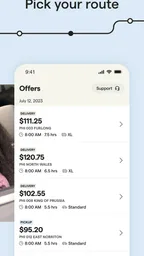
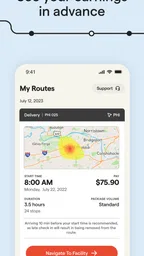
Veho Driver is a business app for people interested in driving delivery routes with Veho. Its central appeal is simple: drivers can choose their own routes, areas, and trip length. That flexibility sounds useful in everyday life, but it also raises an important question for anyone considering the app: how well does the experience fit different abilities, schedules, and working situations? I find that the clearest way to assess it is to look at the practical demands implied by route-based driving, while separating the app’s stated purpose from assumptions about features it may or may not offer.
A driver app built around choice
The app’s name and purpose are straightforward. Veho Driver is designed for drivers, not customers tracking a parcel or browsing a general business dashboard. Its store summary highlights the ability to select routes, areas, and trip length, making choice the main idea behind the product. For someone who values control over where and how long they drive, that focus is immediately understandable.
The app belongs to the business category and is developed by Veho. It is free to download, rated for Everyone, and has been available since September 4, 2019. The current version is 3.5.3. Those details help place it as an established work-oriented app rather than a new, experimental tool, though they do not by themselves reveal how every screen works or how every driver’s experience will feel.
Its public reception is substantial: the app has a 4.7 average from around 16,000 ratings, with roughly 2,100 written reviews and over 500,000 installs. I see those figures as useful context, not a promise that the app will suit every person. Ratings can reflect many aspects of a work app, and a strong average cannot answer specific questions about readability, physical interaction, or fit for an individual driver.
Readability and navigation in a work context
For an app used around delivery work, clarity matters as much as the range of options. A driver needs to understand what a route involves and make decisions without unnecessary confusion. Veho Driver’s concise proposition—choose a route, area, and trip length—is easy to grasp at a high level. That simplicity is a good starting point: the basic purpose is not buried beneath a long list of unrelated functions.
Still, a clear summary is not the same as a fully accessible interface. People differ in how they read small text, process dense screens, or interpret maps and route information. Someone with low vision may need strong contrast and scalable text; someone who finds busy layouts difficult may benefit from restrained screens and a predictable order of information. I can’t assume that the app provides those specific options simply because its main idea is easy to explain.
That distinction is worth keeping in mind before relying on any driver app for work. The most useful test is whether the actual screens make essential choices obvious and whether a person can review route details at a comfortable pace. A calm, legible interface can support confident decisions; unclear labels or crowded information can add strain. Drivers should judge the app on the device and display settings they expect to use, rather than infer usability from its short description alone.
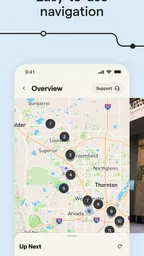
Navigation also has a practical meaning beyond moving between screens. A driver may need to move between choosing work and carrying it out, often while managing time and attention. Good navigation design should make it easy to understand where one is in a task and what action comes next. That is a useful standard for evaluating Veho Driver, even though I won’t claim particular menus, prompts, or customization controls that aren’t established here.
Motor and sensory considerations
Route-based driving can involve a mixture of screen use, reading, movement, and attention to surroundings. Those demands can affect people differently. A driver with limited dexterity may prefer larger touch targets and fewer repeated interactions; a driver with sensory sensitivities may appreciate a focused display and restrained notifications. These are general considerations for anyone assessing a work app, not claims that Veho Driver includes a particular accessibility mode.
The safest approach is to treat app interaction as something to evaluate before a shift, not while driving. Route information and work decisions deserve attention, while operating a phone on the road can create distraction. A person should follow applicable traffic rules and use the app only in a safe, lawful manner. This matters especially for drivers who need extra time to read, tap, or interpret information: having a route choice is valuable only if it can be managed without rushing or dividing attention at an unsafe moment.
For people with motor impairments, the ability to choose trip length and area may be relevant, but it does not establish that every route is physically suitable. The practical demands of driving, deliveries, and handling work can vary. Anyone considering the app should think about the full task, including the driving itself and any duties connected with a route, instead of judging accessibility solely by the interface.
Sensory access deserves the same careful distinction. A person may find map visuals, alerts, or changing information tiring, while another may rely on visual cues to stay oriented. Without making assumptions about specific controls, I’d recommend checking whether the app’s presentation is comfortable in the lighting and environment where it will be used. A screen that seems clear indoors may feel different in bright daylight or during a demanding work period.
Situational access and flexible work choices
The most inclusive idea in Veho Driver’s pitch is the choice of area and trip length. Flexibility can help people compare work with their available time and personal circumstances. A shorter trip may be more manageable for someone balancing other commitments, while selecting an area could matter to a driver who prefers to work in a familiar part of town. These are reasonable ways the stated choices could be useful; they should not be read as a guarantee that every desired route or schedule will be available.
Context shapes access. A person might be using the app after a long day, with limited time to review options, or in a setting where glare and noise make careful reading harder. Another driver may need to plan around caregiving, health needs, or transportation constraints. The freedom to choose among routes and trip lengths is a promising foundation for those varied situations, but meaningful flexibility depends on what options are actually available when the driver is ready to work.
That makes the app potentially relevant to people who want a more self-directed approach to delivery driving. It is not presented as a general-purpose accessibility tool, and I would not frame it that way. Instead, its appeal is practical: it centers the driver’s ability to select an area and length of trip. For many people, that kind of control is more useful than a rigid, one-size-fits-all proposition.
There is also a difference between choosing work and being able to complete it comfortably. A route may suit someone’s schedule but still involve conditions that are not a good fit for their mobility, energy, or sensory needs. Thinking through those factors in advance can help a driver make a more informed decision. The app’s focus on choice is encouraging, but personal suitability still depends on the actual route and the person’s circumstances.
What to consider before relying on it
The main limitation in evaluating any work app from its broad purpose is that a short description cannot answer every usability question. Drivers may want to know how route details are presented, how easy it is to compare options, and whether the interface remains comfortable over repeated use. Those questions matter particularly for people with disabilities, older users, or anyone who finds prolonged screen interaction tiring.
I would avoid treating high popularity as proof of universal access. A well-rated app can work very well for many people while still presenting barriers to others. Likewise, the Everyone content rating describes the general audience classification; it does not establish that the app has been designed or certified to meet any particular accessibility standard. It is more helpful to evaluate the product on the needs that matter to you than to rely on broad labels.
Before making it part of a work routine, consider whether the app is comfortable to read and operate on your phone, whether its route choices align with your real availability, and whether using it fits safely into your driving practices. If a friend, family member, or support professional helps you assess technology, reviewing the app together may make it easier to spot friction points before they become stressful during work.
These are not reasons to dismiss the app. They are sensible checks for any tool tied to driving and work. A driver app should support clear decisions, while the person using it remains in control of whether a route and its demands are appropriate. Veho Driver’s emphasis on selecting an area and trip length gives that assessment a useful starting point.
Who may find the approach appealing?
Drivers who value choosing where they work and how long a trip lasts may find Veho Driver worth exploring. Its message is direct, and the ability to make those selections could suit people who want some control over how delivery driving fits into their day. The app may also interest people looking for a dedicated tool rather than a broad business platform, since its identity is specifically tied to driving for Veho.
It may be a less comfortable fit for someone who needs confirmed details about particular accessibility settings before getting started. In that case, the right next step is to examine the app itself and determine whether its interface and available work options meet personal needs. The same care applies to anyone who has limits around driving, lifting, repetitive phone interaction, or working in changing sensory conditions.
On the practical side, I appreciate that the app’s core promise is easy to remember: routes, areas, and trip length are choices for the driver. That focus gives users a clear reason to consider it, without pretending that flexibility solves every barrier. For an app connected to work, honest expectations are more useful than sweeping claims about who can use it.
An inclusive verdict on Veho Driver
Overall, Veho Driver has a straightforward work-focused purpose and a potentially valuable emphasis on personal choice. Selecting an area and trip length may help drivers fit delivery work around their schedules and preferences. Its established presence and strong average rating make it a recognizable option in the business app space, while still leaving each person to decide whether the interface and work demands suit them.
My inclusive verdict is cautiously positive. The app’s flexible framing is a meaningful advantage, especially for people who want more say in where and for how long they drive. At the same time, accessibility depends on details that matter in daily use: readable information, comfortable interaction, safe timing, and routes that align with an individual’s needs. I wouldn’t assume those needs are covered automatically, but I do think the app’s central idea gives drivers a practical basis for exploring their options.
If choosing routes, areas, and trip length sounds useful, Veho Driver is worth considering as a dedicated driver app. Approach it with a realistic view of the work, check that the experience is comfortable for you, and make safety the priority whenever a phone is involved. Its strongest appeal is the combination of a clear purpose and driver choice—a promising starting point for people seeking a more flexible way to approach delivery driving.
What we like
- Designed to help drivers manage delivery work from a mobile device.
- Can make route and job details accessible while on the road.
- Useful for drivers who want delivery tasks in one app.
- May reduce the need to check separate tools for work updates.
- A dedicated driver interface can simplify common delivery tasks.
What could be better
- Requires a reliable mobile internet connection for current job details.
- Frequent phone use can distract from safe driving.
- Drivers may need to enable location access for route features.
- App usefulness depends on available Veho delivery work in your area.
- Battery use may increase when location services are active.





