
USPS MOBILE® review
 Analysis by Appsdrops
I would judge a postal app less by how impressive it feels on the first day and more by whether I still reach for it when an ordinary errand comes up. USPS Mobile® is built for that quieter test: it puts commonly used Postal Service tools on a phone, where they can be useful before a trip to the post office, while waiting for a delivery, or when I need to handle a mailing task away from home. Its appeal is practical rather than entertaining, and whether it earns lasting space depends on how often USPS services are part of your routine.
Useful from the first errand
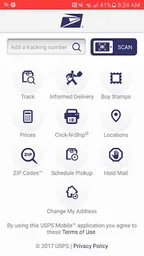
In my experience, the strongest reason to try USPS Mobile® is that it brings familiar postal tasks together instead of making me start from a general search every time. The app is developed by the United States Postal Service®, and its purpose is straightforward: provide mobile access to popular USPS.com tools. That makes it most valuable when I already know I need a postal service and want to get to the relevant task without sitting down at a computer.
A realistic first-week use might be preparing for a parcel drop-off. I can use the app to look into the available postal tools, check what I need to do next, and sort out a question before leaving home. That does not remove every step of mailing something, but it can help me avoid arriving at a counter only to realize I still need basic information. For an occasional sender, that bit of preparation can be more useful than a complicated set of features.
The app also makes sense for people who receive packages as part of everyday life. If I am expecting a delivery, having USPS services close at hand can make the postal side of that routine easier to manage. The key distinction is that this is a USPS companion, not a universal delivery organizer: it is most relevant when the United States Postal Service is involved, and less helpful when a parcel belongs to another carrier.
That narrow focus is a strength for the right person. Rather than trying to become an all-purpose shipping dashboard, it stays tied to postal tasks. I would recommend giving it a try if you regularly mail items, receive USPS deliveries, or want a mobile starting point for common postal errands. If you only send a letter once in a long while, the convenience may be real but too occasional to change your habits.
What it does well in ordinary use
The benefit I notice most is reduced friction between remembering a task and acting on it. Postal errands often involve small decisions: what to check, when to prepare, and where to begin. A dedicated app can make the first step feel clearer than searching around from scratch. Its value is not that every postal question disappears; it is that commonly used tools are closer when one of those questions comes up.
One useful habit is to open the app before leaving for an errand, rather than waiting until I am already at a counter or on the way. That gives me time to confirm the next step and gather what I need. Another is to treat it as a source for USPS-related tasks only, instead of expecting it to organize mail from every company. Those boundaries keep the app useful without asking it to do a job it was not built for.
It is a free business app for everyone, so there is little commitment involved in trying it. It has a 4.7 average from around 78,000 ratings, with more than a million installs. Those figures suggest broad use, but I would still decide based on my own mailing habits: a popular postal app cannot create much recurring value if USPS services rarely come up in my life.
Why it can stay useful month after month
The first-week appeal is easy to understand; the longer-term question is whether I have a reason to return. For me, the answer depends on repetition. Someone who sends occasional packages for a small business, handles household returns, or regularly checks in on USPS deliveries has more chances to benefit than someone whose postal needs are limited to a few letters each year. The app becomes worthwhile when it fits into errands that already happen.
For a small seller, a useful routine could be to handle postal planning from a phone while packing orders, then use the same app when checking on a USPS delivery. That keeps the postal part of the workflow in one familiar place. It is not a substitute for inventory, customer communication, or a full business shipping system; I would use it as a convenient postal tool, not as the control center for an entire operation.
Compared with going straight to a desktop browser, the mobile app is better suited to quick checks and tasks while away from a desk. Compared with a general shipping app, its advantage is that it is focused on USPS rather than trying to cover multiple carriers. The trade-off is just as clear: if I need one place to coordinate deliveries from several companies, a broader tracking service may fit better. If I need USPS-specific access, the focused approach is easier to understand.
There is also a small but worthwhile planning advantage in using the app before a busy day. I can check what I need to know while I am still at home, instead of letting a postal question interrupt the errand itself. That is not a dramatic feature, but it is the kind of recurring convenience that can make a practical app earn a place on a phone.
Keeping it useful without adding upkeep
USPS Mobile® does not call for a elaborate personal system to get value from it. I would keep it only if I have a repeat reason to use USPS tools, and I would make it part of an existing routine: check it when planning a mailing, preparing for a postal errand, or dealing with a USPS delivery. A habit attached to a real task is more likely to last than opening an app simply because it is installed.
One practical tip is to decide what you want the app to replace. If it saves you from repeatedly searching for USPS services, that is a clear benefit. If you already have a dependable way to handle every postal task and rarely need mobile access, adding another icon may not improve anything. This is especially true for people who prefer handling postal business in person or from a computer and do not mind the extra steps.
Another useful boundary is to avoid treating the app as a guarantee that every delivery question can be settled instantly. Postal tasks can still require attention beyond a quick phone check, and a mobile tool is most helpful when used for access and preparation rather than as a promise that an errand will be effortless. I find that expectation keeps the experience grounded: it is a handy route to USPS tools, not a replacement for every part of mailing and delivery.
The maintenance burden is modest in the sense that the app’s purpose is clear and tied to recurring postal needs. It is currently version 6.2.1 and requires Android 6.0 or later. Those details matter if you are considering installing it on an older Android device; otherwise, the more important maintenance question is personal: do you still use postal services often enough to justify keeping a dedicated app?
Where the routine can wear thin
The main source of fatigue is not a complicated learning curve so much as infrequent need. If I go weeks or months without a USPS task, I may forget the app is there. That is not a serious flaw for a utility, but it does mean the experience can feel unnecessary for people whose postal errands are rare. It earns its space through repeated usefulness, not through novelty.
A second limitation is its carrier-specific focus. It is a poor fit as the only tool for someone who receives parcels from a mix of delivery companies and wants every shipment in one place. In that situation, I would use a broader tracking option for the overall picture and keep USPS Mobile® for tasks that specifically involve the Postal Service. Using the right tool for each job is less frustrating than expecting one app to cover every delivery.
It may also be more than a casual sender needs. If your only postal task is an occasional trip to send a letter, the app’s convenience may not outweigh the simplicity of handling that task without another app. On the other hand, if postal errands regularly compete with work or family plans, having the tools on your phone can make preparation less disruptive. The difference is frequency, not whether one kind of user is using it incorrectly.
The app is not a general business-management solution, either. A small business owner can find it useful for postal errands, but I would not expect it to replace the broader systems needed to manage orders, customers, or a multicarrier operation. Keeping that distinction in mind makes the app easier to evaluate fairly: its job is postal access, and it should be judged on how well that supports your actual USPS-related routine.
Does it deserve a permanent place?
My long-term verdict is that USPS Mobile® can earn lasting space for people who repeatedly use USPS services, but it does not need to be a permanent fixture for everyone. Its best qualities are practical: mobile access to postal tools, a clear connection to the Postal Service, and a sensible role in preparing for everyday mailing and delivery tasks. The value builds through repetition rather than through a first-run spectacle.
I would keep it if I were sending packages regularly, managing a small amount of postal work for a business, or often checking on USPS-related errands. I would be less likely to keep it if I rarely mail anything, rely on several carriers and want one combined view, or prefer to do all postal tasks on a computer. Those are not shortcomings that a different habit can fix; they are signs that another approach may suit you better.
The app was released on October 23, 2023, and its content rating is Everyone. For an uncomplicated postal companion, that broad accessibility and free price make trying it an easy decision, while the lasting decision should come down to your routine. My recommendation is simple: install it if USPS is a recurring part of your week, then keep it only if it genuinely saves you a step. That is the standard a practical utility should meet once its novelty fades.
What we like
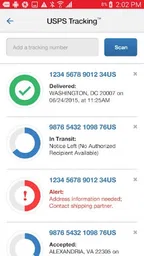
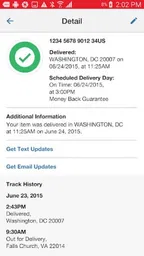
- Track packages with a clear status timeline.
- Schedule free next-day package pickups.
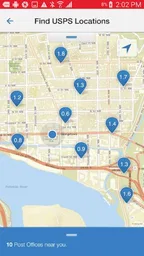
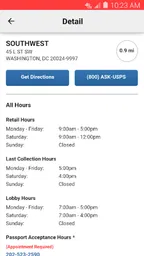
- Find nearby Post Office locations and hours.
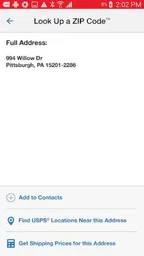
- Look up ZIP Codes by address or city.
- Order select USPS shipping supplies in the app.
What could be better
- Some features require a USPS.com account.
- Tracking updates may not appear immediately.
- Package pickup scheduling depends on service availability.
- The app may request location access to find nearby offices.
- Some shipments require a fee to change delivery options.





