
UPS review
 Analysis by Appsdrops
When I need to send something, I want to answer a few practical questions quickly: what service makes sense, where can I hand the parcel over, and how will I keep track of it afterward? UPS brings those tasks together in one business-focused app. I find that most useful when shipping is an occasional chore rather than a daily job, or when I’m away from my desk and need to check a parcel’s progress on the go.
From a shipping question to a plan
The app is made by UPS and sits in the business category, but its appeal isn’t limited to companies. A household sending a return, a small seller preparing an order, or someone arranging a parcel for a relative can all benefit from having shipping, tracking, location search, and quote tools in one place. It is free, and its Everyone age rating makes it broadly suitable for general use.
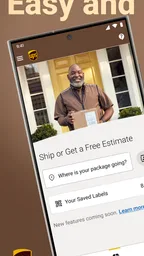
I’d start with the question that prompted me to open it. If I’m deciding whether a shipment is practical, the quote function is a sensible first stop: it helps turn a vague plan into a shipping estimate before I commit to packing or arranging a handoff. I would still check the details carefully before proceeding, since the right service depends on the parcel and destination, not just on convenience.
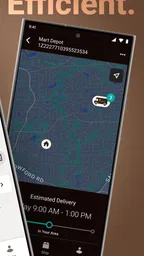
For someone who already has a shipment moving, tracking is the more immediate route. Instead of switching between unrelated tools for a service estimate, a nearby location, and a parcel update, I can look for those parts of the task inside the UPS app. That joined-up approach is its clearest advantage over a general-purpose maps app or a carrier-neutral tracking tool: it is centered on UPS shipments and the steps around them.
Making the handoff easier to plan
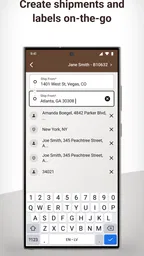
A realistic example is a small online seller finishing an order after work. Before leaving home, I could use the location-finding part of the app to consider where to take the parcel, then check a quote if I still need to choose a shipping approach. That order matters: deciding on the handoff first can save a wasted trip, while checking the shipment plan first helps avoid arriving with an unfinished decision.
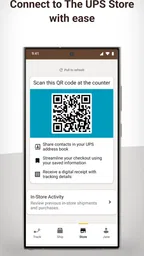
Location search is especially useful when I’m not familiar with the area or don’t want to rely on memory. I’d use it as a planning aid, then confirm the location and its suitability for my specific parcel before setting out. A location result is not the same as completing the shipment, and treating those as separate steps keeps expectations realistic.
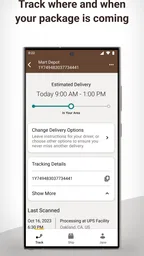
One practical tip is to keep the parcel’s identifying information accessible when I expect to track it. That makes the transition from preparing a shipment to checking its progress less fiddly. For a seller handling several orders, I’d also make a habit of checking the identifier against the right customer or parcel before acting on an update; a tracking screen is only useful if I’m looking at the shipment I actually mean to follow.
Following the parcel after it leaves
Once the parcel is in motion, tracking becomes the app’s natural follow-up. I like having a direct way to check progress without having to remember which other service or search result I used when I first looked up the shipment. For a recipient, that can help answer the everyday question of whether there has been a change worth acting on. For a sender, it offers a convenient place to revisit the shipment after the handoff.
There is a useful distinction between information and control here. Tracking can help me understand what is happening, but I shouldn’t assume that every update means I can change the delivery or resolve an exception from the app. If something looks unclear, I would use the information shown as a starting point and follow the appropriate UPS support or shipment process rather than repeatedly refreshing and expecting the situation to change.
This is where the app differs from a broad parcel-tracking service. A multi-carrier tool may suit someone who regularly receives parcels from many delivery companies and wants one consolidated view. UPS’s own app is the more natural choice when the shipment is with UPS and I also need the carrier’s quote or location tools. The trade-off is focus: it is handy for a UPS workflow, not a universal control center for every carrier.
Where the workflow can snag
The main friction is that the app can only help with the parts of a shipment that fit its tools. A quote does not by itself answer every packing or destination question, and a location search does not remove the need to check that the selected handoff works for the parcel I’m carrying. I’d avoid leaving those checks until I’m already on the way, particularly if the shipment is unusual or time-sensitive.
There is also a learning curve for people who ship only once in a while. The options are related, but they serve different moments: quoting helps before sending, location search supports the physical handoff, and tracking matters after the parcel is moving. If I open the app without knowing which stage I’m in, it may feel like a set of separate tools rather than one guided process. Thinking in that sequence makes it easier to use.
For a business that ships frequently, a phone app may be a useful companion but not necessarily the whole workflow. A desktop setup or a dedicated shipping process may be more comfortable when preparing many parcels or coordinating work across a team. I’d choose the mobile app for checking or handling a shipment while away from a computer, not assume that it replaces every operational tool a larger shipping routine needs.
Who will get the most from it
I’d recommend it to people who send or receive UPS parcels often enough to value quick access, and to occasional shippers who want one familiar place to estimate, locate, and follow a shipment. It is also a sensible fit for someone who has just dropped off a parcel and wants to check its progress later without searching from scratch.
I’d skip it as my main shipping app if I mostly use other carriers, or if I want one dashboard to manage parcels across several companies. In that case, a carrier-neutral tracker may be a better match for monitoring, while a map app may be enough when all I need is a general search for nearby services. Those alternatives are less tailored to UPS’s own shipping steps, but that broader coverage can matter more than having carrier-specific tools.
UPS has been available since April 2, 2010, and the current version is 10.36.1.7, with a minimum operating-system requirement of version 9. That makes checking device compatibility worthwhile before installing on an older phone. Its scale is also notable: the app has more than 10 million installs, around 339,000 ratings, about 50,000 written reviews, and an average rating of 4.5. Those figures suggest it is widely used, though I’d still judge it by whether its UPS-centered workflow matches my own shipping needs.
A useful companion, with a clear boundary
In my view, the best way to think about the app is as a practical companion for the journey from planning a UPS shipment to checking on it afterward. Its strength is the connection between those tasks: estimate, find a handoff point, then track. The most helpful habit is to do the planning before leaving, keep the shipment details close at hand, and treat tracking as visibility rather than a guarantee that every delivery issue can be fixed inside the app.
If UPS is the carrier I use, I’d keep it available for those moments when I’m away from a computer or simply want the relevant tools together. If my shipping life is spread across many carriers, I’d pair or replace it with a broader option for that purpose. For a UPS-specific shipment, it makes the everyday workflow easier to manage; its limits are mostly the limits of choosing one carrier’s ecosystem.
What we like
- Track eligible packages with current delivery status.
- Get estimated delivery dates for incoming shipments.
- Receive notifications when package status changes.
- Access delivery options for eligible shipments.
- Use the app to find nearby UPS locations.
What could be better
- Some tracking details may take time to update.
- Delivery options vary by shipment and location.
- Certain changes may require a UPS account.
- The app depends on an internet connection.
- Some features may not be available in every region.





