
UKG Ready review
 Analysis by Appsdrops
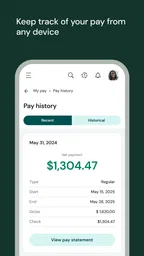
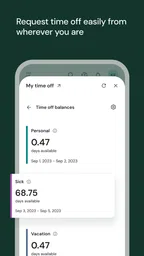
I see UKG Ready as a workplace tool that works best when it fits into a routine your employer has already set up. It is not a general planner or a personal productivity app: it connects employees with their organization’s UKG Ready system. That distinction matters. If your workplace uses the platform for mobile access, it may make everyday work administration easier; if it does not, installing the app alone will not give you a useful standalone service.
Make the workplace workflow clear first
Before relying on a work app, I like to know which tasks my employer expects me to handle there and which still belong in another system. With UKG Ready, that first check is especially important because mobile use depends on the employer having its software configured for it. Ask your manager or workplace administrator whether mobile access is enabled and what you are expected to use it for. That can save you from mistaking an organization setup issue for a problem with your phone.
UKG, Inc. develops this business app, and its purpose is tied to the employer’s UKG Ready environment rather than a universal set of services available to every employee. The practical experience may therefore depend on how your workplace has arranged its system. I would treat it as a companion to your organization’s processes, not as a replacement for asking how those processes work.
That framing also helps set expectations about alternatives. A personal calendar or notes app can be more flexible for organizing your own day, but it cannot stand in for an employer’s configured workplace system. Conversely, if your organization already communicates tasks and schedules through a different platform, UKG Ready is unlikely to be useful simply because it is a business app. The best choice is the one your workplace actually supports.
Check access before building a habit
My first practical step would be to confirm that the account and mobile setup are ready before making the app part of a daily routine. If you are new to a job, ask which workplace details should be handled in the app and where to go when something does not appear as expected. This is a small but valuable distinction: app access and employer configuration are connected, so not every access issue can be solved by changing settings on your device.
I would also avoid putting the app at the center of a process until I know what my employer expects me to check there. For example, if a supervisor says to use it for a particular work task, I would follow that guidance and keep any separate personal reminders clearly labeled. That prevents a common productivity problem: maintaining duplicate records in several places and then forgetting which one is authoritative.
Capture work information without creating clutter
The useful role for a workplace app is not simply to give you another screen to check. It should reduce the effort of handling work-related information in the right place. In my experience, the most sustainable approach is to open UKG Ready with a specific purpose, complete the task your workplace has assigned to it, and then return to your main work. That is more reliable than repeatedly checking an app without knowing whether anything requires action.
A realistic example is a busy employee who has a short break between tasks and wants to take care of an employer-related item before the end of the day. If the workplace has enabled the relevant mobile workflow, the app can be part of that quick check. The helpful habit is to decide in advance what counts as “done”—for instance, completing the task and confirming that the app reflects the action—rather than reopening it several times out of uncertainty.
Another useful tip is to keep work and personal organization separate even when both live on the same phone. I would use my personal calendar for appointments and private reminders, while following the employer’s instructions for anything that belongs in UKG Ready. This reduces duplication and makes it clearer where to look if a work detail needs to be checked later. It also avoids treating an employer-facing system as a general notebook for information that does not belong there.
Because the app’s role depends on the organization’s setup, I would not assume that another employee sees precisely the same work process I do. If a coworker describes a different routine, that does not necessarily mean either person is using the app incorrectly. Ask which procedure applies to your team, and use that as your reference. That is a more useful response than trying to infer how your employer configured the system from someone else’s screen.
Build a repeatable, low-effort routine
I prefer a routine with a clear trigger over an open-ended reminder to “check the app.” For example, an employee might review the workplace tool at a consistent point in the day when their team expects administrative tasks to be handled. The exact timing should come from the job and employer guidance, not from a universal rule. A predictable cue makes it less likely that a task gets lost, while avoiding constant checking that interrupts focused work.
It can help to pair the app with a simple end-of-task check: open the relevant area, do the assigned action, and make sure you have reached the appropriate completion state before closing it. I would not create a second record of every action unless the workplace asks for one. Extra tracking can become its own burden, and conflicting notes can make it harder to know which system reflects the current status.
For employees who move between work and personal responsibilities during the day, a short, deliberate check can be easier to maintain than trying to remember everything at once. I would keep any reminder for that check in a place I already use, but avoid copying sensitive or unnecessary workplace details into personal notes. The point is to remember to use the official workflow, not to reproduce it elsewhere.
The app is free, rated for Everyone, and has an average rating of 4.7 from around 37,000 ratings, with roughly 9,000 written reviews. Those figures suggest that many people have evaluated it, but they cannot tell me whether it will match a particular employer’s setup. For an employee deciding whether it belongs in a daily routine, organizational support is more important than popularity.
Where the routine can break down
The biggest limitation is also the key condition for using the app: an employer must have UKG Ready configured for mobile access. If that setup is not in place, downloading the app is not a substitute for employer support. I would contact the appropriate workplace administrator rather than repeatedly reinstalling it or assuming that a personal phone change will fix an organization-level issue.
A second source of friction is uncertainty about responsibility. An app can make a workplace task easier to reach, but it cannot tell you which procedure your manager expects if that has not been explained. When a work item seems missing or unclear, I would check the team’s instructions before relying on an informal workaround. That keeps the app from becoming a source of false confidence.
It may also be the wrong tool for someone who wants one universal hub for personal planning, household tasks, and work. UKG Ready is tied to an employer’s business environment, so I would not choose it as a replacement for a personal calendar, general task manager, or communication tool. Those alternatives are better when the goal is flexible organization across different parts of life rather than access to an employer’s configured system.
Compatibility is worth checking before making plans around mobile access. The current version is 1.107.7, and the minimum operating system is 11. If your device does not meet that requirement, or your workplace does not support mobile use, the app may not fit your situation. In that case, ask your employer what supported route to use rather than assuming the app is the only way to complete a work process.
Who should make it part of the workday?
I would recommend UKG Ready to employees whose organization actively uses the UKG Ready system and has enabled its mobile experience. For them, it can be a practical way to handle employer-related tasks without treating a workplace process as something to reconstruct in personal apps. It is most appealing when the employer has explained what belongs in the app and employees can access it as part of a consistent routine.
I would be more cautious if you are considering it without an employer connection, if you only want a general organizer, or if your workplace has not confirmed mobile support. In those situations, a familiar calendar or task app may better serve personal planning, while the employer’s designated system remains the right place for work processes. The distinction is simple but important: a general alternative can help you plan, but it cannot replace an organization-specific workflow.
My recommendation is to adopt it only after confirming your workplace’s mobile setup and the tasks it expects you to handle there. UKG Ready is free, has more than one million installs, and has been available since December 13, 2017, but those facts matter less to an individual employee than whether their organization has made it part of everyday work. When that fit is real, a brief, purposeful routine can keep work administration manageable. Without that fit, the app is unlikely to add much to your day.
What we like
- Combines timekeeping and HR tools in one app.
- Employees can check schedules from their phones.
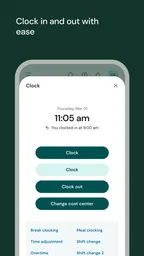
- Mobile clock-in is available for supported workplaces.
- Push alerts can help users keep up with workplace updates.
- Managers can review team information while away from a desk.
What could be better
- Available features depend on the employer's UKG setup.
- Some actions require an internet connection.
- Location access may be needed for mobile clock-in.
- Employees may need company credentials to sign in.
- App performance and access can vary by device and configuration.





